
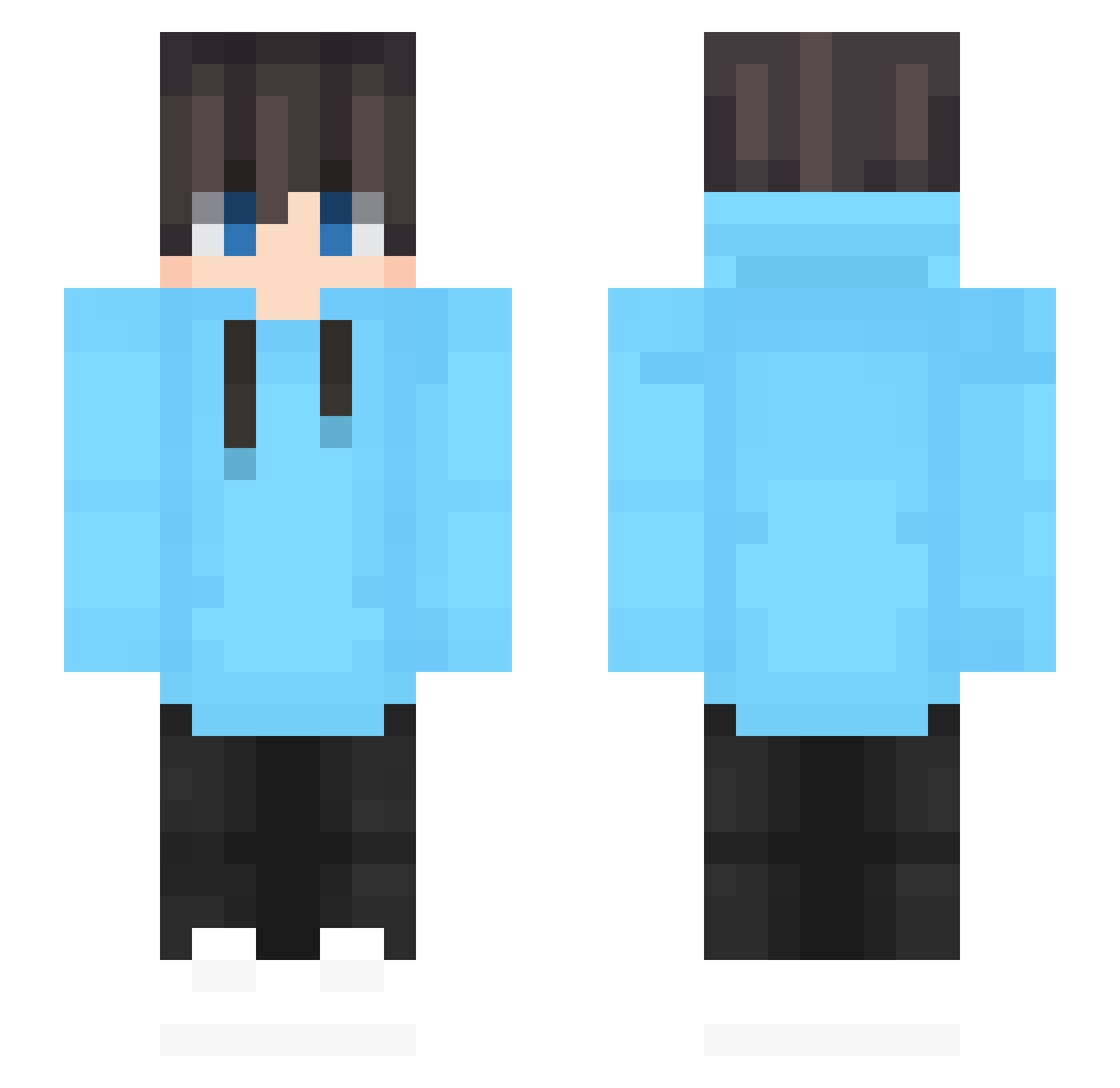
Current Minecraft skin of the player I_Dont_Cheat_Cuz, loaded from the official Mojang API. Rotate the 3D model with your mouse or finger, then download the skin as a PNG file and use it in Minecraft: Bedrock Edition or Java Edition for free. When I_Dont_Cheat_Cuz changes their skin, this page updates automatically and the old skin stays in the history below.
Other players with this skin (479)
I_Dont_Cheat_Cuz was the 364th player we have seen with this skin, first spotted on 02.10.2026. The same skin was seen on these players. Open a nickname to see their current skin and skin history.
 tofi2020 kiyorenn Lucky13053 GUAIHE ZamoZidshoot SevenFangXiao XANINZZ pitkwiecien In_kuma Igi9999 F6renheit hote789 VulgoIceBlue206 NoMax1012 BradyBeastt RUN_APPLE LazSheep Craft_qwq Coolofduty AugustusMaximus estebandc93 LucashioQ11 willy19564 coulds4 EntonEnton DragonX05 Nin010 Caussiius TanjiroTheGod Vikram_Maurya_YT SLOW0001 Basti_15 wentan7 R3yf Goalups Ibrahim72116 Krynt NavyPC Kiriko8 JenkinsplayzonYT Black_Snail _Tactical_ Can38 FerociousKL Petersilie_MC ws123456 AssassinKiwi54 h_taketo Nico123GHG pin__xiao Balder019 Bonki02 Velocity_Lethal ShuiMu_WB ClarifySwift jyuushi221 bean_sugar ilovebigtoes1234 eunnnS2 dltldhs0925
How to install the I_Dont_Cheat_Cuz skin
- Press the Download button above to save the skin as a PNG file.
- Minecraft: Bedrock Edition (PE): open the Dressing Room from the main menu (or tap your character → Edit Character), go to Classic Skins → Owned, press the + (new skin) button, choose the downloaded PNG and pick the Slim (Alex) model. Works on PC and mobile; consoles cannot import custom skins.
- Minecraft: Java Edition: open the Minecraft Launcher, go to the Skins tab, click New Skin, load the PNG, pick the Slim (Alex) model and press Save & Use. You can also upload it at minecraft.net → Profile → Change Skin.
The skin does not show up after import - what should I do?
Restart Minecraft and open the Dressing Room again - imported skins sometimes appear only after a restart. Also make sure you selected the imported skin and picked the Slim (Alex) model.
Which model should I choose, Classic or Slim?
This skin is designed for the Slim (Alex) model. If you pick the wrong model, the arms of the skin will look stretched or squeezed.
Is the skin of I_Dont_Cheat_Cuz free to download?
Yes. Press Download, save the PNG file and use it in Minecraft: Bedrock Edition or Java Edition - no payment or registration needed. The skin also works on multiplayer servers and Realms.
More skins
Looking for more? Go back to all Minecraft skins and check the top skins of the week, month and all time, or find any player's skin by nickname.