
INFAMOUS12 - Minecraft Skins & Skin History
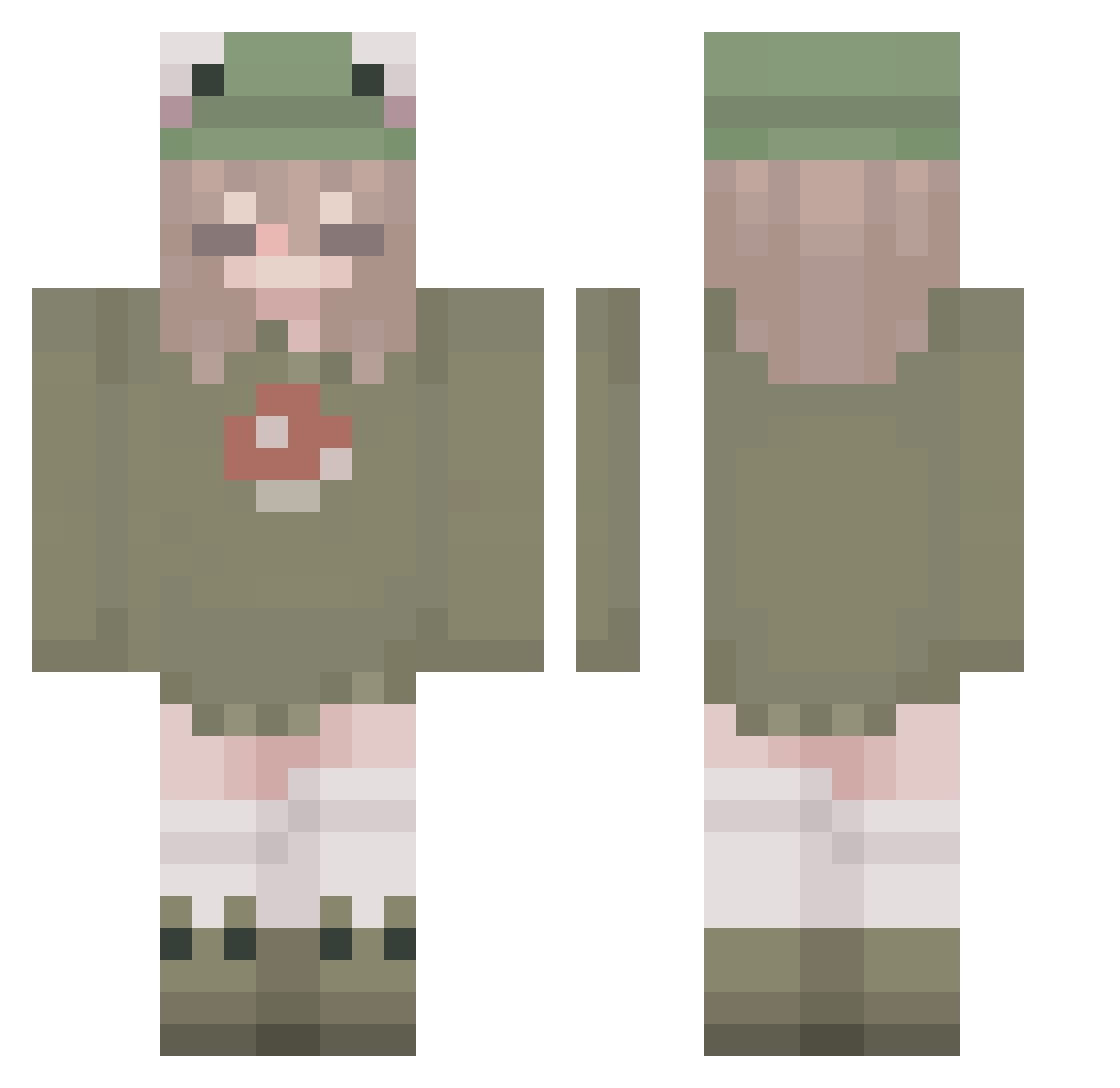
Current Minecraft skin of the player INFAMOUS12, loaded from the official Mojang API. Rotate the 3D model with your mouse or finger, then download the skin as a PNG file and use it in Minecraft: Bedrock Edition or Java Edition for free. When INFAMOUS12 changes their skin, this page updates automatically and the old skin stays in the history below.
Other players with this skin (265)
INFAMOUS12 was the 119th player we have seen with this skin, first spotted on 04.09.2026. The same skin was seen on these players. Open a nickname to see their current skin and skin history.
 _Alecks Moyinas
 jwantoz marleenchennn Ruru0909 ladypinoy Araroo yuna888 tofinoux RooShroom Lemiie Nickochi beemonday05 Lounazx Fqlr Frogwi Unknowchijin
 HerCase RSAalt Zephricus qin111 glutennugget velvetic Guinne andr32008 MooLush coldpaleflesh xxEspeonxx PigeonTheOnly sigsig__ Avigai1ee zoethecoolcat Juliproplayer777 ScarlettBamboo Madi_M Clanckk _mo0x_1 Smellycat1436 MazeLox leonie2604 Phoenix_1583 curlyfries434 zxunger ArtemisHunter912 sewpyyy NoodleSoup66 ventis_tiddies JUAHH Cyuqi jxx_08 Hiyy_0w0 Noodle_Doodles Tariack charliewalton1 mothmu ewvsiaaa Airheebz cluztz persephone179 Crystaleigh_
More Mushroom Minecraft skins
How to install the INFAMOUS12 skin
- Press the Download button above to save the skin as a PNG file.
- Minecraft: Bedrock Edition (PE): open the Dressing Room from the main menu (or tap your character → Edit Character), go to Classic Skins → Owned, press the + (new skin) button, choose the downloaded PNG and pick the Classic (Steve) model. Works on PC and mobile; consoles cannot import custom skins.
- Minecraft: Java Edition: open the Minecraft Launcher, go to the Skins tab, click New Skin, load the PNG, pick the Classic (Steve) model and press Save & Use. You can also upload it at minecraft.net → Profile → Change Skin.
The skin does not show up after import - what should I do?
Restart Minecraft and open the Dressing Room again - imported skins sometimes appear only after a restart. Also make sure you selected the imported skin and picked the Classic (Steve) model.
Which model should I choose, Classic or Slim?
This skin is designed for the Classic (Steve) model. If you pick the wrong model, the arms of the skin will look stretched or squeezed.
Is the skin of INFAMOUS12 free to download?
Yes. Press Download, save the PNG file and use it in Minecraft: Bedrock Edition or Java Edition - no payment or registration needed. The skin also works on multiplayer servers and Realms.
More skins
Looking for more? Go back to all Minecraft skins and check the top skins of the week, month and all time, or find any player's skin by nickname.