
HygorCZ - Minecraft Skins & Skin History
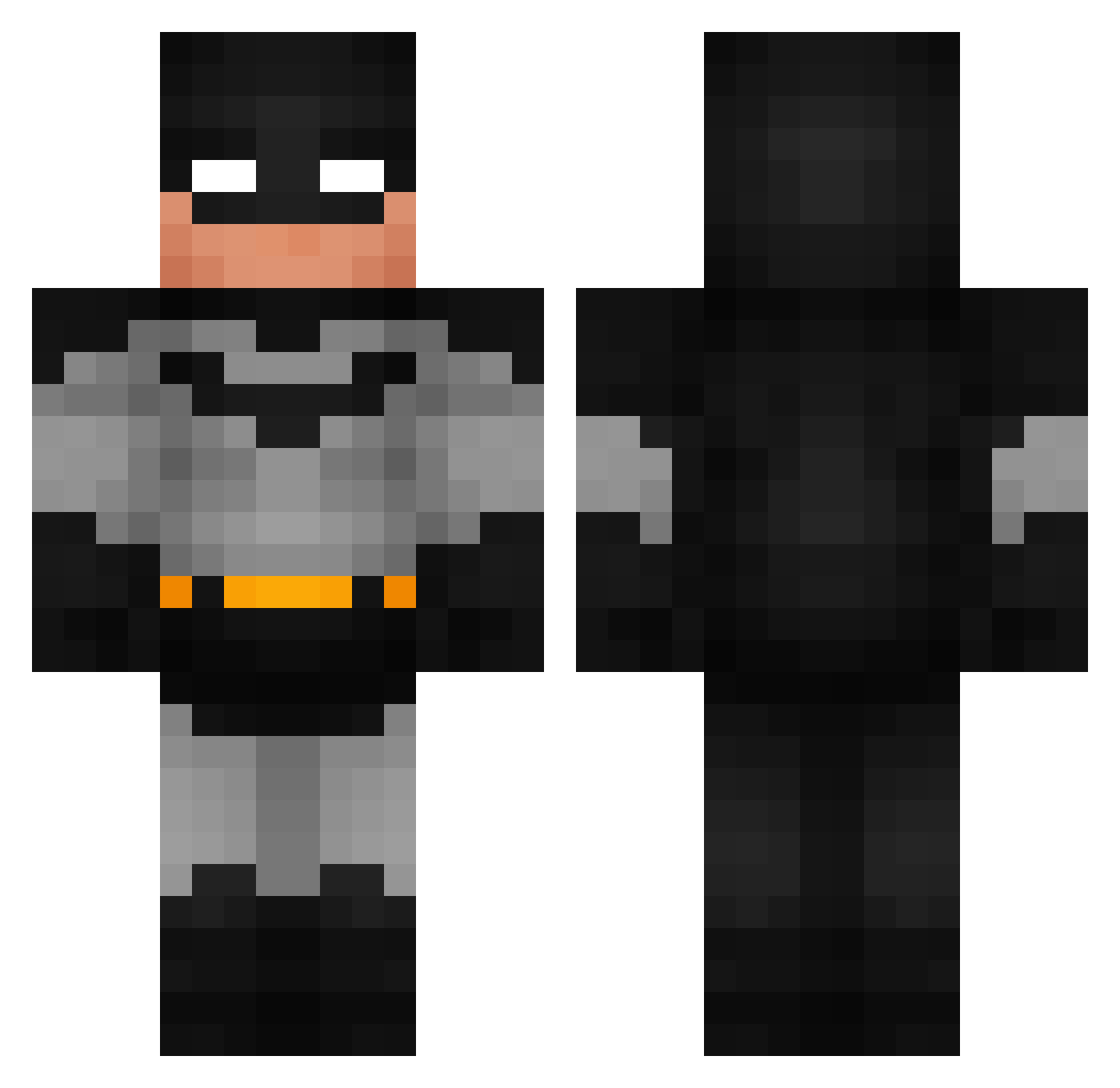
Current Minecraft skin of the player HygorCZ, loaded from the official Mojang API. Rotate the 3D model with your mouse or finger, then download the skin as a PNG file and use it in Minecraft: Bedrock Edition or Java Edition for free. When HygorCZ changes their skin, this page updates automatically and the old skin stays in the history below.
Other players with this skin (992)
HygorCZ was the 918th player we have seen with this skin, first spotted on 03.11.2026. The same skin was seen on these players. Open a nickname to see their current skin and skin history.
 TheLegit_ AuT_R3D_Hornet jordyverab YOuKnOwMe280 Batman85 SiyarHD wyyt123 Astro2sexy millicent2222 ScubaSteve_69420 Arandorn4711 Mr_Steelblue thekrabbyformula jmellor07 Bubbe_09 nskelyoc sasha95230 RUM11 Snicken23 NotSighhh Ahmed10332 pigandrabbit456 iagocv Jollamby Soccerdude11213 hideyodiamons 1nn1s TealTiger6 feetluver420 whiteRushin420 Cragggg TDawg1028 orangetorpedo420 yokartikhadicani MrAwebo Lumie09 Colt1013 Dyl2Short stinkman73 SpudMeister25 YungBruh2003 xnwexta Peachtastic996 IfIWasCool w00tz0re Shiizuu7788 Wilson1777 TheGoshDarnBatma ktoracki69 AndyFrick LordWeeb GQuintal ChezBiscuit ABOSA3D ronysbonilla sccminecraft13 Swaaz_Rompax JustKlutch S5U Kotha_
More Batman Minecraft skins
How to install the HygorCZ skin
- Press the Download button above to save the skin as a PNG file.
- Minecraft: Bedrock Edition (PE): open the Dressing Room from the main menu (or tap your character → Edit Character), go to Classic Skins → Owned, press the + (new skin) button, choose the downloaded PNG and pick the Classic (Steve) model. Works on PC and mobile; consoles cannot import custom skins.
- Minecraft: Java Edition: open the Minecraft Launcher, go to the Skins tab, click New Skin, load the PNG, pick the Classic (Steve) model and press Save & Use. You can also upload it at minecraft.net → Profile → Change Skin.
The skin does not show up after import - what should I do?
Restart Minecraft and open the Dressing Room again - imported skins sometimes appear only after a restart. Also make sure you selected the imported skin and picked the Classic (Steve) model.
Which model should I choose, Classic or Slim?
This skin is designed for the Classic (Steve) model. If you pick the wrong model, the arms of the skin will look stretched or squeezed.
Is the skin of HygorCZ free to download?
Yes. Press Download, save the PNG file and use it in Minecraft: Bedrock Edition or Java Edition - no payment or registration needed. The skin also works on multiplayer servers and Realms.
More skins
Looking for more? Go back to all Minecraft skins and check the top skins of the week, month and all time, or find any player's skin by nickname.