
HuntClient - Minecraft Skins & Skin History
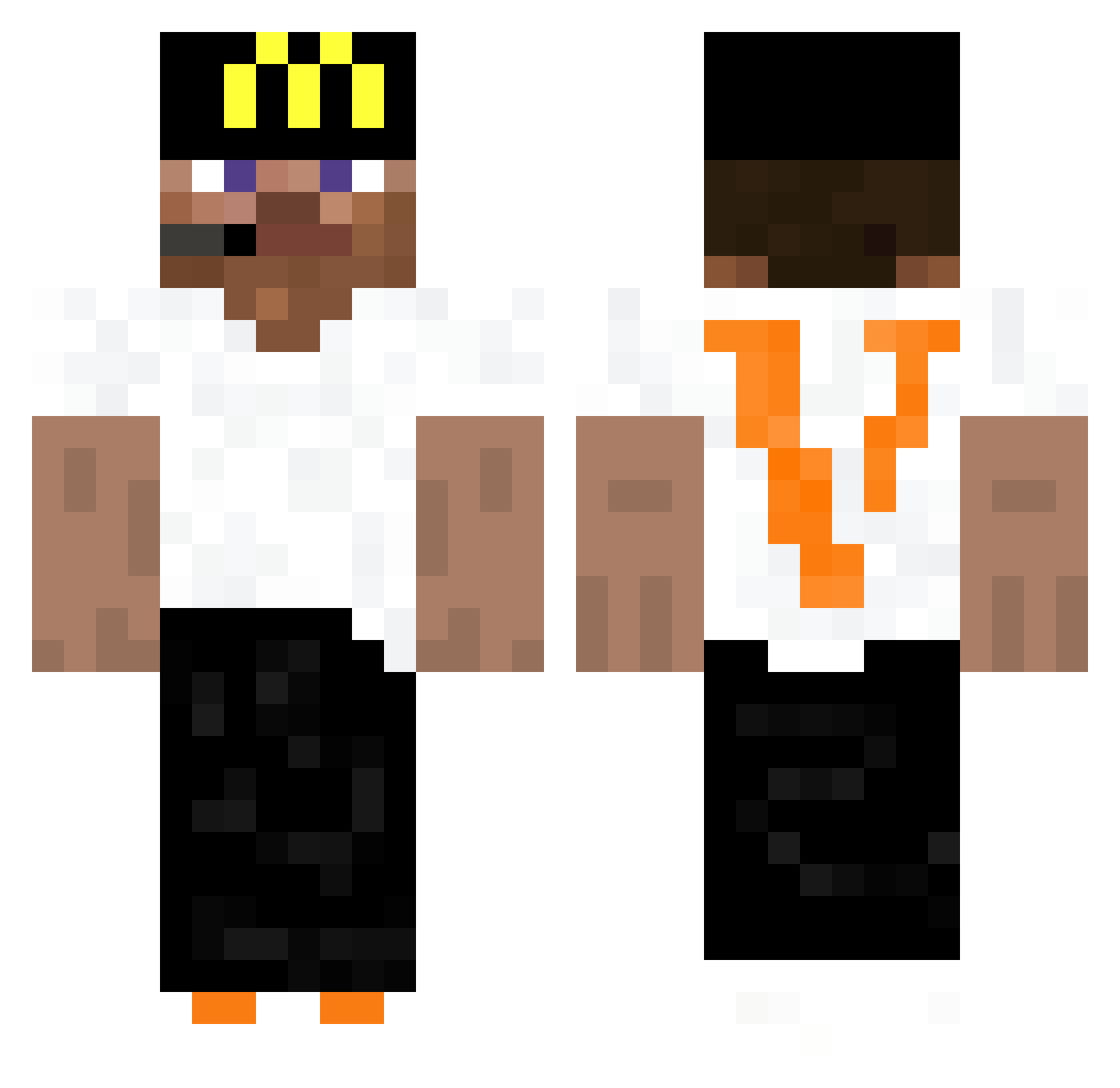
Current Minecraft skin of the player HuntClient, loaded from the official Mojang API. Rotate the 3D model with your mouse or finger, then download the skin as a PNG file and use it in Minecraft: Bedrock Edition or Java Edition for free. When HuntClient changes their skin, this page updates automatically and the old skin stays in the history below.
Other players with this skin (441)
HuntClient was the 301st player we have seen with this skin, first spotted on 09.10.2026. The same skin was seen on these players. Open a nickname to see their current skin and skin history.
 ryal7 Cheese20987 farouq_ raqieta_ Chemico drgnslayer12 7K7k_ DoMzito 1aggy NFTGAMER666 RoboticAi Nazarchh Dark8Sandre NatuNobilis Xnuuki SkiBumTyler assj xklmr CiganskaOsada foxigamer554 Cheaalt Zartigan UrfSebas37 iReza ItzGamer12 iusehuzuni_fan oCough iusehypixel HugZze Dieguextt InnerVallyVal Ayrite_ly ThePatriots _Bot_Client The_rare17 ItsZeyko_ Narikau zahorisbdj MEMEDMEMBERCLT Arushop Alpaca_exe Cubeboi_ excessiveforce05 DEEF0719 iuseWater sihuuu Rajulx IamShoubyx_ xpsftw FaridBang67 Bob3r__ 10GO_ realthin xMF2546 Naxyoo yoostorm BotSlayer_ LooneyWade Sangqui0 whoWee
More Headset Minecraft skins
How to install the HuntClient skin
- Press the Download button above to save the skin as a PNG file.
- Minecraft: Bedrock Edition (PE): open the Dressing Room from the main menu (or tap your character → Edit Character), go to Classic Skins → Owned, press the + (new skin) button, choose the downloaded PNG and pick the Classic (Steve) model. Works on PC and mobile; consoles cannot import custom skins.
- Minecraft: Java Edition: open the Minecraft Launcher, go to the Skins tab, click New Skin, load the PNG, pick the Classic (Steve) model and press Save & Use. You can also upload it at minecraft.net → Profile → Change Skin.
The skin does not show up after import - what should I do?
Restart Minecraft and open the Dressing Room again - imported skins sometimes appear only after a restart. Also make sure you selected the imported skin and picked the Classic (Steve) model.
Which model should I choose, Classic or Slim?
This skin is designed for the Classic (Steve) model. If you pick the wrong model, the arms of the skin will look stretched or squeezed.
Is the skin of HuntClient free to download?
Yes. Press Download, save the PNG file and use it in Minecraft: Bedrock Edition or Java Edition - no payment or registration needed. The skin also works on multiplayer servers and Realms.
More skins
Looking for more? Go back to all Minecraft skins and check the top skins of the week, month and all time, or find any player's skin by nickname.