
Gujr - Minecraft Skins & Skin History
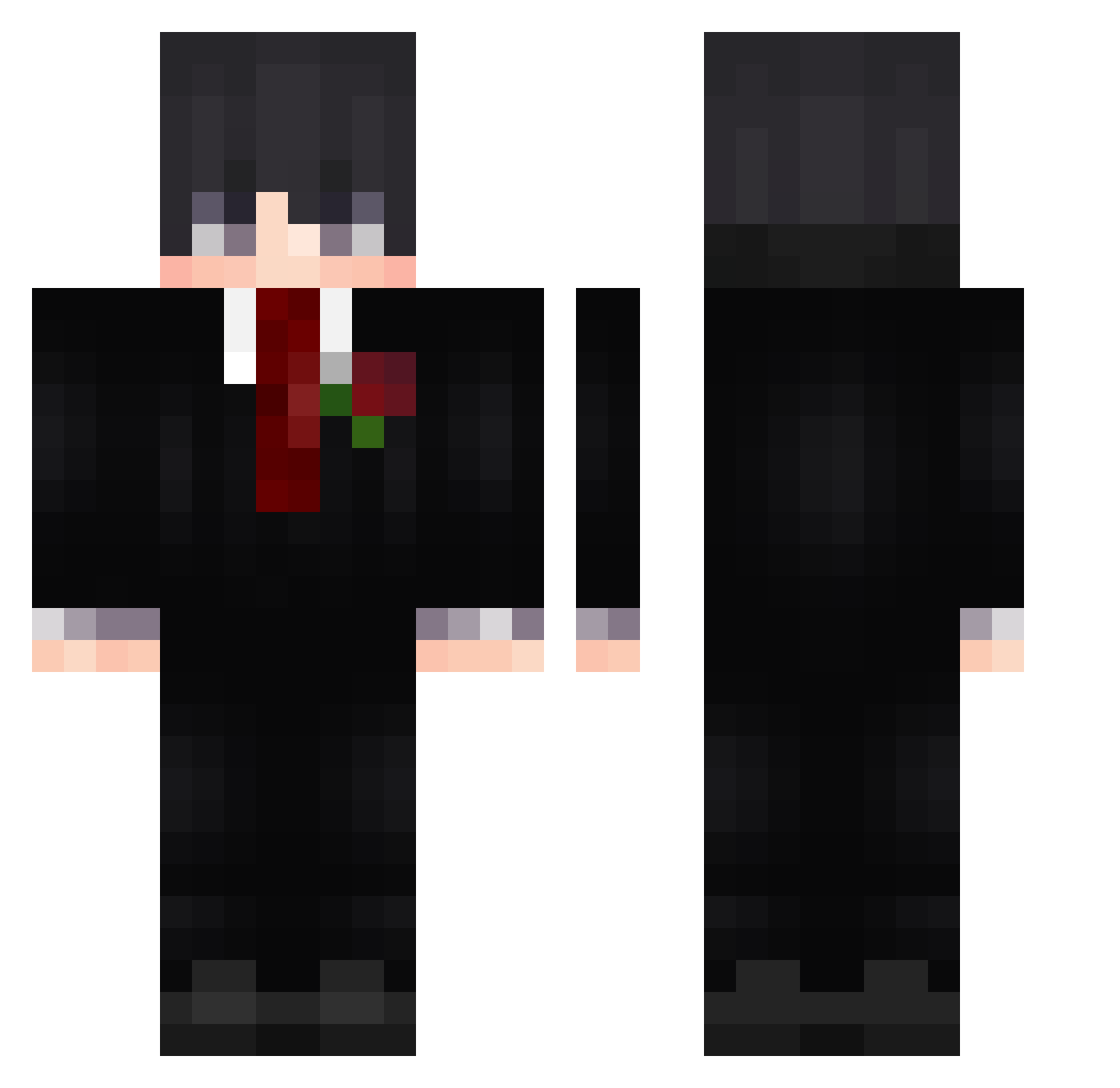
Current Minecraft skin of the player Gujr, loaded from the official Mojang API. Rotate the 3D model with your mouse or finger, then download the skin as a PNG file and use it in Minecraft: Bedrock Edition or Java Edition for free. When Gujr changes their skin, this page updates automatically and the old skin stays in the history below.
Other players with this skin (660)
Gujr was the 599th player we have seen with this skin, first spotted on 02.11.2026. The same skin was seen on these players. Open a nickname to see their current skin and skin history.
 feiniao303 Nitrocellulose24 arlecvu MG_D xiaohu2 huazige666 Horaciioo kovvv21 IIRaizerII boromik1 OtistikKaktus PatcherBoy Celestixx Manouche_MOSH sebas141011 NAKSH154 CV09 BiigV simbacachorro hudsonso HANGK19 iMaxi_ EduardoDanny 3arsk2 AGACrafter Stinky_Cheezy ShardesTR BlessYou11 _Bryxnnnn PaulSMP Lahutte OZ___DM DonEmox Ghostface2009 RobGut Mpolska Polcheloveka BagbagJo49 MIRACLE2001 LegendXXD kotana2011 memishan ElGuri1518 Poushused079 Itzrudraboiz9 lwh999 v1ntage777 zrege armyxin Cas7ha muring_098 D3hghaNi blackvsilent _Crestar tahawa Aurelio21 L_G_A_05 AscenderGrey Jaayzen Mever1k
More Rose Minecraft skins
How to install the Gujr skin
- Press the Download button above to save the skin as a PNG file.
- Minecraft: Bedrock Edition (PE): open the Dressing Room from the main menu (or tap your character → Edit Character), go to Classic Skins → Owned, press the + (new skin) button, choose the downloaded PNG and pick the Classic (Steve) model. Works on PC and mobile; consoles cannot import custom skins.
- Minecraft: Java Edition: open the Minecraft Launcher, go to the Skins tab, click New Skin, load the PNG, pick the Classic (Steve) model and press Save & Use. You can also upload it at minecraft.net → Profile → Change Skin.
The skin does not show up after import - what should I do?
Restart Minecraft and open the Dressing Room again - imported skins sometimes appear only after a restart. Also make sure you selected the imported skin and picked the Classic (Steve) model.
Which model should I choose, Classic or Slim?
This skin is designed for the Classic (Steve) model. If you pick the wrong model, the arms of the skin will look stretched or squeezed.
Is the skin of Gujr free to download?
Yes. Press Download, save the PNG file and use it in Minecraft: Bedrock Edition or Java Edition - no payment or registration needed. The skin also works on multiplayer servers and Realms.
More skins
Looking for more? Go back to all Minecraft skins and check the top skins of the week, month and all time, or find any player's skin by nickname.