
Grymou - Minecraft Skins & Skin History
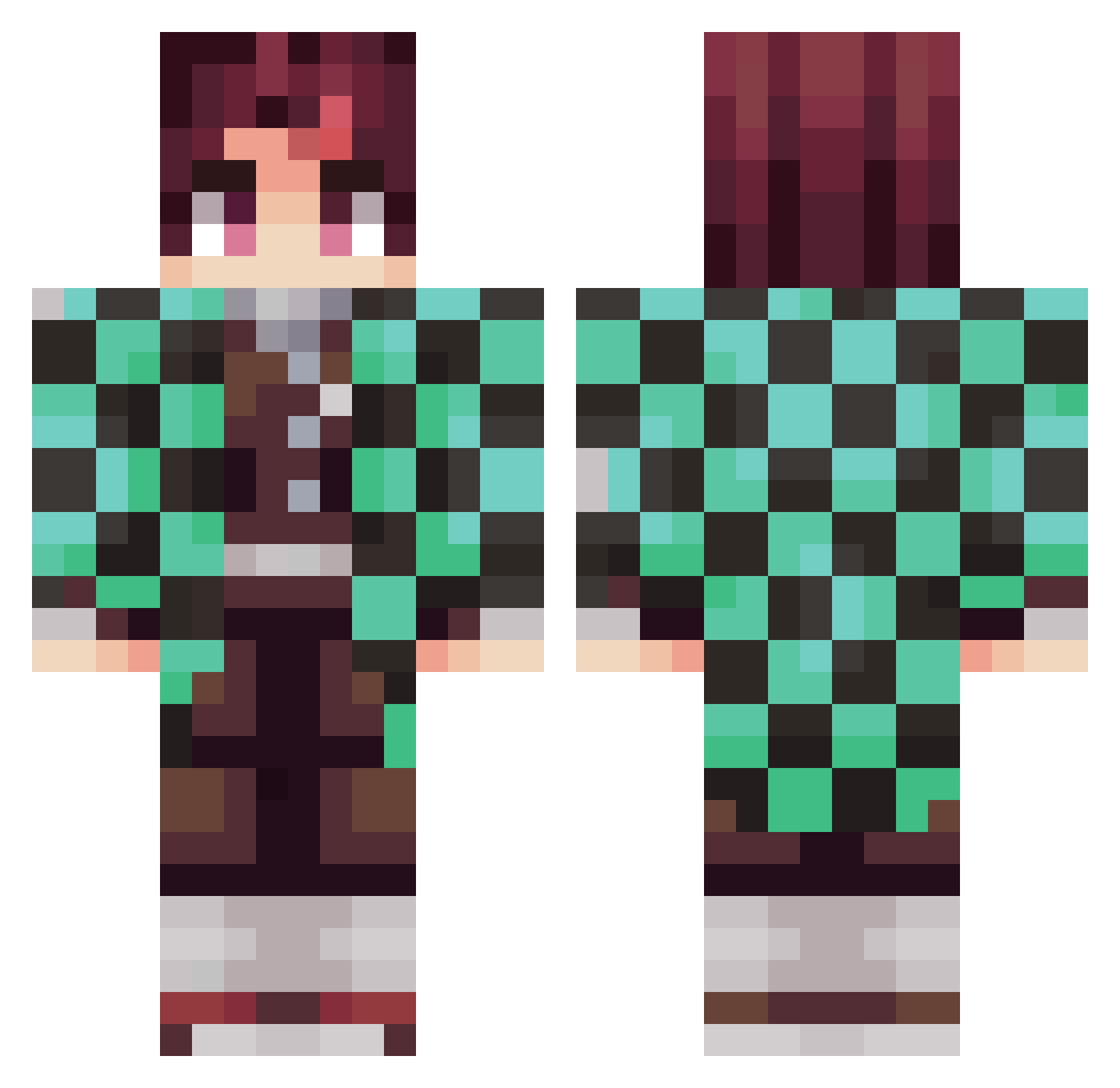
Current Minecraft skin of the player Grymou, loaded from the official Mojang API. Rotate the 3D model with your mouse or finger, then download the skin as a PNG file and use it in Minecraft: Bedrock Edition or Java Edition for free. When Grymou changes their skin, this page updates automatically and the old skin stays in the history below.
Other players with this skin (372)
Grymou was the 144th player we have seen with this skin, first spotted on 12.09.2026. The same skin was seen on these players. Open a nickname to see their current skin and skin history.
 Drusher joz543 gurororo Jimeen ShiroNekoSensei xBossNx charobin14 hightideOG SilverMetDem710 DaddyAustin07 Unseasoned_Bread boldpincher warupchina MORALESPRO5 carloshfelixs robertzxz SonsyAlmond ItsJazh PreshevaNRJ Pikaax Natsuki1080 DEATHBLOW01 Chaouito Silent_Studio_ gabritico97 Gaybii LazerYT Ratadouille FranCharre95 Sasquati Rhythm2xs K_KOMORNIKK Sebdebeb ReyToretto Kloomze Blitho joacastell Utqu_v2 DanneDll IxM13 PokrzywkaPL Scott9503 Vovonn20 HappyDluffy DarkOne25 Friizh aydenganer12 Tadeo24 yokokon loukli guidom26 imRugy Spielo3000 Roborth cybergost Shushik11 taratyan103 Nat0020 Fluffyyman Saioa
More Tanjiro Kamado Minecraft skins
See all 437 Tanjiro Kamado skins
How to install the Grymou skin
- Press the Download button above to save the skin as a PNG file.
- Minecraft: Bedrock Edition (PE): open the Dressing Room from the main menu (or tap your character → Edit Character), go to Classic Skins → Owned, press the + (new skin) button, choose the downloaded PNG and pick the Classic (Steve) model. Works on PC and mobile; consoles cannot import custom skins.
- Minecraft: Java Edition: open the Minecraft Launcher, go to the Skins tab, click New Skin, load the PNG, pick the Classic (Steve) model and press Save & Use. You can also upload it at minecraft.net → Profile → Change Skin.
The skin does not show up after import - what should I do?
Restart Minecraft and open the Dressing Room again - imported skins sometimes appear only after a restart. Also make sure you selected the imported skin and picked the Classic (Steve) model.
Which model should I choose, Classic or Slim?
This skin is designed for the Classic (Steve) model. If you pick the wrong model, the arms of the skin will look stretched or squeezed.
Is the skin of Grymou free to download?
Yes. Press Download, save the PNG file and use it in Minecraft: Bedrock Edition or Java Edition - no payment or registration needed. The skin also works on multiplayer servers and Realms.
More skins
Looking for more? Go back to all Minecraft skins and check the top skins of the week, month and all time, or find any player's skin by nickname.