
Shushik11 - Minecraft Skins & Skin History
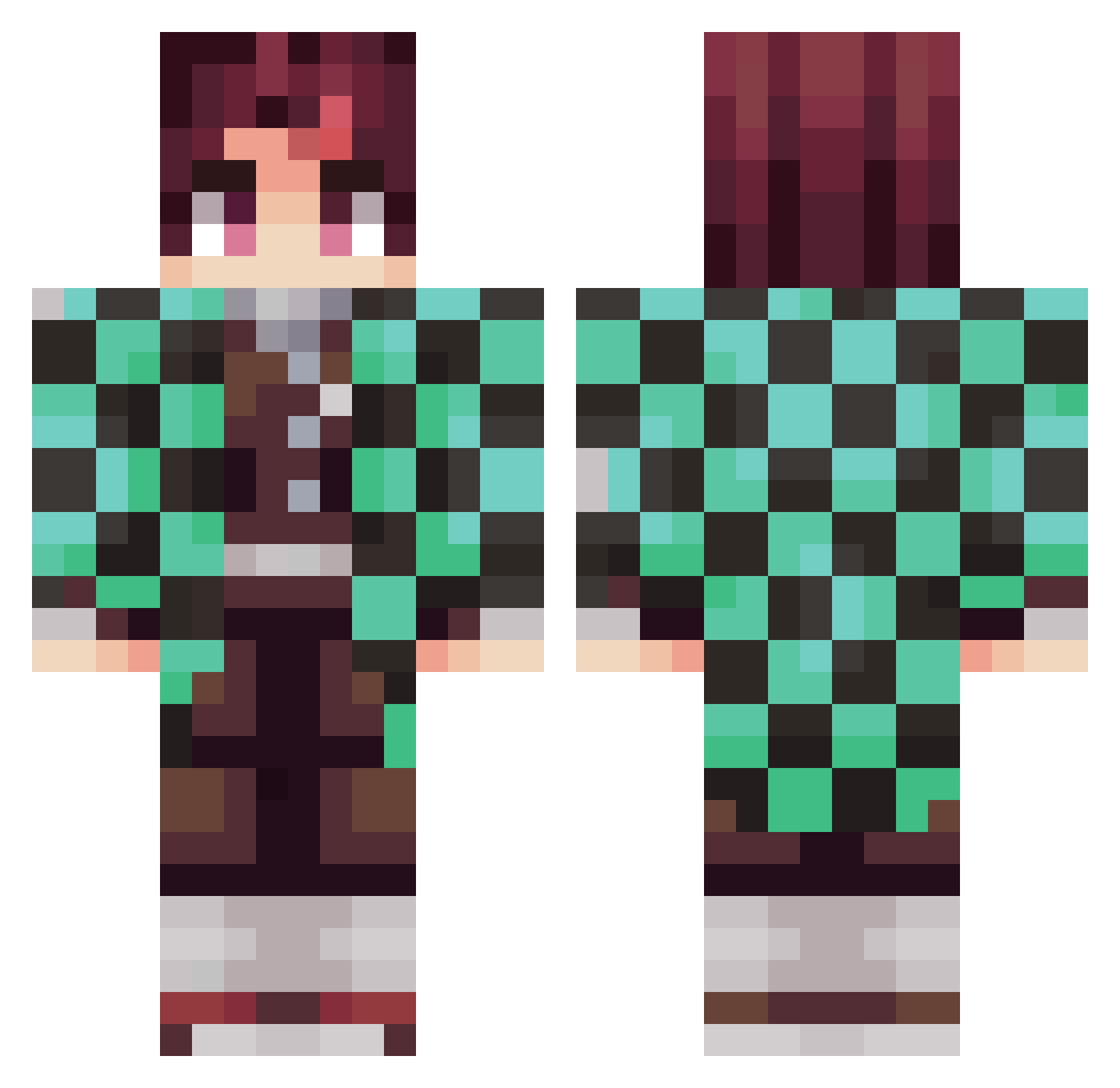
Current Minecraft skin of the player Shushik11, loaded from the official Mojang API. Rotate the 3D model with your mouse or finger, then download the skin as a PNG file and use it in Minecraft: Bedrock Edition or Java Edition for free. When Shushik11 changes their skin, this page updates automatically and the old skin stays in the history below.
Other players with this skin (372)
Shushik11 was the 176th player we have seen with this skin, first spotted on 22.09.2026. The same skin was seen on these players. Open a nickname to see their current skin and skin history.
 cybergost Fluffyyman Spielo3000 Saioa guidom26 yokokon Tadeo24 aydenganer12 Andrews21 kirex115 RafaSM125 Scott9503 PokrzywkaPL Jazlyxuwxz HCW1010 ThelastMirco Lil_jinxee Blxdy_ jackryzz1 Carrion216 ReyToretto DarkHope88 RedScot YupyTyzon Sebdebeb K_KOMORNIKK rvluzi TheNikiGamer24 Rhythm2xs FranCharre95 BlackDevilGER KingGD_ Ratadouille Emre3454 LazerYT FernandoSammy Gaybii Silent_Studio_ pludoski Chaouito ArkanM Joseph9875 DEATHBLOW01 Ludgen CAM420N AriCyrus Jaxer14 abcdlm Natsuki1080 Factor_12 giuliofrz PreshevaNRJ Amir_TANJIRO JuXpl Ginnxz AFITSME ninjagaidon1234 GiorgiaKN robertzxz roouugee
More Tanjiro Kamado Minecraft skins
See all 437 Tanjiro Kamado skins
How to install the Shushik11 skin
- Press the Download button above to save the skin as a PNG file.
- Minecraft: Bedrock Edition (PE): open the Dressing Room from the main menu (or tap your character → Edit Character), go to Classic Skins → Owned, press the + (new skin) button, choose the downloaded PNG and pick the Classic (Steve) model. Works on PC and mobile; consoles cannot import custom skins.
- Minecraft: Java Edition: open the Minecraft Launcher, go to the Skins tab, click New Skin, load the PNG, pick the Classic (Steve) model and press Save & Use. You can also upload it at minecraft.net → Profile → Change Skin.
The skin does not show up after import - what should I do?
Restart Minecraft and open the Dressing Room again - imported skins sometimes appear only after a restart. Also make sure you selected the imported skin and picked the Classic (Steve) model.
Which model should I choose, Classic or Slim?
This skin is designed for the Classic (Steve) model. If you pick the wrong model, the arms of the skin will look stretched or squeezed.
Is the skin of Shushik11 free to download?
Yes. Press Download, save the PNG file and use it in Minecraft: Bedrock Edition or Java Edition - no payment or registration needed. The skin also works on multiplayer servers and Realms.
More skins
Looking for more? Go back to all Minecraft skins and check the top skins of the week, month and all time, or find any player's skin by nickname.