
Grayer - Minecraft Skins & Skin History
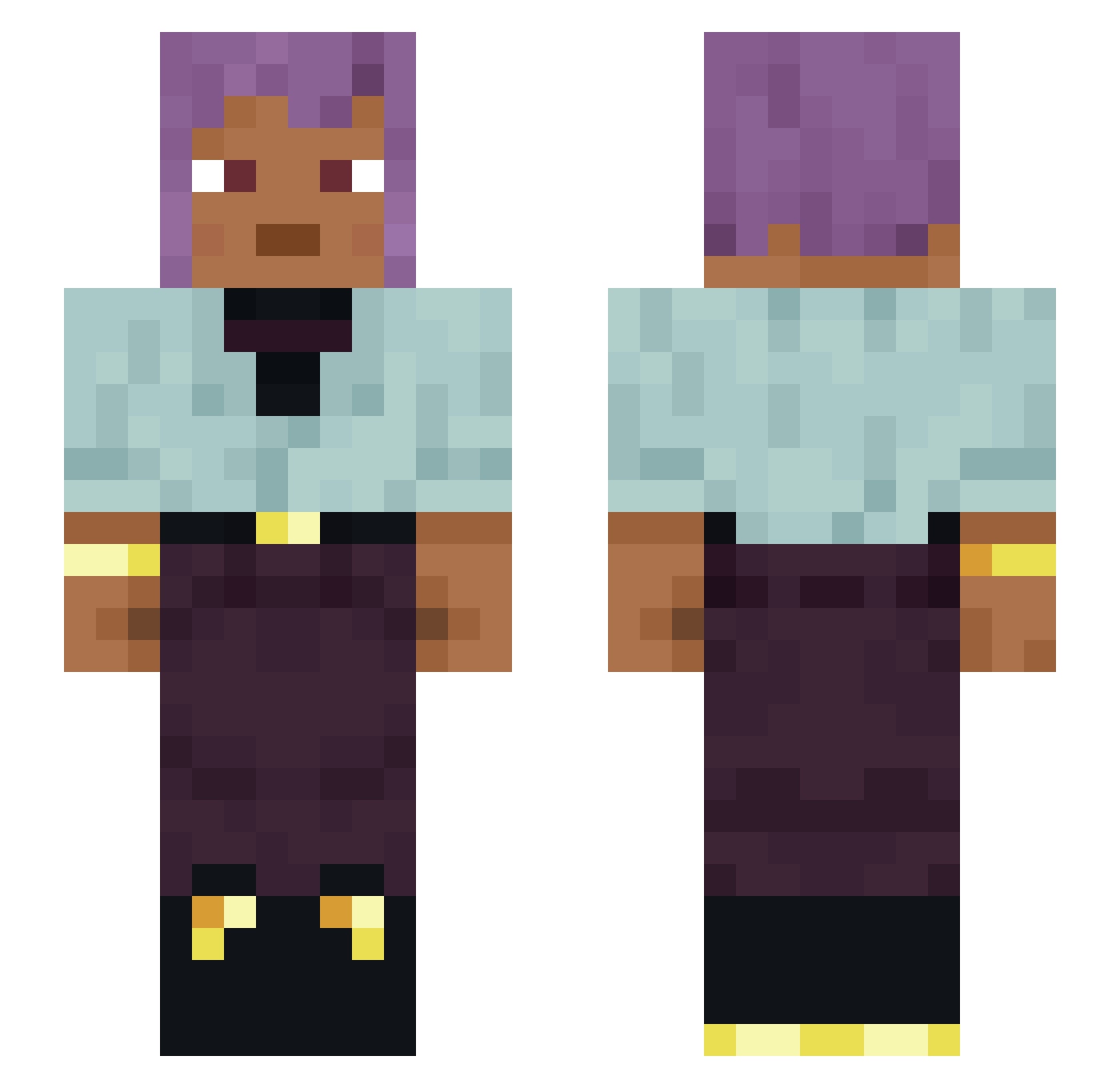
Current Minecraft skin of the player Grayer, loaded from the official Mojang API. Rotate the 3D model with your mouse or finger, then download the skin as a PNG file and use it in Minecraft: Bedrock Edition or Java Edition for free. When Grayer changes their skin, this page updates automatically and the old skin stays in the history below.
Other players with this skin (1122)
Grayer was the 214th player we have seen with this skin, first spotted on 13.08.2026. The same skin was seen on these players. Open a nickname to see their current skin and skin history.
 Odoriferous Quotid Manias RawAlt25 Deaner21 Sol7D bekimkoo MrLongDong6924 RhinoKun KaarOoliiin86a Abudi overcIock ReRisen Despots
 Pan_Rock3 Laure420 radekjolo Protonema LaGlaceQuiBrule Rousette Svante councilwoman Timmalv fuis1v1 RBGZ 56bc stan_k28 Shou_SKFM
 _Sanchexzzz
 ClawKingDustin orality Poeeel lord_mikus tupping Berith papula Circumnavigating Janiform 0brxh mico6ix Gool andzejszkalowacz Pharmacodynamic
 Clarimini lavenderfield7 stumping iMurdErq
 PERKINASO_ ilikefewd OREMAN TheJjChiam subaqueous Coookiess_ patriot_zov Fura04 zenclixxx Beastliest ZINJANTHROPI lixenon25 fralastella0699
How to install the Grayer skin
- Press the Download button above to save the skin as a PNG file.
- Minecraft: Bedrock Edition (PE): open the Dressing Room from the main menu (or tap your character → Edit Character), go to Classic Skins → Owned, press the + (new skin) button, choose the downloaded PNG and pick the Slim (Alex) model. Works on PC and mobile; consoles cannot import custom skins.
- Minecraft: Java Edition: open the Minecraft Launcher, go to the Skins tab, click New Skin, load the PNG, pick the Slim (Alex) model and press Save & Use. You can also upload it at minecraft.net → Profile → Change Skin.
The skin does not show up after import - what should I do?
Restart Minecraft and open the Dressing Room again - imported skins sometimes appear only after a restart. Also make sure you selected the imported skin and picked the Slim (Alex) model.
Which model should I choose, Classic or Slim?
This skin is designed for the Slim (Alex) model. If you pick the wrong model, the arms of the skin will look stretched or squeezed.
Is the skin of Grayer free to download?
Yes. Press Download, save the PNG file and use it in Minecraft: Bedrock Edition or Java Edition - no payment or registration needed. The skin also works on multiplayer servers and Realms.
More skins
Looking for more? Go back to all Minecraft skins and check the top skins of the week, month and all time, or find any player's skin by nickname.