
Goku_Kaioke - Minecraft Skins & Skin History
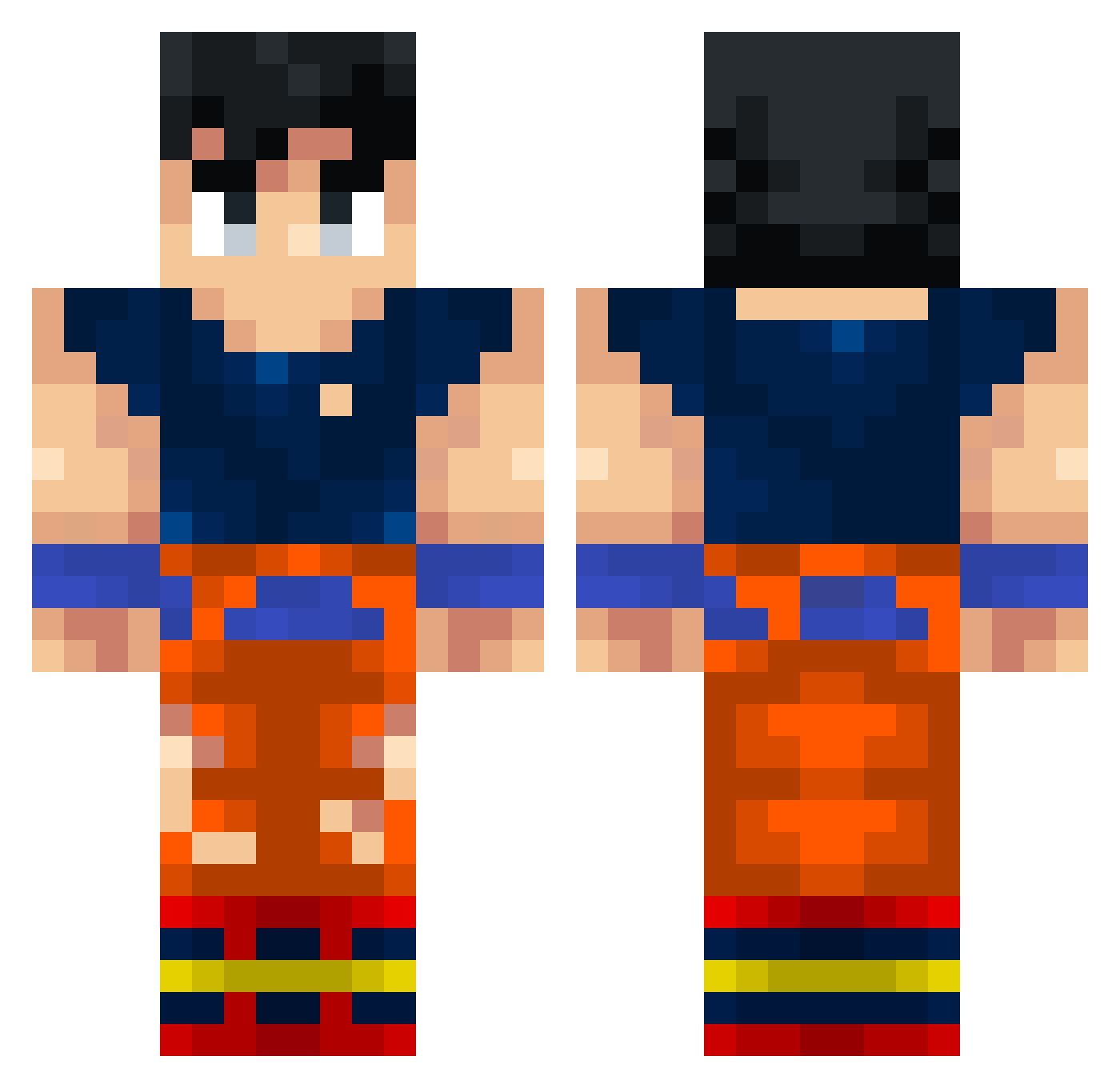
Current Minecraft skin of the player Goku_Kaioke, loaded from the official Mojang API. Rotate the 3D model with your mouse or finger, then download the skin as a PNG file and use it in Minecraft: Bedrock Edition or Java Edition for free. When Goku_Kaioke changes their skin, this page updates automatically and the old skin stays in the history below.
Other players with this skin (406)
Goku_Kaioke was the 364th player we have seen with this skin, first spotted on 08.11.2026. The same skin was seen on these players. Open a nickname to see their current skin and skin history.
 Gokhan059 GentilKurapika Bernat108_ juanescool1 InFiiniTYx V1NSMOKER Krusher1007 superfang2000 ArkDude Darkened61 Xkizuato chimchim9000 danimastr0 BenjaBH DrKibKab DarkSaiyan miguitriki mbjsquad Pillete69 Fun9 Keph_Zadq NinjaMyKinja Saullove Lemmur_ Mainblade_ Noodles242 MattMatt2007 TITOMONTE BusterWither trxtl Aquilesgs XdUnKnOwN67 Elyatrope XaloAri mamjaja14 xllAlex98llx SantRo470 JustAmann Hedi01 younaldo Weyxset Antony_084 Mat_03 MarcoABC PLAYB0YCARTl jlg222009 Ulisesrts Nightcoil Fousouley XanderPie_ LeoziM_12 Miguel6556 ColdFar Ayyza gokublack_2011 DrBilly1620 GABBO12GANG Sahylars MattMaras Squal_78
More Goku Minecraft skins
How to install the Goku_Kaioke skin
- Press the Download button above to save the skin as a PNG file.
- Minecraft: Bedrock Edition (PE): open the Dressing Room from the main menu (or tap your character → Edit Character), go to Classic Skins → Owned, press the + (new skin) button, choose the downloaded PNG and pick the Classic (Steve) model. Works on PC and mobile; consoles cannot import custom skins.
- Minecraft: Java Edition: open the Minecraft Launcher, go to the Skins tab, click New Skin, load the PNG, pick the Classic (Steve) model and press Save & Use. You can also upload it at minecraft.net → Profile → Change Skin.
The skin does not show up after import - what should I do?
Restart Minecraft and open the Dressing Room again - imported skins sometimes appear only after a restart. Also make sure you selected the imported skin and picked the Classic (Steve) model.
Which model should I choose, Classic or Slim?
This skin is designed for the Classic (Steve) model. If you pick the wrong model, the arms of the skin will look stretched or squeezed.
Is the skin of Goku_Kaioke free to download?
Yes. Press Download, save the PNG file and use it in Minecraft: Bedrock Edition or Java Edition - no payment or registration needed. The skin also works on multiplayer servers and Realms.
More skins
Looking for more? Go back to all Minecraft skins and check the top skins of the week, month and all time, or find any player's skin by nickname.