
GODLY_SHUBHALT - Minecraft Skins & Skin History
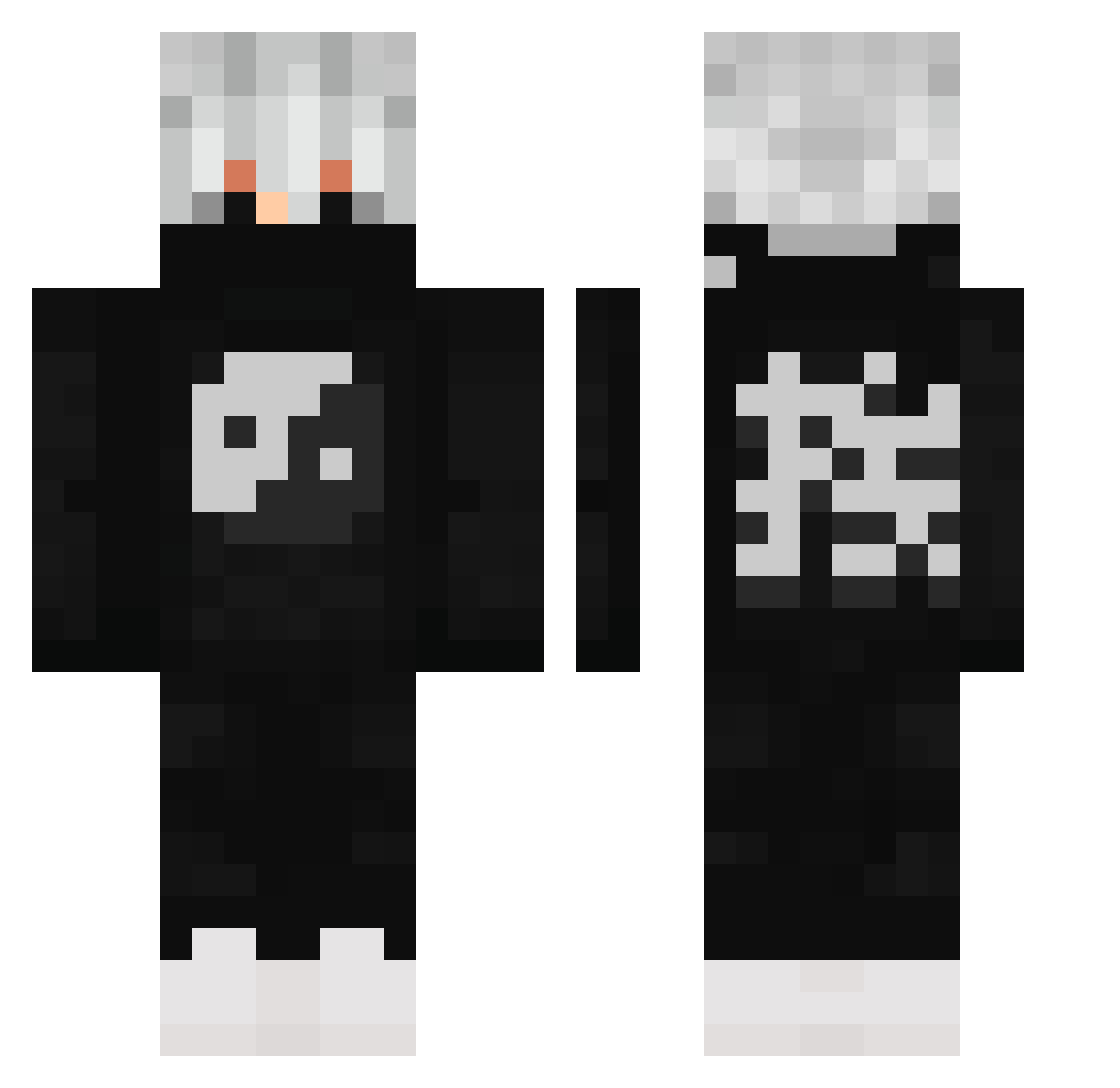
Current Minecraft skin of the player GODLY_SHUBHALT, loaded from the official Mojang API. Rotate the 3D model with your mouse or finger, then download the skin as a PNG file and use it in Minecraft: Bedrock Edition or Java Edition for free. When GODLY_SHUBHALT changes their skin, this page updates automatically and the old skin stays in the history below.
Other players with this skin (503)
GODLY_SHUBHALT was the 354th player we have seen with this skin, first spotted on 04.10.2026. The same skin was seen on these players. Open a nickname to see their current skin and skin history.
 BRW_Metin07 Bolita Okinh Havrebollar69 SumTingWong420 SylerReap1 VillalonV Chobo_hui clonexx19 Akarane seann7 DPSPrime Mie_scattering AEclos skentex_TTV Mayhemyomama Facturadoh_ kayser07 IIIIIDIIIII Vinco303 SemajJGV _Lunar_Requiem_ Robnpop liluzililuzi PhxntomACE Reysiel69 Kutay957 mengle ggsdark Labobbo Gamer2008david 2Kaze PBIMS xHqnex Vixorex CinnamanSuga RKSNquellovero Tasmaner2008 ThatRattineBxtch RuztyGhost Kz_Ky DrChristmasJones M4nq0 glxxx tombb0512 Anders181 WhyFY Conque_D_Frost RN_gost Slaycooper98 GetDeleted9929 G3kIbo Yujiro19 Thaweesak tylerwalters55 Shuaib272 StardustHaya Maguslinus WACKYxWasted notreallycool12
More Yin Yang Minecraft skins
How to install the GODLY_SHUBHALT skin
- Press the Download button above to save the skin as a PNG file.
- Minecraft: Bedrock Edition (PE): open the Dressing Room from the main menu (or tap your character → Edit Character), go to Classic Skins → Owned, press the + (new skin) button, choose the downloaded PNG and pick the Classic (Steve) model. Works on PC and mobile; consoles cannot import custom skins.
- Minecraft: Java Edition: open the Minecraft Launcher, go to the Skins tab, click New Skin, load the PNG, pick the Classic (Steve) model and press Save & Use. You can also upload it at minecraft.net → Profile → Change Skin.
The skin does not show up after import - what should I do?
Restart Minecraft and open the Dressing Room again - imported skins sometimes appear only after a restart. Also make sure you selected the imported skin and picked the Classic (Steve) model.
Which model should I choose, Classic or Slim?
This skin is designed for the Classic (Steve) model. If you pick the wrong model, the arms of the skin will look stretched or squeezed.
Is the skin of GODLY_SHUBHALT free to download?
Yes. Press Download, save the PNG file and use it in Minecraft: Bedrock Edition or Java Edition - no payment or registration needed. The skin also works on multiplayer servers and Realms.
More skins
Looking for more? Go back to all Minecraft skins and check the top skins of the week, month and all time, or find any player's skin by nickname.