
Fxdrs - Minecraft Skins & Skin History
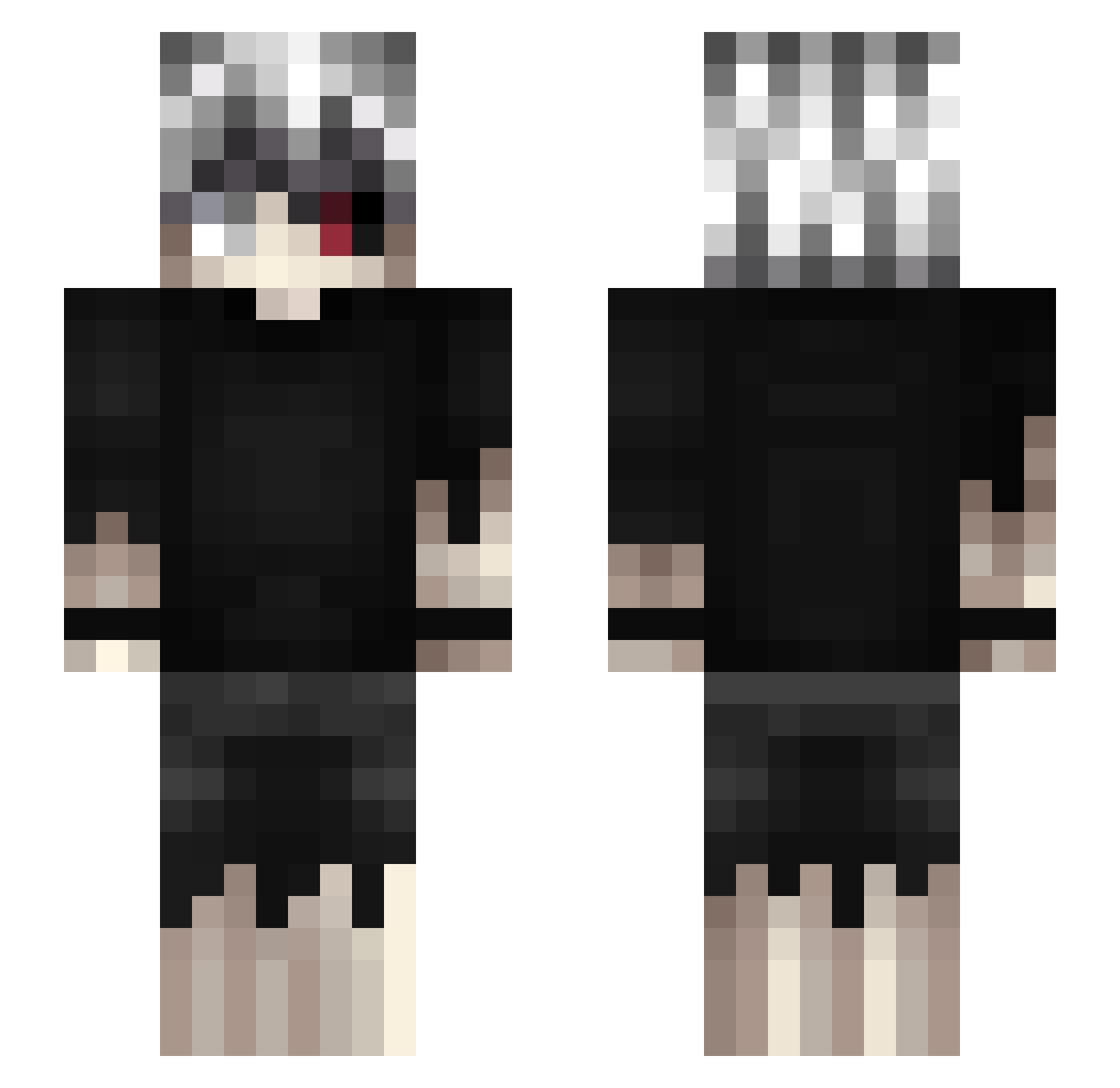
Current Minecraft skin of the player Fxdrs, loaded from the official Mojang API. Rotate the 3D model with your mouse or finger, then download the skin as a PNG file and use it in Minecraft: Bedrock Edition or Java Edition for free. When Fxdrs changes their skin, this page updates automatically and the old skin stays in the history below.
Other players with this skin (462)
Fxdrs was the 91st player we have seen with this skin, first spotted on 14.08.2026. The same skin was seen on these players. Open a nickname to see their current skin and skin history.
 Gfifou v8km_ Benzoes KMMarcel akahotaru07 Hakstorq TwojstaryDRIP AngelLG raramsesjp Real9zZ KINGMOB1014 ChidoriSss fferum Jadevima 11lines Sofek_Nesterenko yuankai48 Noblenuts1 scar_12 KAMYYYYYYYYYYYYY 736indifferent
 ravzu MiniVido Pletran santimid ZanBot01 KALE113 pa1izi MrWild basssilio YoungMulti a097067782559 AnimeFAN01 SOMNICULOSUS MrGoudies ezxo3 fl4menko Bossandio TheNeuryX oscar0206 That__Chris ASHB_7846 slxyer95 Hannah_01 colocon ochipaku 5285 Juwi93 soutako0506 ToiToY JohnnySinss_ Xan_h2
 SadHaru VileLyr1c Grandma_Dorris downthunder135 kappachin dxvilskiss karzeu_ LaZy_OtaKu
More Kaneki Ken Minecraft skins
How to install the Fxdrs skin
- Press the Download button above to save the skin as a PNG file.
- Minecraft: Bedrock Edition (PE): open the Dressing Room from the main menu (or tap your character → Edit Character), go to Classic Skins → Owned, press the + (new skin) button, choose the downloaded PNG and pick the Slim (Alex) model. Works on PC and mobile; consoles cannot import custom skins.
- Minecraft: Java Edition: open the Minecraft Launcher, go to the Skins tab, click New Skin, load the PNG, pick the Slim (Alex) model and press Save & Use. You can also upload it at minecraft.net → Profile → Change Skin.
The skin does not show up after import - what should I do?
Restart Minecraft and open the Dressing Room again - imported skins sometimes appear only after a restart. Also make sure you selected the imported skin and picked the Slim (Alex) model.
Which model should I choose, Classic or Slim?
This skin is designed for the Slim (Alex) model. If you pick the wrong model, the arms of the skin will look stretched or squeezed.
Is the skin of Fxdrs free to download?
Yes. Press Download, save the PNG file and use it in Minecraft: Bedrock Edition or Java Edition - no payment or registration needed. The skin also works on multiplayer servers and Realms.
More skins
Looking for more? Go back to all Minecraft skins and check the top skins of the week, month and all time, or find any player's skin by nickname.