
FushiguroSoker - Minecraft Skins & Skin History
Current Minecraft skin of the player FushiguroSoker, loaded from the official Mojang API. Rotate the 3D model with your mouse or finger, then download the skin as a PNG file and use it in Minecraft: Bedrock Edition or Java Edition for free. When FushiguroSoker changes their skin, this page updates automatically and the old skin stays in the history below.
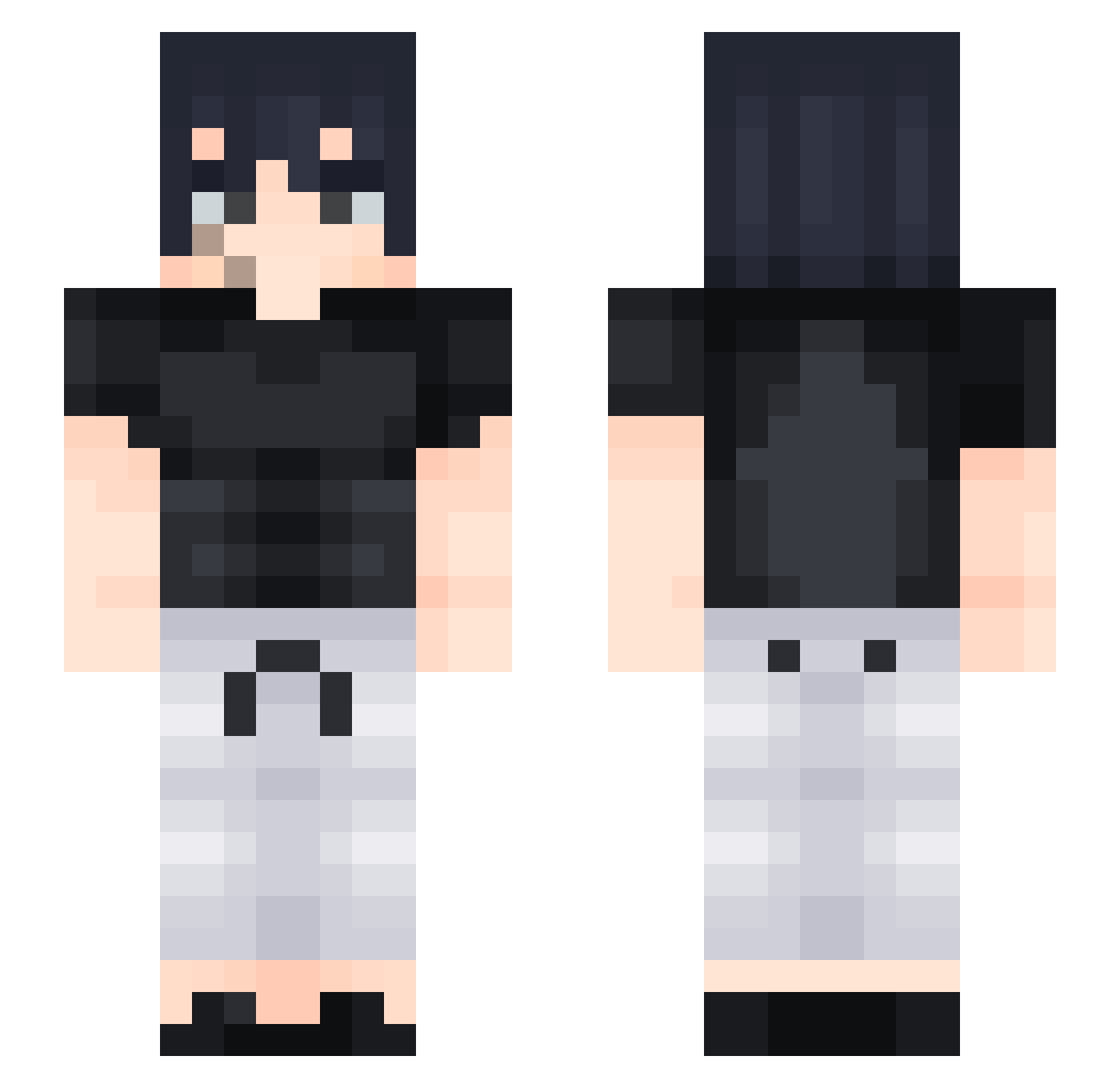
Other players with this skin (428)
FushiguroSoker was the 76th player we have seen with this skin, first spotted on 13.08.2026. The same skin was seen on these players. Open a nickname to see their current skin and skin history.
 yaebalmamu Neat24 Flamberg2010 pagzuu mirofentmaxer Zzebri_ ruzafixz21 HJSatchel Wangsterzzz
 Inosuke_H16 Rubenuu Lycoris_0 Demonkillerrrrr ASTRAFER ShadowSnipezYT
 ParadoxCSS Angluken KSirius Chazza_gazza69 Sekkaro Blurphy7 Gabxzx456 CoC0Melon imyKyle parkdh1021 M3TO_ Lowcaa Moudi7 berisasimp 09152005 snanssnans xxennto Nagar42 yorealsky Manhache WaysieOG
 ZBorgne wearka DuckoBee Drako_keo69 obJLo4ko japaqzxx ChinosSon
 Rada077 Hyprspac3 cN3N Yokunti CorvosDeath iwannabeDop Turrkz megagamer111 Seungli_52 TOBRAT07 FlacoRicky
 ItzRealSkaal Saschka2 BoilinDenim NosMines aizen344 HunchoSoB
More Sasuke Uchiha Minecraft skins
See all 727 Sasuke Uchiha skins
How to install the FushiguroSoker skin
- Press the Download button above to save the skin as a PNG file.
- Minecraft: Bedrock Edition (PE): open the Dressing Room from the main menu (or tap your character → Edit Character), go to Classic Skins → Owned, press the + (new skin) button, choose the downloaded PNG and pick the Slim (Alex) model. Works on PC and mobile; consoles cannot import custom skins.
- Minecraft: Java Edition: open the Minecraft Launcher, go to the Skins tab, click New Skin, load the PNG, pick the Slim (Alex) model and press Save & Use. You can also upload it at minecraft.net → Profile → Change Skin.
The skin does not show up after import - what should I do?
Restart Minecraft and open the Dressing Room again - imported skins sometimes appear only after a restart. Also make sure you selected the imported skin and picked the Slim (Alex) model.
Which model should I choose, Classic or Slim?
This skin is designed for the Slim (Alex) model. If you pick the wrong model, the arms of the skin will look stretched or squeezed.
Is the skin of FushiguroSoker free to download?
Yes. Press Download, save the PNG file and use it in Minecraft: Bedrock Edition or Java Edition - no payment or registration needed. The skin also works on multiplayer servers and Realms.
More skins
Looking for more? Go back to all Minecraft skins and check the top skins of the week, month and all time, or find any player's skin by nickname.