
Francesco_Jack - Minecraft Skins & Skin History
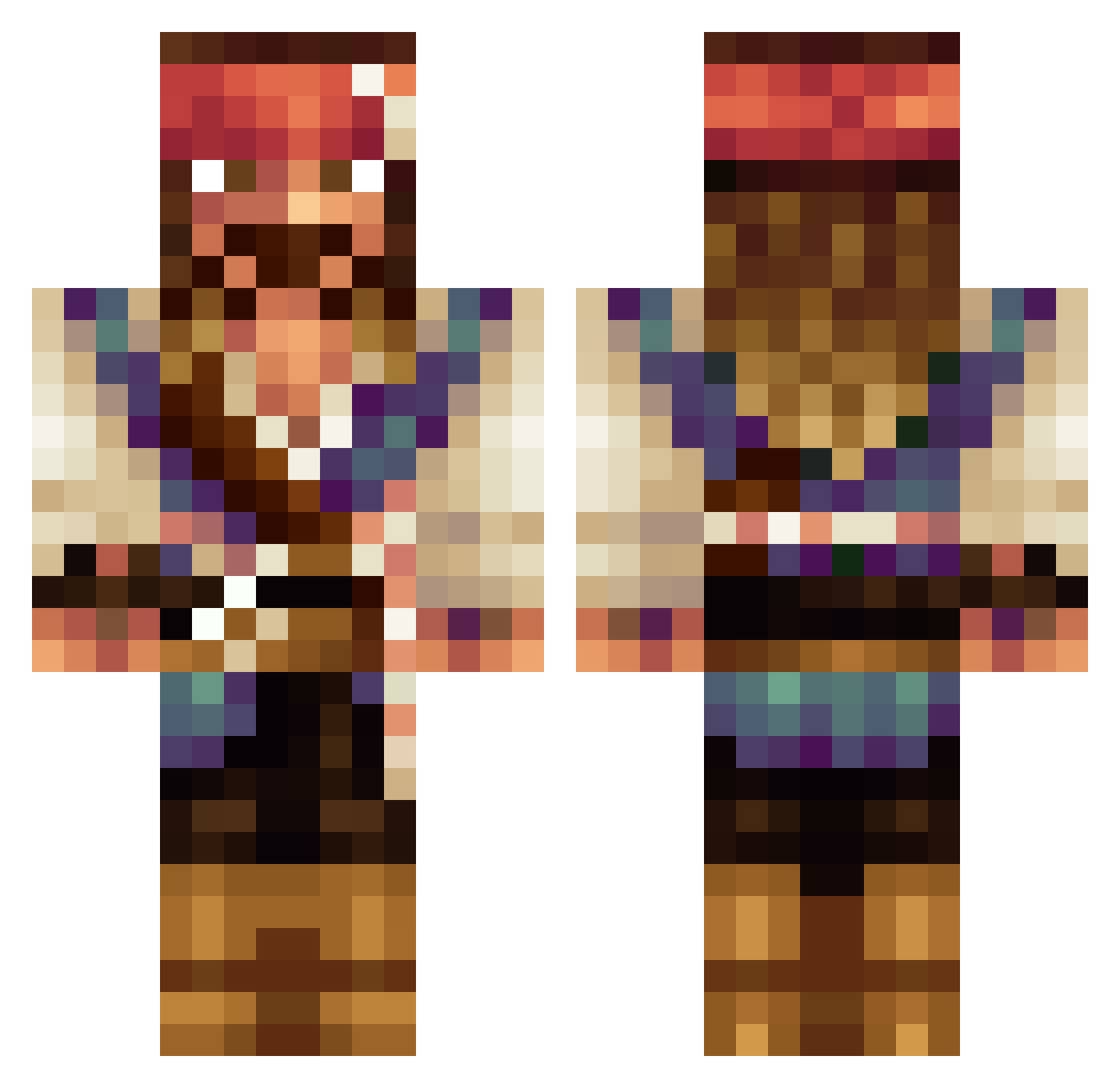
Current Minecraft skin of the player Francesco_Jack, loaded from the official Mojang API. Rotate the 3D model with your mouse or finger, then download the skin as a PNG file and use it in Minecraft: Bedrock Edition or Java Edition for free. When Francesco_Jack changes their skin, this page updates automatically and the old skin stays in the history below.
Other players with this skin (533)
Francesco_Jack was the 46th player we have seen with this skin, first spotted on 03.08.2026. The same skin was seen on these players. Open a nickname to see their current skin and skin history.
 Zertaal Endep
 Wogason IvanRadnev Hugehoe DrFatButt beauSCOPE Malasitos Castielix Chri5is Jaco_XXVIII nrgden4o5 Timidcrow LOW_Cudo potatoatak ThePurpleCM chakuzito Sir_Bluewolf MrRems ThayGandalf starknese Kcobra103 allanzera QuattroS1 Abihey247 Rico_1108
 SlyFDB2 Ex3cuteur10 Az0602 brunexxx777 Elinous M_RASCON WIKI11X_8 Yabee marboski Lothbrok_1 BanzaiBonsai17 Blaze_Redstone
 Kermatt7 Delfa32 MaloCorr BlueIce001 marcoobcn thesebsterplayer c0okIe drewf4 sdpinterlude
 CL92K omochi77 Namonex JSauce7 Nichi_Craft Lmarsera123 Didix14 miller411 MonicaMeanMouse nahte009 Alino1985 DayKay682 SemiProStump
More Jack Sparrow Minecraft skins
See all 108 Jack Sparrow skins
How to install the Francesco_Jack skin
- Press the Download button above to save the skin as a PNG file.
- Minecraft: Bedrock Edition (PE): open the Dressing Room from the main menu (or tap your character → Edit Character), go to Classic Skins → Owned, press the + (new skin) button, choose the downloaded PNG and pick the Classic (Steve) model. Works on PC and mobile; consoles cannot import custom skins.
- Minecraft: Java Edition: open the Minecraft Launcher, go to the Skins tab, click New Skin, load the PNG, pick the Classic (Steve) model and press Save & Use. You can also upload it at minecraft.net → Profile → Change Skin.
The skin does not show up after import - what should I do?
Restart Minecraft and open the Dressing Room again - imported skins sometimes appear only after a restart. Also make sure you selected the imported skin and picked the Classic (Steve) model.
Which model should I choose, Classic or Slim?
This skin is designed for the Classic (Steve) model. If you pick the wrong model, the arms of the skin will look stretched or squeezed.
Is the skin of Francesco_Jack free to download?
Yes. Press Download, save the PNG file and use it in Minecraft: Bedrock Edition or Java Edition - no payment or registration needed. The skin also works on multiplayer servers and Realms.
More skins
Looking for more? Go back to all Minecraft skins and check the top skins of the week, month and all time, or find any player's skin by nickname.