
Fo6yy - Minecraft Skins & Skin History
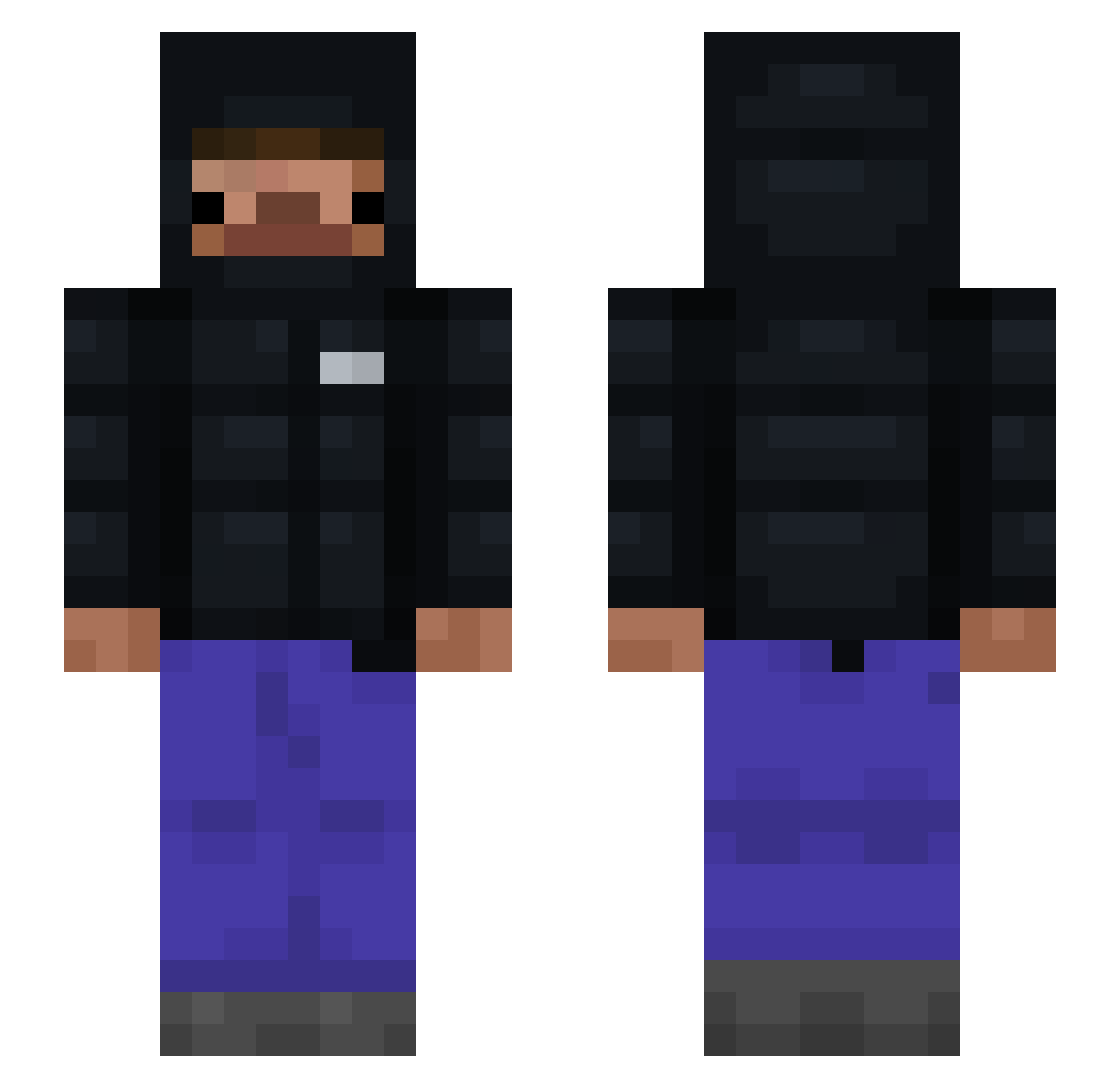
Current Minecraft skin of the player Fo6yy, loaded from the official Mojang API. Rotate the 3D model with your mouse or finger, then download the skin as a PNG file and use it in Minecraft: Bedrock Edition or Java Edition for free. When Fo6yy changes their skin, this page updates automatically and the old skin stays in the history below.
Other players with this skin (98)
Fo6yy was the 26th player we have seen with this skin, first spotted on 17.08.2026. The same skin was seen on these players. Open a nickname to see their current skin and skin history.
 InquisitorZyn
 ReNoss_ PERS75 BlueCloudMJ _clxtch21 zxvvwq SightyJ Onixpq enz_on_hypixel zZenSv ImXyf SovsenV2
 ___blu idxvx
 FabiXpl xamec blockcipher Sxndro777 palmtree323 Muecke1110 Reddamadora YzamithS2 Drippy_Tacoo ItsP4r Enzo_Of_Tomorrow Marekable FlingBlock MrMarrown Dreary18 Zagrir
 Yoshi_lol Patorrikku
 okrc Nah_Id_W1n Drip_shooter karterdottk Azetix__ jhoxn_z1 kavinsrivastava pedrosky777 JusThisStu LegitNiko1741 NxthanJM JumpingJackie09 BananGuy fusionwasd MysticSaess Nachlaniec_2015 sefilotobus Azoht Jackie_Treckoak ssiballoma freakymilosz Smorawski poanizer jrtmc biegal23 SvK0 xitix91 Sasmul
How to install the Fo6yy skin
- Press the Download button above to save the skin as a PNG file.
- Minecraft: Bedrock Edition (PE): open the Dressing Room from the main menu (or tap your character → Edit Character), go to Classic Skins → Owned, press the + (new skin) button, choose the downloaded PNG and pick the Slim (Alex) model. Works on PC and mobile; consoles cannot import custom skins.
- Minecraft: Java Edition: open the Minecraft Launcher, go to the Skins tab, click New Skin, load the PNG, pick the Slim (Alex) model and press Save & Use. You can also upload it at minecraft.net → Profile → Change Skin.
The skin does not show up after import - what should I do?
Restart Minecraft and open the Dressing Room again - imported skins sometimes appear only after a restart. Also make sure you selected the imported skin and picked the Slim (Alex) model.
Which model should I choose, Classic or Slim?
This skin is designed for the Slim (Alex) model. If you pick the wrong model, the arms of the skin will look stretched or squeezed.
Is the skin of Fo6yy free to download?
Yes. Press Download, save the PNG file and use it in Minecraft: Bedrock Edition or Java Edition - no payment or registration needed. The skin also works on multiplayer servers and Realms.
More skins
Looking for more? Go back to all Minecraft skins and check the top skins of the week, month and all time, or find any player's skin by nickname.