
Floppi_HD - Minecraft Skins & Skin History
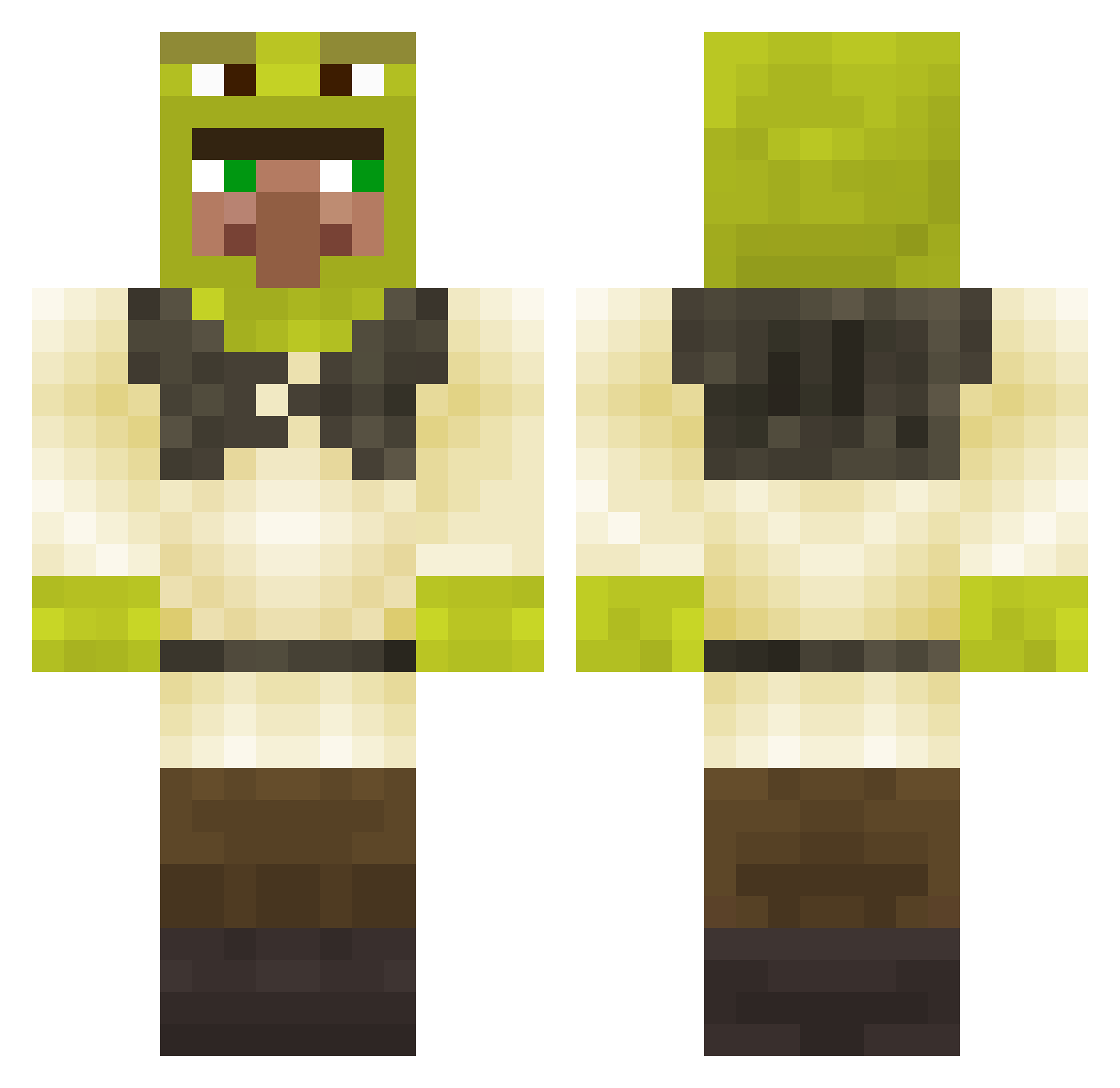
Current Minecraft skin of the player Floppi_HD, loaded from the official Mojang API. Rotate the 3D model with your mouse or finger, then download the skin as a PNG file and use it in Minecraft: Bedrock Edition or Java Edition for free. When Floppi_HD changes their skin, this page updates automatically and the old skin stays in the history below.
Other players with this skin (280)
Floppi_HD was the 82nd player we have seen with this skin, first spotted on 23.08.2026. The same skin was seen on these players. Open a nickname to see their current skin and skin history.
 Skraimer_ CapitalBraaaJa CaptainZebu CHIENbonjour EeppiPuisto Ruhstikk MurderMeSlowly73 Kaba4an DeadPiranha richiemoreno226 Mates235 Girtzie MrAre01 AngusLai7 Vagosen_ Kreiito joelthejack doodoogargle Avem42 SpermaInGym JOFA33 Miguel303 ttttttaleka Pamife Caboom1337 DogsCrack PinkThePink Mamakiller344 Pan__Magma DarkNuYA trsnick terman8ter Dripguzzler sozoku Capn_Kraken matt098990 Astro___ Nibbo_8 Paulll choygn12 Soldja04 eyelesscoffee68 piletonikolai Sockolo MrShreko JorJu69 MegaNalesnik
 DubstepCookie_ paperbox_ouo Riverbuilder moist__hugs TomeWu Navdude PichulongostinIV JackyCola20 _Noaru_ krutaya_pipiska KapitanPiotrulo EonDuel gomigomichan
More Shrek Minecraft skins
How to install the Floppi_HD skin
- Press the Download button above to save the skin as a PNG file.
- Minecraft: Bedrock Edition (PE): open the Dressing Room from the main menu (or tap your character → Edit Character), go to Classic Skins → Owned, press the + (new skin) button, choose the downloaded PNG and pick the Classic (Steve) model. Works on PC and mobile; consoles cannot import custom skins.
- Minecraft: Java Edition: open the Minecraft Launcher, go to the Skins tab, click New Skin, load the PNG, pick the Classic (Steve) model and press Save & Use. You can also upload it at minecraft.net → Profile → Change Skin.
The skin does not show up after import - what should I do?
Restart Minecraft and open the Dressing Room again - imported skins sometimes appear only after a restart. Also make sure you selected the imported skin and picked the Classic (Steve) model.
Which model should I choose, Classic or Slim?
This skin is designed for the Classic (Steve) model. If you pick the wrong model, the arms of the skin will look stretched or squeezed.
Is the skin of Floppi_HD free to download?
Yes. Press Download, save the PNG file and use it in Minecraft: Bedrock Edition or Java Edition - no payment or registration needed. The skin also works on multiplayer servers and Realms.
More skins
Looking for more? Go back to all Minecraft skins and check the top skins of the week, month and all time, or find any player's skin by nickname.