
Flingleton_III - Minecraft Skins & Skin History
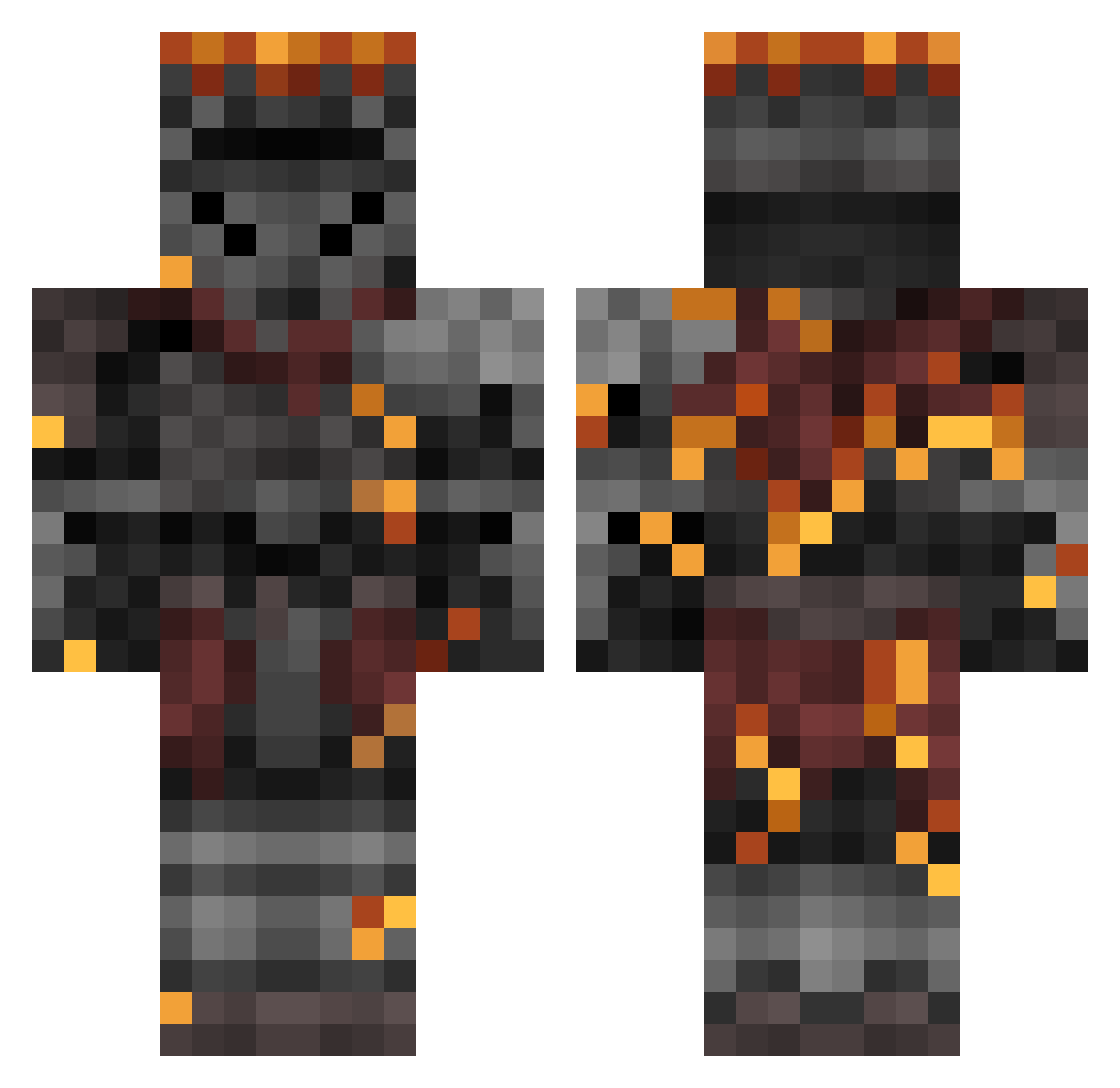
Current Minecraft skin of the player Flingleton_III, loaded from the official Mojang API. Rotate the 3D model with your mouse or finger, then download the skin as a PNG file and use it in Minecraft: Bedrock Edition or Java Edition for free. When Flingleton_III changes their skin, this page updates automatically and the old skin stays in the history below.
Other players with this skin (362)
Flingleton_III was the 126th player we have seen with this skin, first spotted on 29.08.2026. The same skin was seen on these players. Open a nickname to see their current skin and skin history.
 Dovahkiin786 Octohedgehog datboi7484 TwHv1 Selbstmorde SuccoriaV SAVAGExALCAZAR A_MZQ IAmLegenDairy LycheeSauce PilotCeiling Fallen_no
 _T0ji_ CinderedSoul 16degreeangle ChrisTheMan213 Viktor_Ch Z__PJ Manitas23 CyberBullyFTW Anubis77NP Alatreon96 mosaicadam phall74 x0K0rn3l0x LordOfHunter69 JayMAQS drdrkn i4lt99 Samanocri DubbleDee RickyFitness M7thical Mr_Softee JoeLigma24 TheArtrias besibaby UranicAcorn C0ffeeMugg zagorhako Ball_Dragger47 AlbinoGlue68 Isabelle_F ManVsMicrowave Private52 AskYoDoc Willmoose TooSebi Destro915 JacquesCliver Pancreas15 SpydrPlays TRACECUT Loterich MinecraftMO123 xXPersonaXx Azrael777 LaManchaland soulsofcat nv1602
More Netherite Armor Minecraft skins
See all 81 Netherite Armor skins
How to install the Flingleton_III skin
- Press the Download button above to save the skin as a PNG file.
- Minecraft: Bedrock Edition (PE): open the Dressing Room from the main menu (or tap your character → Edit Character), go to Classic Skins → Owned, press the + (new skin) button, choose the downloaded PNG and pick the Classic (Steve) model. Works on PC and mobile; consoles cannot import custom skins.
- Minecraft: Java Edition: open the Minecraft Launcher, go to the Skins tab, click New Skin, load the PNG, pick the Classic (Steve) model and press Save & Use. You can also upload it at minecraft.net → Profile → Change Skin.
The skin does not show up after import - what should I do?
Restart Minecraft and open the Dressing Room again - imported skins sometimes appear only after a restart. Also make sure you selected the imported skin and picked the Classic (Steve) model.
Which model should I choose, Classic or Slim?
This skin is designed for the Classic (Steve) model. If you pick the wrong model, the arms of the skin will look stretched or squeezed.
Is the skin of Flingleton_III free to download?
Yes. Press Download, save the PNG file and use it in Minecraft: Bedrock Edition or Java Edition - no payment or registration needed. The skin also works on multiplayer servers and Realms.
More skins
Looking for more? Go back to all Minecraft skins and check the top skins of the week, month and all time, or find any player's skin by nickname.