
Flavona00 - Minecraft Skins & Skin History
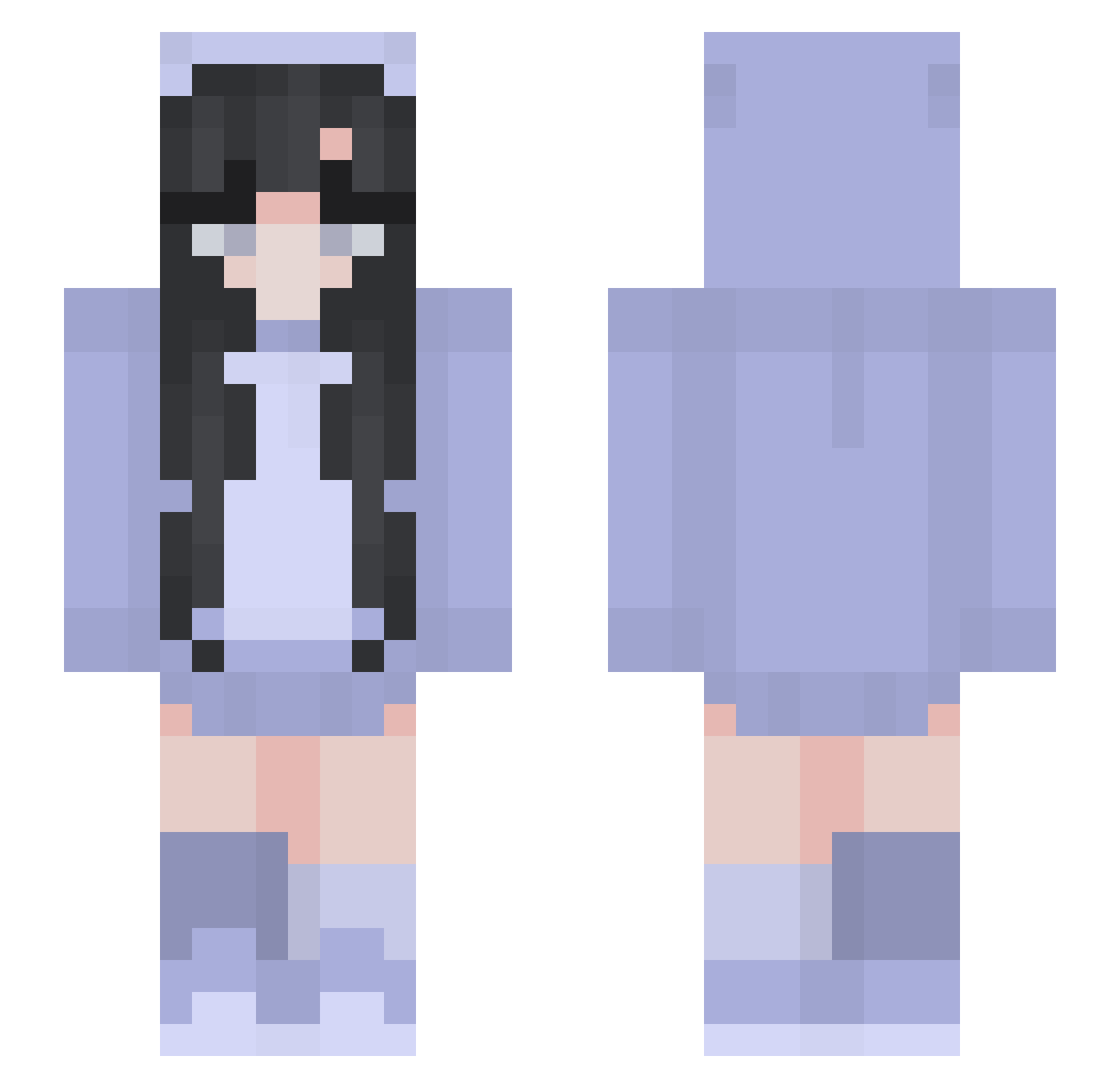
Current Minecraft skin of the player Flavona00, loaded from the official Mojang API. Rotate the 3D model with your mouse or finger, then download the skin as a PNG file and use it in Minecraft: Bedrock Edition or Java Edition for free. When Flavona00 changes their skin, this page updates automatically and the old skin stays in the history below.
Other players with this skin (318)
Flavona00 was the 283rd player we have seen with this skin, first spotted on 05.11.2026. The same skin was seen on these players. Open a nickname to see their current skin and skin history.
 HunderP Hanidh2017 YourNumberOne1 elliotasterisk PotatoxChip Pipinha12 Maryatt nabimbab Emlemgothoes Lissyloo2010 Elif21 aribravo12 Bree1205 FlyQT ABY7924 foxhow Marty890 MissyJia Dong_g3131 MIRDAYU Corgice junexbugxx Safiya3 uoio_ QianJue_ gracehobbs104 xl_m1kasa_lx JoshT1234 kilmin12345 ChAechaC9 granrana HandCream9 paisleys MickiRecovery CheezitsAndRanch Cai_guoguo sevenmaxx bhcroxana unreservedly pipi___ Jassvley kepi121 ChunkNoodle _CapriCapri_ EinfachMiaa Vollzeitqueenie Ice_tea_peach_11 won416 kayrenae33 chasinghoran Ribbenyms MysticMungus Rozi04 Enizel Anan_Ania ItsSaviCat LovE_R Shira_Simchony hanhandes hahiru00
More Pastel Minecraft skins
How to install the Flavona00 skin
- Press the Download button above to save the skin as a PNG file.
- Minecraft: Bedrock Edition (PE): open the Dressing Room from the main menu (or tap your character → Edit Character), go to Classic Skins → Owned, press the + (new skin) button, choose the downloaded PNG and pick the Slim (Alex) model. Works on PC and mobile; consoles cannot import custom skins.
- Minecraft: Java Edition: open the Minecraft Launcher, go to the Skins tab, click New Skin, load the PNG, pick the Slim (Alex) model and press Save & Use. You can also upload it at minecraft.net → Profile → Change Skin.
The skin does not show up after import - what should I do?
Restart Minecraft and open the Dressing Room again - imported skins sometimes appear only after a restart. Also make sure you selected the imported skin and picked the Slim (Alex) model.
Which model should I choose, Classic or Slim?
This skin is designed for the Slim (Alex) model. If you pick the wrong model, the arms of the skin will look stretched or squeezed.
Is the skin of Flavona00 free to download?
Yes. Press Download, save the PNG file and use it in Minecraft: Bedrock Edition or Java Edition - no payment or registration needed. The skin also works on multiplayer servers and Realms.
More skins
Looking for more? Go back to all Minecraft skins and check the top skins of the week, month and all time, or find any player's skin by nickname.