
Faelyoar - Minecraft Skins & Skin History
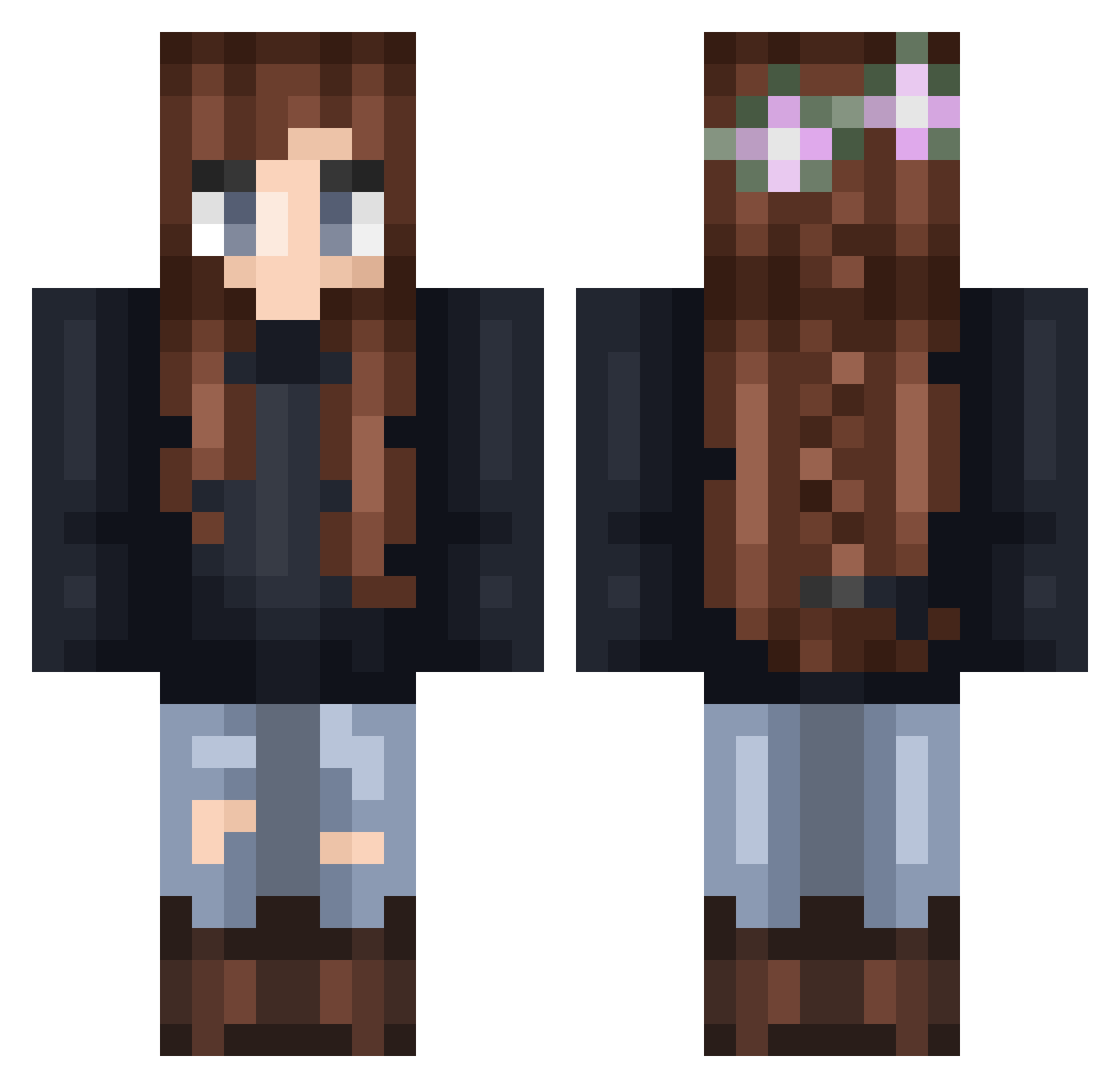
Current Minecraft skin of the player Faelyoar, loaded from the official Mojang API. Rotate the 3D model with your mouse or finger, then download the skin as a PNG file and use it in Minecraft: Bedrock Edition or Java Edition for free. When Faelyoar changes their skin, this page updates automatically and the old skin stays in the history below.
Other players with this skin (293)
Faelyoar was the 125th player we have seen with this skin, first spotted on 15.09.2026. The same skin was seen on these players. Open a nickname to see their current skin and skin history.
 xhhslh tiphlaqueen NNM852 pioupiou_licorne Chocollatty _merza sophelix madexleine Ketku666 Saraleea AwsmKiki IxMoNa_ EneroWater JennieSupernova Aurejia elehctin Kuro_Tori valifae Inyoni_ wuhuqifei233 Deirdria vyator DirtNWorms1 suzille SpazzyCat2001 Ela1994Ko apricotyua Chines_wen CheeseHouses Thestral_Wings EslayKey IssisBellis LittleAhltair Jasmin450 jacqui82 Kloetzchen3D whitetiger567 Shad3Slay3r99 DBKAN Eduonbotti Nwasssde Estherap Chillkay PANDIBIN LJ47 layuh_ Trialandry fluffyandi LilyVampireGamer Lyricam Soruuus purplegem3 Aeleora NerdyOwl77 Lala204 Barlexus Cumeskey April_J CrayolaCoral07 EtherealRealms
More Braid Minecraft skins
How to install the Faelyoar skin
- Press the Download button above to save the skin as a PNG file.
- Minecraft: Bedrock Edition (PE): open the Dressing Room from the main menu (or tap your character → Edit Character), go to Classic Skins → Owned, press the + (new skin) button, choose the downloaded PNG and pick the Classic (Steve) model. Works on PC and mobile; consoles cannot import custom skins.
- Minecraft: Java Edition: open the Minecraft Launcher, go to the Skins tab, click New Skin, load the PNG, pick the Classic (Steve) model and press Save & Use. You can also upload it at minecraft.net → Profile → Change Skin.
The skin does not show up after import - what should I do?
Restart Minecraft and open the Dressing Room again - imported skins sometimes appear only after a restart. Also make sure you selected the imported skin and picked the Classic (Steve) model.
Which model should I choose, Classic or Slim?
This skin is designed for the Classic (Steve) model. If you pick the wrong model, the arms of the skin will look stretched or squeezed.
Is the skin of Faelyoar free to download?
Yes. Press Download, save the PNG file and use it in Minecraft: Bedrock Edition or Java Edition - no payment or registration needed. The skin also works on multiplayer servers and Realms.
More skins
Looking for more? Go back to all Minecraft skins and check the top skins of the week, month and all time, or find any player's skin by nickname.