
Enzorb06 - Minecraft Skins & Skin History
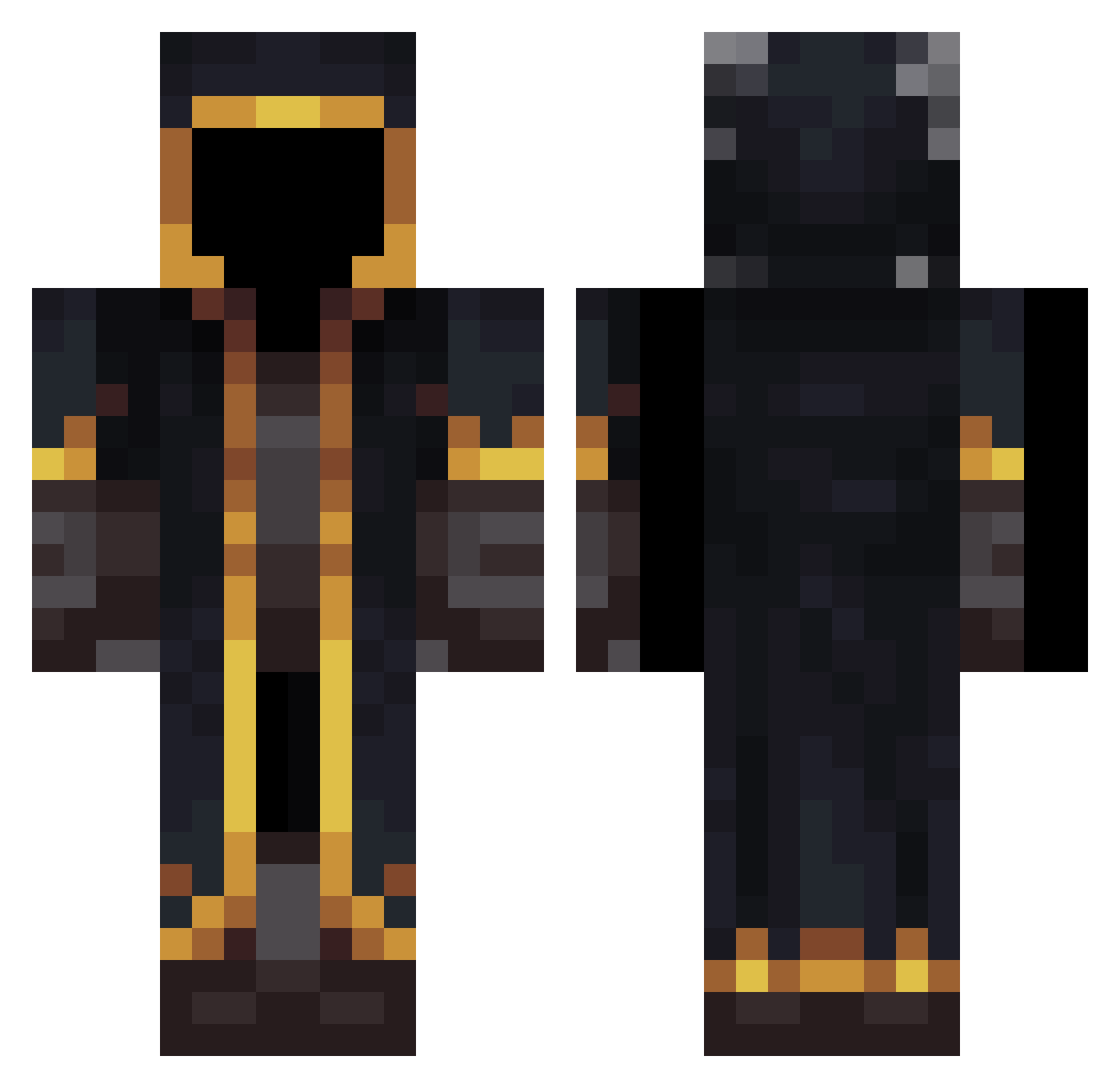
Current Minecraft skin of the player Enzorb06, loaded from the official Mojang API. Rotate the 3D model with your mouse or finger, then download the skin as a PNG file and use it in Minecraft: Bedrock Edition or Java Edition for free. When Enzorb06 changes their skin, this page updates automatically and the old skin stays in the history below.
Other players with this skin (533)
Enzorb06 was the 5th player we have seen with this skin, first spotted on 22.07.2026. The same skin was seen on these players. Open a nickname to see their current skin and skin history.
 CygameSima Kevaol Alano050 thinkyan amjd_142 sean0623 hoyoung6796 Axiy3003 Alpha756 blake2332 AIXIAOHE Car1n SupaJavierC pog4er BaseDrummer97 xploock elruckysito88 lemon_tangerines zhanif Caritta vinodeagua 22rt Yannuel tac00004 Lozanna_ Arsin__ memozz02 PAKOOOOOOOOOO Dotodo05 krazy_pablo1234 youreverydayn00b Andr0medaY1 ChenYuanxiang Drakonq CORRUPTXDREAM Shanaj eugene200008 RookieHT RockHardOnix Mymistyle CoreFlux Balthasar_Gelt_ Anomis94 LucasSon2000 Creative2402 Jimchuang1234 Marianull Asdfordian_ TohaskaRin kuronekoozi MorenitoHD1 six0one Hishiko_0 dictionary_stack APatiii th3xd neverbeen07 Aleexgabu xianzhen637 avarish
More Mage Minecraft skins
How to install the Enzorb06 skin
- Press the Download button above to save the skin as a PNG file.
- Minecraft: Bedrock Edition (PE): open the Dressing Room from the main menu (or tap your character → Edit Character), go to Classic Skins → Owned, press the + (new skin) button, choose the downloaded PNG and pick the Classic (Steve) model. Works on PC and mobile; consoles cannot import custom skins.
- Minecraft: Java Edition: open the Minecraft Launcher, go to the Skins tab, click New Skin, load the PNG, pick the Classic (Steve) model and press Save & Use. You can also upload it at minecraft.net → Profile → Change Skin.
The skin does not show up after import - what should I do?
Restart Minecraft and open the Dressing Room again - imported skins sometimes appear only after a restart. Also make sure you selected the imported skin and picked the Classic (Steve) model.
Which model should I choose, Classic or Slim?
This skin is designed for the Classic (Steve) model. If you pick the wrong model, the arms of the skin will look stretched or squeezed.
Is the skin of Enzorb06 free to download?
Yes. Press Download, save the PNG file and use it in Minecraft: Bedrock Edition or Java Edition - no payment or registration needed. The skin also works on multiplayer servers and Realms.
More skins
Looking for more? Go back to all Minecraft skins and check the top skins of the week, month and all time, or find any player's skin by nickname.