
Elevated__Gaming - Minecraft Skins & Skin History
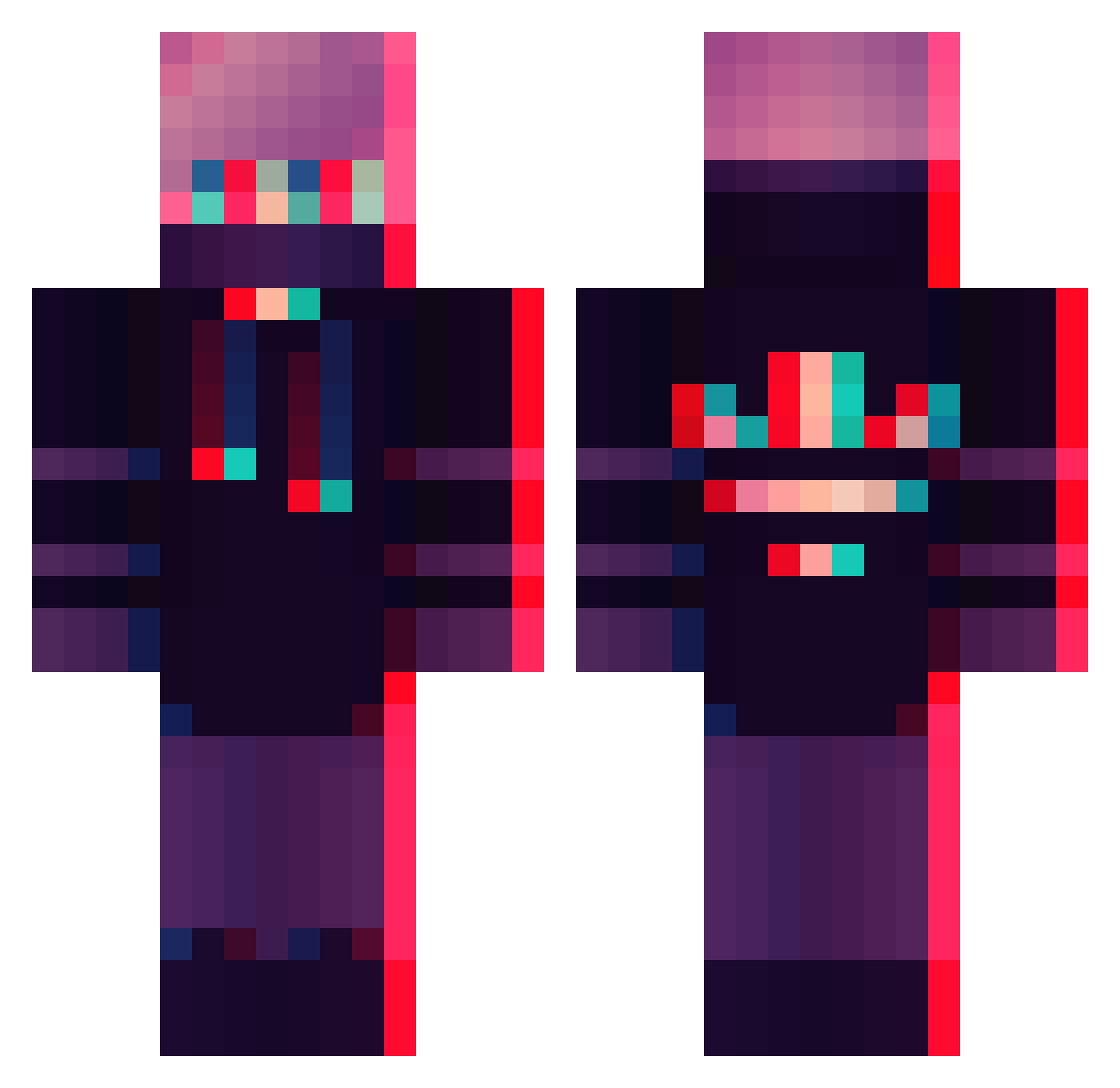
Current Minecraft skin of the player Elevated__Gaming, loaded from the official Mojang API. Rotate the 3D model with your mouse or finger, then download the skin as a PNG file and use it in Minecraft: Bedrock Edition or Java Edition for free. When Elevated__Gaming changes their skin, this page updates automatically and the old skin stays in the history below.
Other players with this skin (358)
Elevated__Gaming was the 304th player we have seen with this skin, first spotted on 21.10.2026. The same skin was seen on these players. Open a nickname to see their current skin and skin history.
 PlayfulTurtle1 TheTugberk leo_FN Ribarton Shizhen2153 Schwangerer AliKaya Admiral_ackBRO Scarletfaith Pleezing Kilanight EGZONSHALA Failscope NEWT_DARK Oliver_77_m jordy280701 PsychoMercss SkyRyujin Skraxy RiverPhoenix435 GaMeRDaDDy1977 itsgray_lol LUKEVALVANO Vaxeen14 SetupTeam55 R3kin67 ZomBic213 _RESLE_ MrZ445 Emjack24 yuhfuk JoseOnTop GSFaisal luvlixx leeblind Seconstar Ammaccabanane9 Fabiano1_0 makutherealone CerasusAureus RegularPlayer SHB63 DocSn0w Double_C420 siyuan _Marvin1911 Oppy2k5 Cheesy0908 Notstalgia Sezer2007 _nuage__ raffa505 n_n_2k SiGueri0r Jottum Flippinhutt05 ABRACHINXD Wyflix Zstarstriker neverdie1457
More Glitch Minecraft skins
How to install the Elevated__Gaming skin
- Press the Download button above to save the skin as a PNG file.
- Minecraft: Bedrock Edition (PE): open the Dressing Room from the main menu (or tap your character → Edit Character), go to Classic Skins → Owned, press the + (new skin) button, choose the downloaded PNG and pick the Classic (Steve) model. Works on PC and mobile; consoles cannot import custom skins.
- Minecraft: Java Edition: open the Minecraft Launcher, go to the Skins tab, click New Skin, load the PNG, pick the Classic (Steve) model and press Save & Use. You can also upload it at minecraft.net → Profile → Change Skin.
The skin does not show up after import - what should I do?
Restart Minecraft and open the Dressing Room again - imported skins sometimes appear only after a restart. Also make sure you selected the imported skin and picked the Classic (Steve) model.
Which model should I choose, Classic or Slim?
This skin is designed for the Classic (Steve) model. If you pick the wrong model, the arms of the skin will look stretched or squeezed.
Is the skin of Elevated__Gaming free to download?
Yes. Press Download, save the PNG file and use it in Minecraft: Bedrock Edition or Java Edition - no payment or registration needed. The skin also works on multiplayer servers and Realms.
More skins
Looking for more? Go back to all Minecraft skins and check the top skins of the week, month and all time, or find any player's skin by nickname.