
EXBBX39 - Minecraft Skins & Skin History
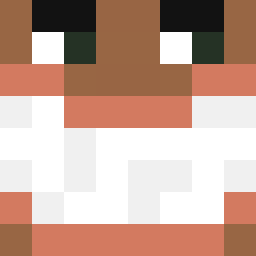
Current Minecraft skin of the player EXBBX39, loaded from the official Mojang API. Rotate the 3D model with your mouse or finger, then download the skin as a PNG file and use it in Minecraft: Bedrock Edition or Java Edition for free. When EXBBX39 changes their skin, this page updates automatically and the old skin stays in the history below.

Other players with this skin (78)
EXBBX39 was the 53rd player we have seen with this skin, first spotted on 30.09.2026. The same skin was seen on these players. Open a nickname to see their current skin and skin history.
 rnaqoddl_ ane3q Moli_xy Linki_ WhereRewer miu1100 petitewhitebih PineLedger jrtiger76 samu20099877 renegado_pvp sanriolove123 Xiang_white VClian ZeZe798 Theriens LUC4SMxW qwe2280 Lennysauce shukimaru_uncbr alejandroszzz DatGuyreece BANANA5271 Thechainstay Freylo Kenzuss Hanghangonj berlinerkoray Lolota__08 Ghos2ts0p _don_pepe Donato7L MiCaMaCaMiCaMi extazeer Frac2RedS Fundraiser23 GGOLDDUK Ecoo6 Smile_Time_123 YORPP Lanzallamas28 asugur91 UngaBungac JuFujisaki Samvyrn Jh3su4 PowerSwift18 Szymonki13 Vichosky_ Wasg00d MatyMi_ Spryciazzz AeroGabriell
 drerror289 Cristian73 Kristik2013 Le1feng14 nehhs WeimarChavez86 dudekeu
More Banana Minecraft skins
How to install the EXBBX39 skin
- Press the Download button above to save the skin as a PNG file.
- Minecraft: Bedrock Edition (PE): open the Dressing Room from the main menu (or tap your character → Edit Character), go to Classic Skins → Owned, press the + (new skin) button, choose the downloaded PNG and pick the Classic (Steve) model. Works on PC and mobile; consoles cannot import custom skins.
- Minecraft: Java Edition: open the Minecraft Launcher, go to the Skins tab, click New Skin, load the PNG, pick the Classic (Steve) model and press Save & Use. You can also upload it at minecraft.net → Profile → Change Skin.
The skin does not show up after import - what should I do?
Restart Minecraft and open the Dressing Room again - imported skins sometimes appear only after a restart. Also make sure you selected the imported skin and picked the Classic (Steve) model.
Which model should I choose, Classic or Slim?
This skin is designed for the Classic (Steve) model. If you pick the wrong model, the arms of the skin will look stretched or squeezed.
Is the skin of EXBBX39 free to download?
Yes. Press Download, save the PNG file and use it in Minecraft: Bedrock Edition or Java Edition - no payment or registration needed. The skin also works on multiplayer servers and Realms.
More skins
Looking for more? Go back to all Minecraft skins and check the top skins of the week, month and all time, or find any player's skin by nickname.