
Dreamjunior13 - Minecraft Skins & Skin History
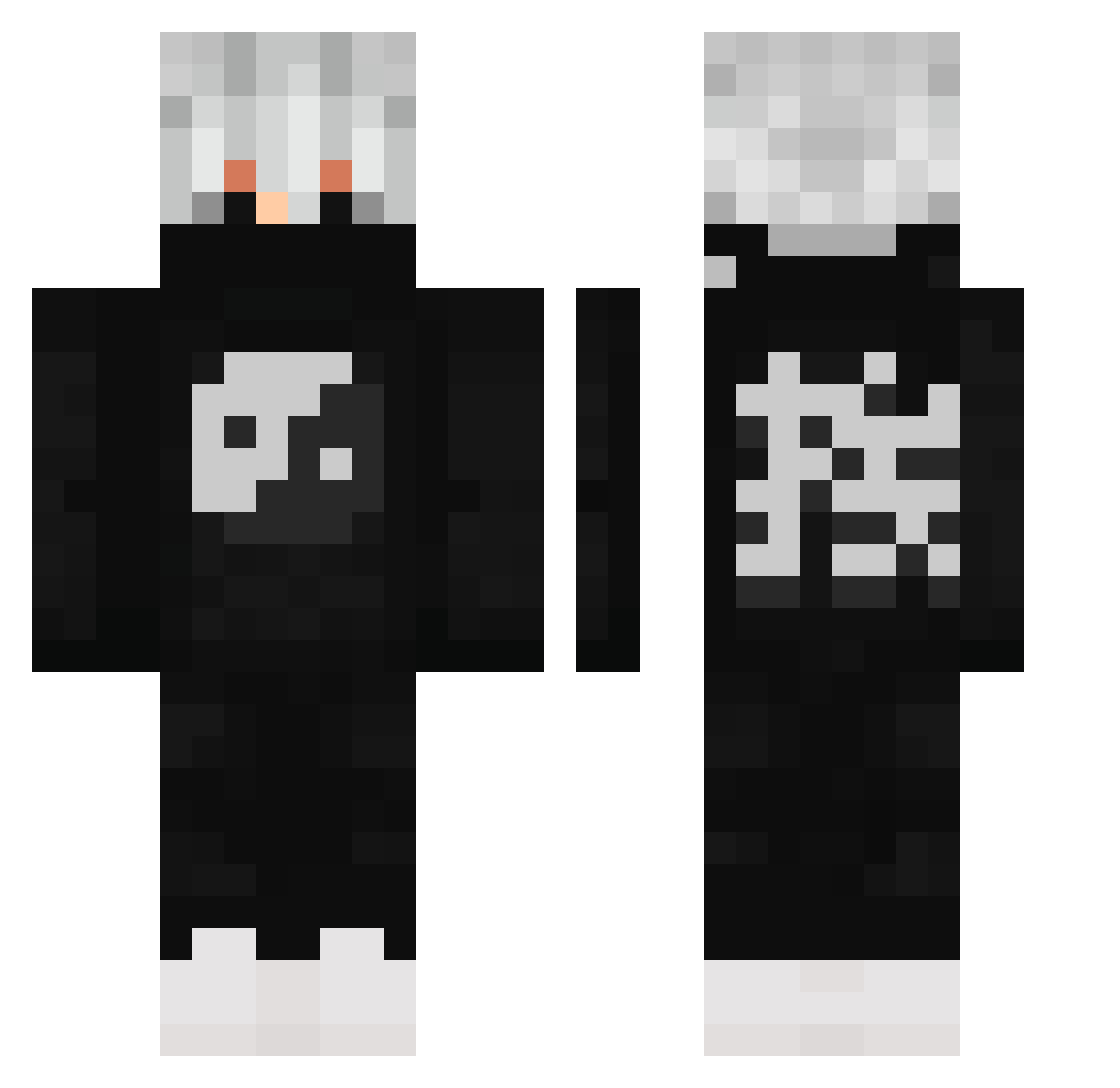
Current Minecraft skin of the player Dreamjunior13, loaded from the official Mojang API. Rotate the 3D model with your mouse or finger, then download the skin as a PNG file and use it in Minecraft: Bedrock Edition or Java Edition for free. When Dreamjunior13 changes their skin, this page updates automatically and the old skin stays in the history below.
Other players with this skin (503)
Dreamjunior13 was the 167th player we have seen with this skin, first spotted on 23.08.2026. The same skin was seen on these players. Open a nickname to see their current skin and skin history.
 Leuzzzsx zWoodwalkers Regeman Shizzle_f7 qKarl KrooKly99 Narutoms2004 Messier_33 JohnsonTam AyoTrxp MouKingLee Coldassasin1234 Msmaar saarimcomfirmed YUHONGTW CisekxDD aDirtyMuffin Fetchubs Shadow_hydra__ carterkinsman71 gilkupvp BlanK_Soulz Mikkel__MP alabri_1 ManOfIron52 DerMitDemBoot ZHE__ Ghost_Kakashi Khaled_2011 Gestor44 Juanluis_1314 IlanGFR St6rmy FinShadow Varetized Majed_11 JHK00 jamzooo skairous Br0kenHazard NotRyaann kainocap xMoneyMaker3x WiiZy1477 Dassamo_oklm WhiteNeone Techn0speak ImElusiv Saios1 DezzartRT Retired_Mafia Rxben0782 Syntopi Son11c ArchorHD DearToDemon iKosm Patrick_Leal G4B__Alan mortalcombat150
More Yin Yang Minecraft skins
How to install the Dreamjunior13 skin
- Press the Download button above to save the skin as a PNG file.
- Minecraft: Bedrock Edition (PE): open the Dressing Room from the main menu (or tap your character → Edit Character), go to Classic Skins → Owned, press the + (new skin) button, choose the downloaded PNG and pick the Classic (Steve) model. Works on PC and mobile; consoles cannot import custom skins.
- Minecraft: Java Edition: open the Minecraft Launcher, go to the Skins tab, click New Skin, load the PNG, pick the Classic (Steve) model and press Save & Use. You can also upload it at minecraft.net → Profile → Change Skin.
The skin does not show up after import - what should I do?
Restart Minecraft and open the Dressing Room again - imported skins sometimes appear only after a restart. Also make sure you selected the imported skin and picked the Classic (Steve) model.
Which model should I choose, Classic or Slim?
This skin is designed for the Classic (Steve) model. If you pick the wrong model, the arms of the skin will look stretched or squeezed.
Is the skin of Dreamjunior13 free to download?
Yes. Press Download, save the PNG file and use it in Minecraft: Bedrock Edition or Java Edition - no payment or registration needed. The skin also works on multiplayer servers and Realms.
More skins
Looking for more? Go back to all Minecraft skins and check the top skins of the week, month and all time, or find any player's skin by nickname.