
Dream_ale_123 - Minecraft Skins & Skin History
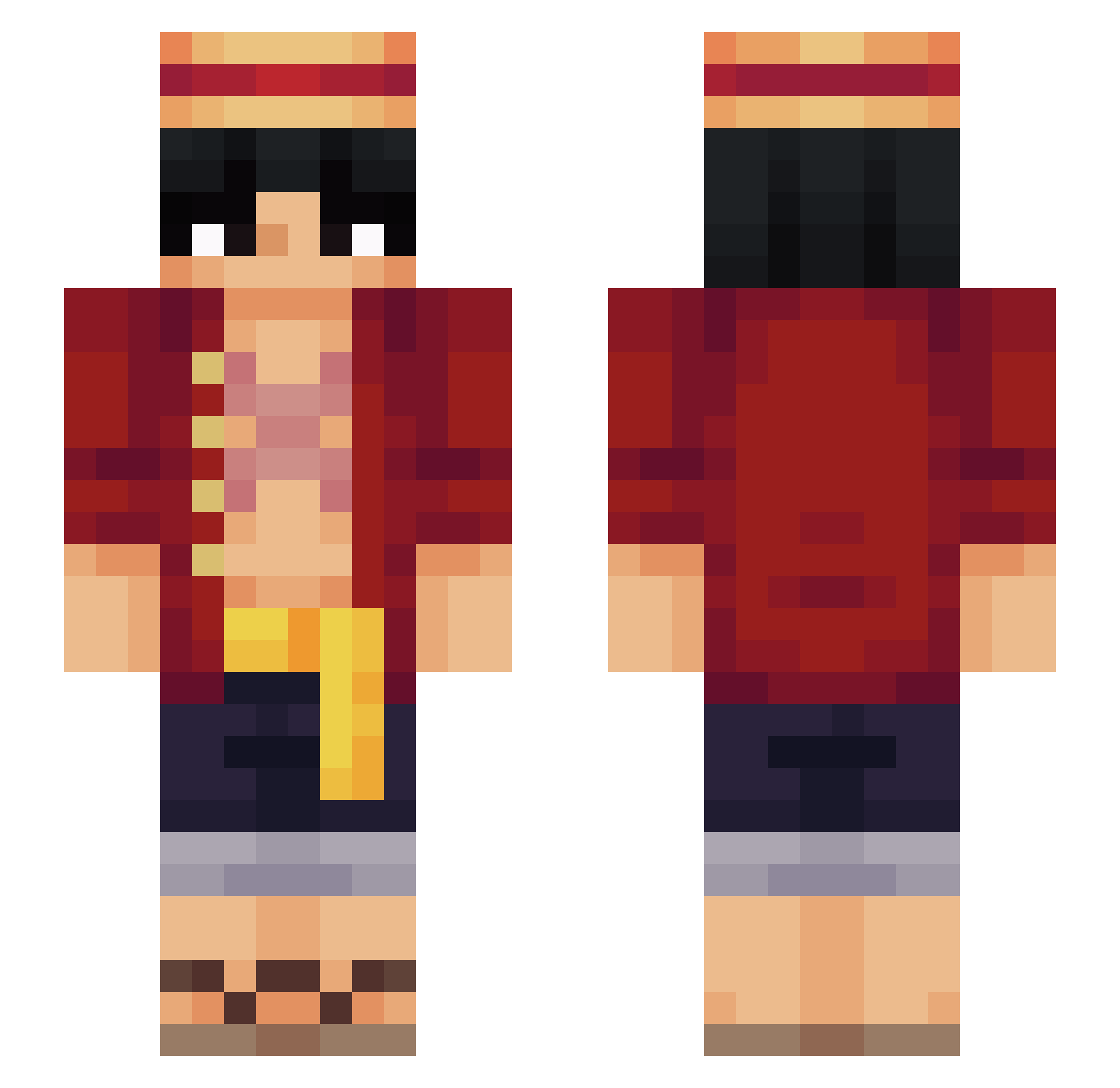
Current Minecraft skin of the player Dream_ale_123, loaded from the official Mojang API. Rotate the 3D model with your mouse or finger, then download the skin as a PNG file and use it in Minecraft: Bedrock Edition or Java Edition for free. When Dream_ale_123 changes their skin, this page updates automatically and the old skin stays in the history below.
Other players with this skin (571)
Dream_ale_123 was the 442nd player we have seen with this skin, first spotted on 13.10.2026. The same skin was seen on these players. Open a nickname to see their current skin and skin history.
 Gustavvvo BMO_IOI Butt3rd SmartBroth3r ycm0306 Secretly_ XB0NG0X babyboyatlanta Pavooney haxnbauer sbwangy Shultzy_ Acoustic_Nico Aupinq ItsKlekcio Gabbriee_ Koptelefoonbaas titanomachi1 drwalu00 Tuyo_23 EMP0S VishMC664 Simple_Cheerio64 mx0211 tyson17soccer Nisii Miidoou bigfloppa87 YayEris Rodders2002 NEWSEGU SuperSilver66 Inflamed30 NicGam NipolasRage AutMai jhonssoon MisterMasterMMM Arun3887 PSYCH0NT0 Hyriu_ Elcursiero420 goatcheeseer Settller Salihbaba3169 Blokydluffy Happynyata JohnSmith11t MatheusNuns Shmeekss Mayonnaiseyy LuffyUA OpeOpeNoMii Argoliver wikky057 ClearLove515 XxMottainaixX Ojerime papafria1 GodlyMove
More Monkey D Luffy Minecraft skins
See all 930 Monkey D Luffy skins
How to install the Dream_ale_123 skin
- Press the Download button above to save the skin as a PNG file.
- Minecraft: Bedrock Edition (PE): open the Dressing Room from the main menu (or tap your character → Edit Character), go to Classic Skins → Owned, press the + (new skin) button, choose the downloaded PNG and pick the Slim (Alex) model. Works on PC and mobile; consoles cannot import custom skins.
- Minecraft: Java Edition: open the Minecraft Launcher, go to the Skins tab, click New Skin, load the PNG, pick the Slim (Alex) model and press Save & Use. You can also upload it at minecraft.net → Profile → Change Skin.
The skin does not show up after import - what should I do?
Restart Minecraft and open the Dressing Room again - imported skins sometimes appear only after a restart. Also make sure you selected the imported skin and picked the Slim (Alex) model.
Which model should I choose, Classic or Slim?
This skin is designed for the Slim (Alex) model. If you pick the wrong model, the arms of the skin will look stretched or squeezed.
Is the skin of Dream_ale_123 free to download?
Yes. Press Download, save the PNG file and use it in Minecraft: Bedrock Edition or Java Edition - no payment or registration needed. The skin also works on multiplayer servers and Realms.
More skins
Looking for more? Go back to all Minecraft skins and check the top skins of the week, month and all time, or find any player's skin by nickname.