
Dr_Tsellos - Minecraft Skins & Skin History
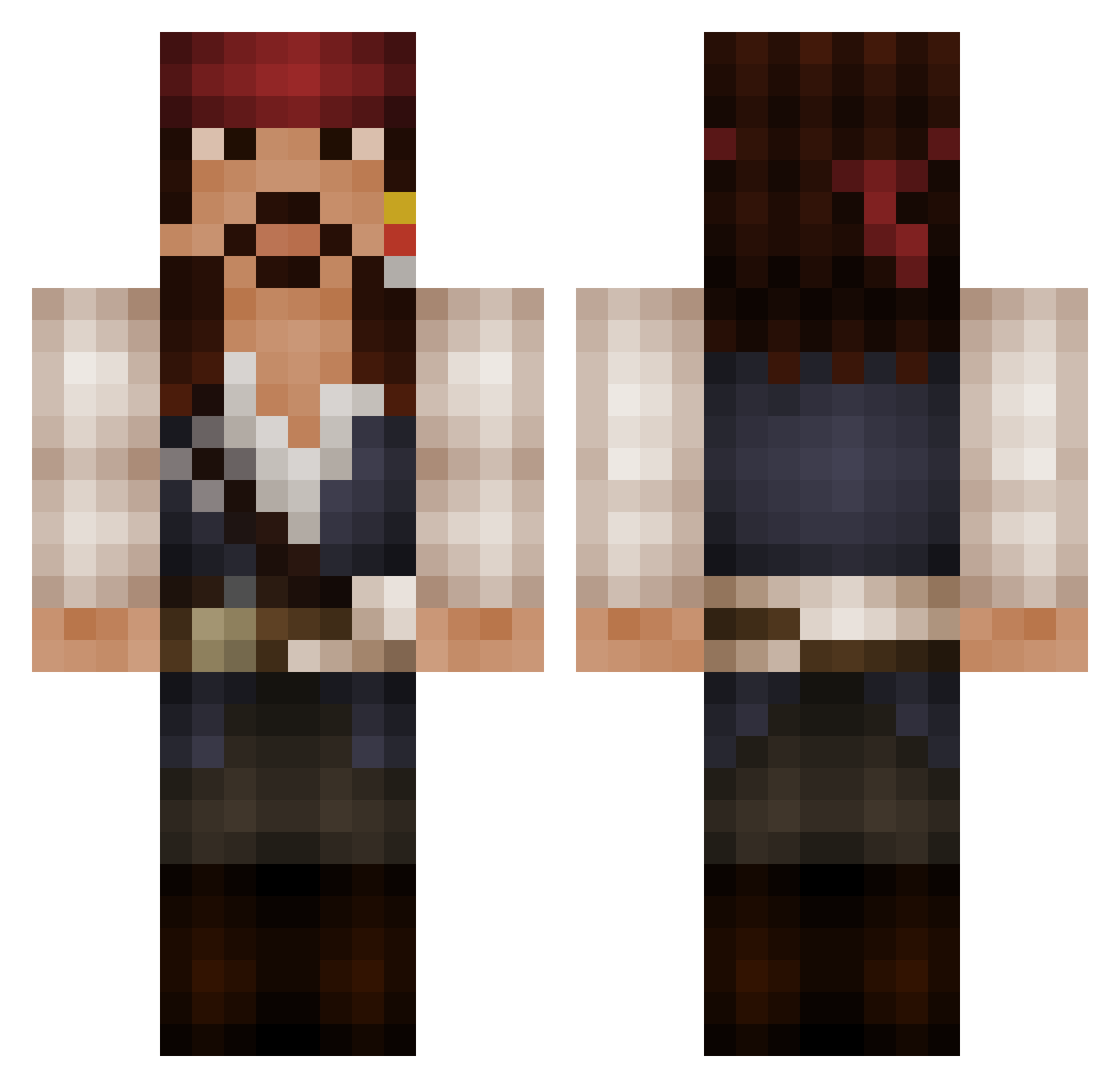
Current Minecraft skin of the player Dr_Tsellos, loaded from the official Mojang API. Rotate the 3D model with your mouse or finger, then download the skin as a PNG file and use it in Minecraft: Bedrock Edition or Java Edition for free. When Dr_Tsellos changes their skin, this page updates automatically and the old skin stays in the history below.
Other players with this skin (525)
Dr_Tsellos was the 155th player we have seen with this skin, first spotted on 27.08.2026. The same skin was seen on these players. Open a nickname to see their current skin and skin history.
 BOYbarbarian CapJS el_dirko Crance1 Bazzup DeathlyJO herose94 Sragou Petsy88 Chatrick Coviello Danyo andyken Royalminer mak476 FLEXXGOD Aeteras Idsertje33 Klp_Pro999 multiscotty12 Emolzz99 derfelhywelbane unknownuser1 Sel84 Jamec6 Axxioon SURFBUM007 Premekie SKULLDOMINION XanderCrow Aiiaii oscarbagger Spaceman_strali austothehun Mathias_990 piratepete816 Raimi10 Noah_Mosborg mcanton1 LouckDown Jawisin espCoder Saleen4eva Boggarts64 Thor9867 coolblackberry jakennasher kfm SashlesHDx Atoeking BadassGhost Ryan_05 senanlee sprovencio Paroxy0 Maar1en scotcreative SkipperMaan Ryssolga Donglord420
More Jack Sparrow Minecraft skins
See all 108 Jack Sparrow skins
How to install the Dr_Tsellos skin
- Press the Download button above to save the skin as a PNG file.
- Minecraft: Bedrock Edition (PE): open the Dressing Room from the main menu (or tap your character → Edit Character), go to Classic Skins → Owned, press the + (new skin) button, choose the downloaded PNG and pick the Classic (Steve) model. Works on PC and mobile; consoles cannot import custom skins.
- Minecraft: Java Edition: open the Minecraft Launcher, go to the Skins tab, click New Skin, load the PNG, pick the Classic (Steve) model and press Save & Use. You can also upload it at minecraft.net → Profile → Change Skin.
The skin does not show up after import - what should I do?
Restart Minecraft and open the Dressing Room again - imported skins sometimes appear only after a restart. Also make sure you selected the imported skin and picked the Classic (Steve) model.
Which model should I choose, Classic or Slim?
This skin is designed for the Classic (Steve) model. If you pick the wrong model, the arms of the skin will look stretched or squeezed.
Is the skin of Dr_Tsellos free to download?
Yes. Press Download, save the PNG file and use it in Minecraft: Bedrock Edition or Java Edition - no payment or registration needed. The skin also works on multiplayer servers and Realms.
More skins
Looking for more? Go back to all Minecraft skins and check the top skins of the week, month and all time, or find any player's skin by nickname.