
DingoPingo07 - Minecraft Skins & Skin History
Current Minecraft skin of the player DingoPingo07, loaded from the official Mojang API. Rotate the 3D model with your mouse or finger, then download the skin as a PNG file and use it in Minecraft: Bedrock Edition or Java Edition for free. When DingoPingo07 changes their skin, this page updates automatically and the old skin stays in the history below.
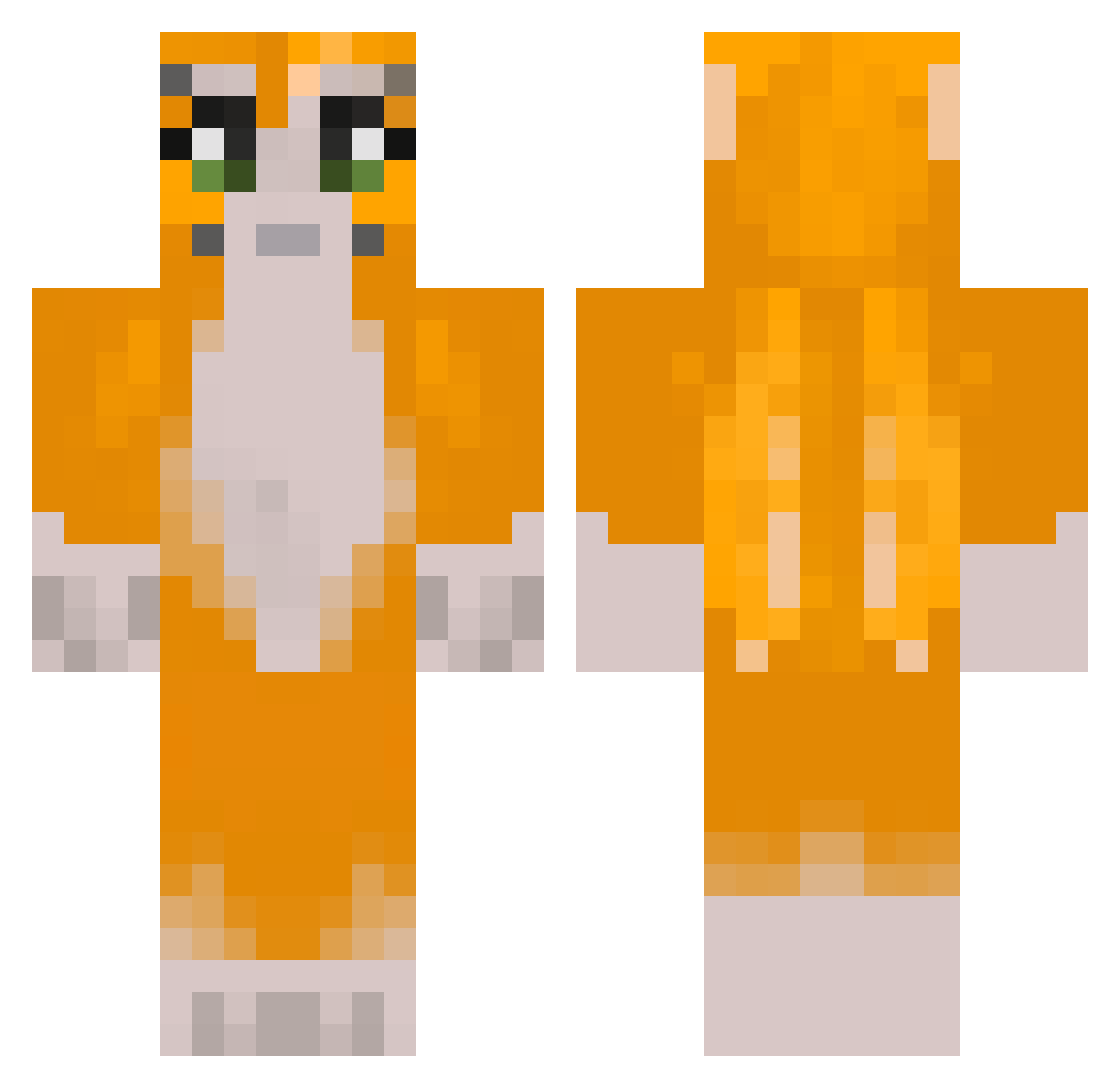
Other players with this skin (238)
DingoPingo07 was the 15th player we have seen with this skin, first spotted on 29.07.2026. The same skin was seen on these players. Open a nickname to see their current skin and skin history.
 CoreyR020 slushiestcord21 AlphaMaleNZ kenobi_jacobi StraightDrop69 VeryCoolio MousesPigsDogs ggtopman321 xthedigs Goodgamer2017 Minetrooper99 comicbuy St4rd0m Two_Snecc xx_izzyrosecx_xx Godorsky MDDream tmmsf SleepLess2234 Prototype_Pug zues52363 gbourgeois11 player1234567898
 StinkyMenu
 NotAllah666 Tutosa certvil novaisrealer AvadaNine audgepodge2004 marblecanine TTVSpookyah wiktorv1 FRG_Buttery thatmartinkid bluntsw TAGG2 wtels RBar1234 thatguycouly GreaseMonkey37 DannyLeeBeFr PPFailure AnimalSlinky773 Sushi12345678 heavyleaves Sauce293 craftyj99 Bestplayer44 MayTMaN No1Vortex FrostJumper pistacieis juuudty BeBob311 zooweemama25 ATVB1 johnedward09 goofusdoofus06 dumpyfrog_
More Furry Minecraft skins
How to install the DingoPingo07 skin
- Press the Download button above to save the skin as a PNG file.
- Minecraft: Bedrock Edition (PE): open the Dressing Room from the main menu (or tap your character → Edit Character), go to Classic Skins → Owned, press the + (new skin) button, choose the downloaded PNG and pick the Classic (Steve) model. Works on PC and mobile; consoles cannot import custom skins.
- Minecraft: Java Edition: open the Minecraft Launcher, go to the Skins tab, click New Skin, load the PNG, pick the Classic (Steve) model and press Save & Use. You can also upload it at minecraft.net → Profile → Change Skin.
The skin does not show up after import - what should I do?
Restart Minecraft and open the Dressing Room again - imported skins sometimes appear only after a restart. Also make sure you selected the imported skin and picked the Classic (Steve) model.
Which model should I choose, Classic or Slim?
This skin is designed for the Classic (Steve) model. If you pick the wrong model, the arms of the skin will look stretched or squeezed.
Is the skin of DingoPingo07 free to download?
Yes. Press Download, save the PNG file and use it in Minecraft: Bedrock Edition or Java Edition - no payment or registration needed. The skin also works on multiplayer servers and Realms.
More skins
Looking for more? Go back to all Minecraft skins and check the top skins of the week, month and all time, or find any player's skin by nickname.