
Dharq - Minecraft Skins & Skin History
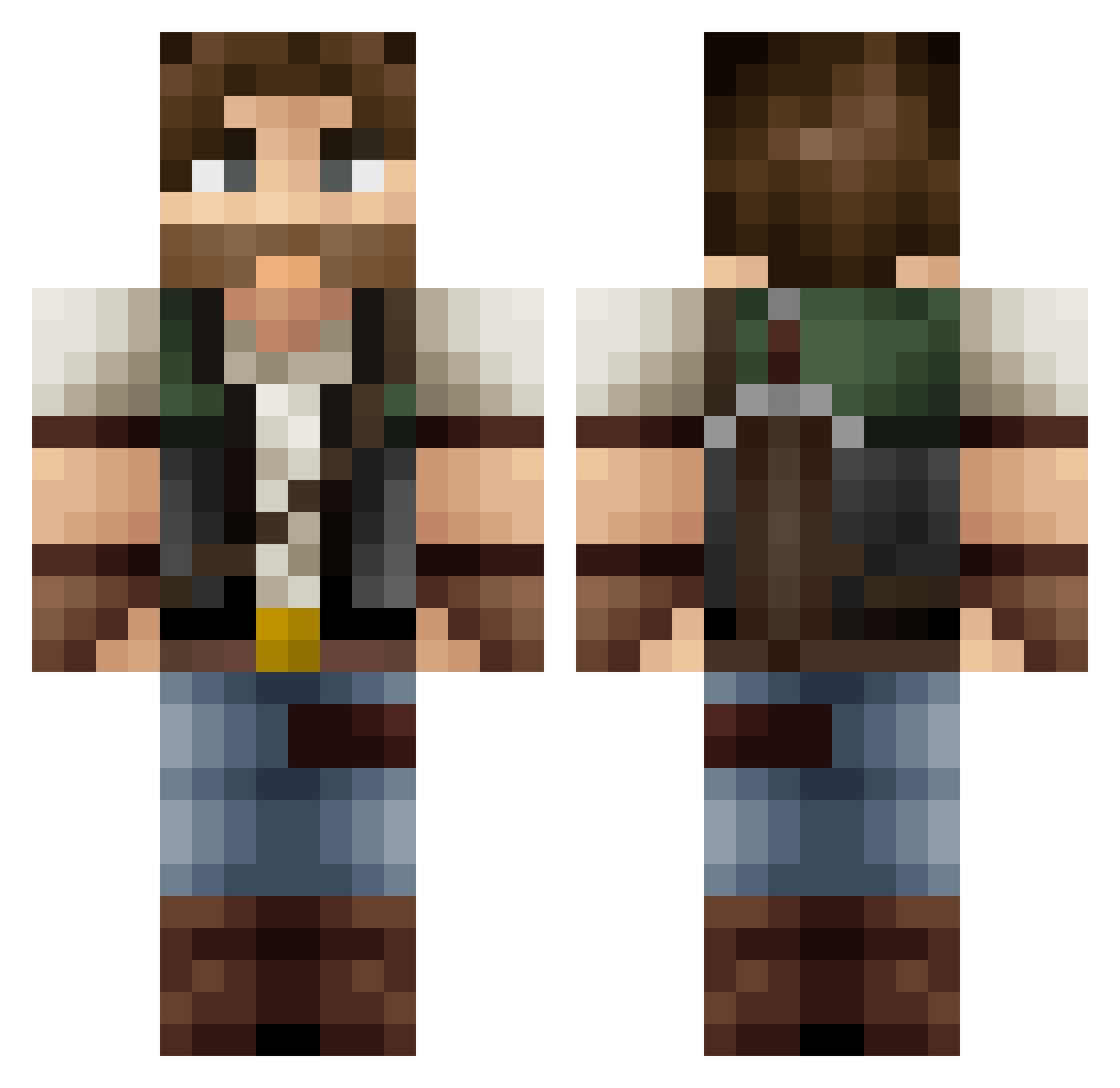
Current Minecraft skin of the player Dharq, loaded from the official Mojang API. Rotate the 3D model with your mouse or finger, then download the skin as a PNG file and use it in Minecraft: Bedrock Edition or Java Edition for free. When Dharq changes their skin, this page updates automatically and the old skin stays in the history below.
Other players with this skin (423)
Dharq was the 390th player we have seen with this skin, first spotted on 06.11.2026. The same skin was seen on these players. Open a nickname to see their current skin and skin history.
 Aphotika NotoriousZRP P0P_EYE jcr4ft Tortillastrijder kkiamblue CelestialOrion MagiczZ Errisu1 RaakaArska00 pyro24 RasorG Noxirey Timber_Blossom Juralion danrampling Mada_2 _Ricoks_ Alex6266 Gaumut PinkyWinkyDinky_ Whiskers3624 Tailz29 donut_king2 jerry8282 Kravell Eksion_ Drixtorm Prom3theus_ izKurzeN Avokada Terios2000 VanCardboardbox mstewart99 Ginkane DL2177 ReGu_02 TAOO2K LEEMO1977 llSosall ZYROX244 Dassidan Knolivier Shnider2015 Elmimica _Zul spooner345 Larwan _Kurjak_ SuperKramp vortexx456 micc21 KBell98 NiuZS TheCharlieKill AtomZz8560 beatman007 Aazo5 DastarRock _cooperg_
More Hunter Minecraft skins
How to install the Dharq skin
- Press the Download button above to save the skin as a PNG file.
- Minecraft: Bedrock Edition (PE): open the Dressing Room from the main menu (or tap your character → Edit Character), go to Classic Skins → Owned, press the + (new skin) button, choose the downloaded PNG and pick the Classic (Steve) model. Works on PC and mobile; consoles cannot import custom skins.
- Minecraft: Java Edition: open the Minecraft Launcher, go to the Skins tab, click New Skin, load the PNG, pick the Classic (Steve) model and press Save & Use. You can also upload it at minecraft.net → Profile → Change Skin.
The skin does not show up after import - what should I do?
Restart Minecraft and open the Dressing Room again - imported skins sometimes appear only after a restart. Also make sure you selected the imported skin and picked the Classic (Steve) model.
Which model should I choose, Classic or Slim?
This skin is designed for the Classic (Steve) model. If you pick the wrong model, the arms of the skin will look stretched or squeezed.
Is the skin of Dharq free to download?
Yes. Press Download, save the PNG file and use it in Minecraft: Bedrock Edition or Java Edition - no payment or registration needed. The skin also works on multiplayer servers and Realms.
More skins
Looking for more? Go back to all Minecraft skins and check the top skins of the week, month and all time, or find any player's skin by nickname.