
DemonCacha - Minecraft Skins & Skin History
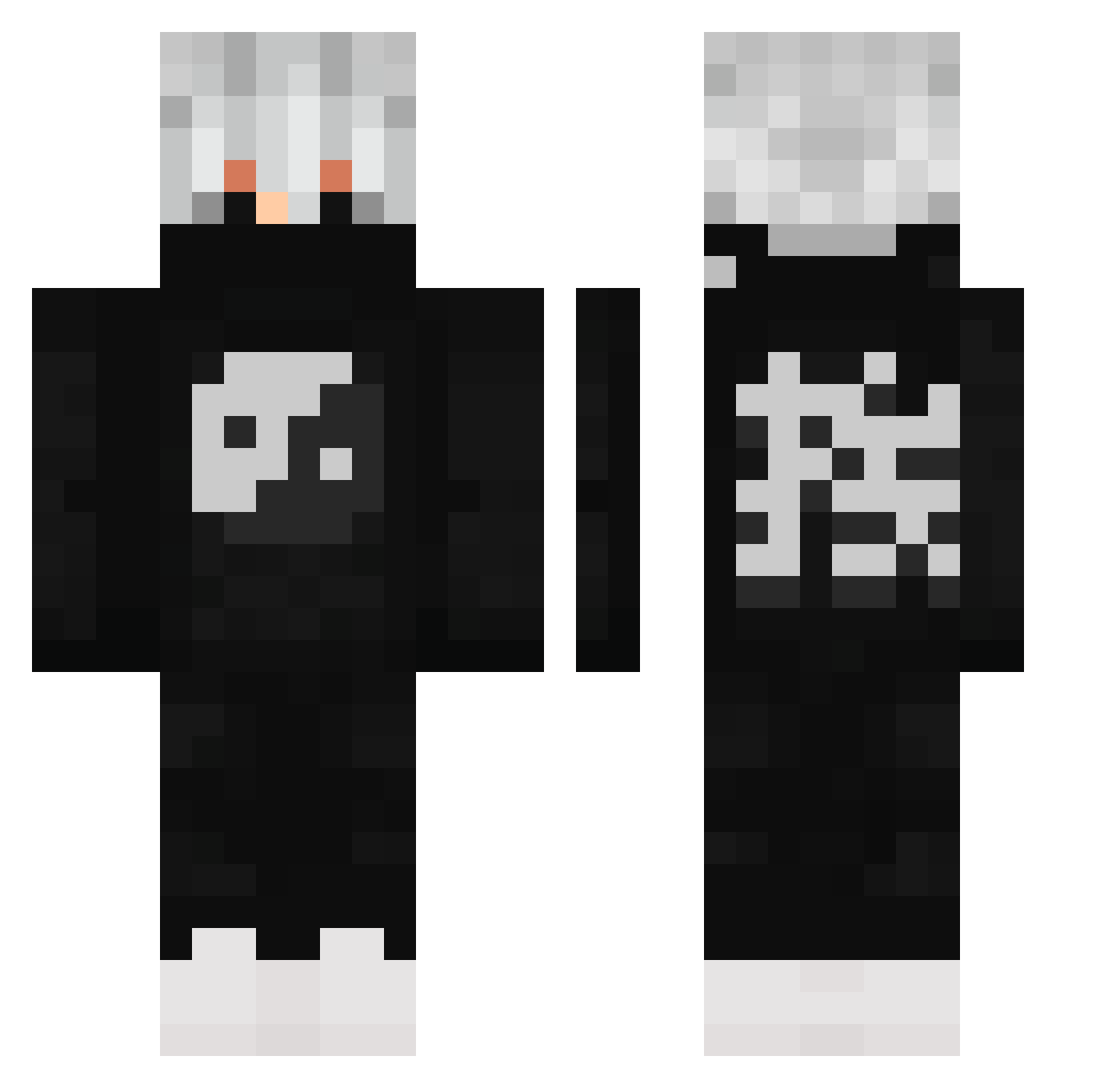
Current Minecraft skin of the player DemonCacha, loaded from the official Mojang API. Rotate the 3D model with your mouse or finger, then download the skin as a PNG file and use it in Minecraft: Bedrock Edition or Java Edition for free. When DemonCacha changes their skin, this page updates automatically and the old skin stays in the history below.
Other players with this skin (613)
DemonCacha was the 514th player we have seen with this skin, first spotted on 03.11.2026. The same skin was seen on these players. Open a nickname to see their current skin and skin history.
 stevemedbriller1 dominik3003 TwistHazard Renk_Zix _SmikkelBeer_ murmified mihss1 AbsurdVis Doshchick Ontoka23 SENIORBrown Helios987 Torikkaa Yfkyism Guren04 Rains_o RichCarlton _EyZen_ KillerByLuis MarcoMarquin Gavcraft01 SorryDatsMyHack TotoAJ TouaTokuchi N0ck1 SaxoDK Pe06 ItIsSlippy LIPEPVPBR fallen_deeno cmrrek07 Felmer_ busato_ kowal220 FQMilk xPeacy Alex0419 MrJadenXD SILVERSTABBER2 Mad_DogKiller9 The_Sloth1616 KhalidBatran kasper_nh AyyJayy__ Mika_123 Kipeel nithi2222 YaoNiMing1870 JackPlayzTY ninja_creeper0_o Yokey_Pokey fdsz Not_Noel24 Minico356 CTRL_DABBERYT CroZzPoo momkilla Skutz_Creeper mohamedtaher biel_greninja
More Yin Yang Minecraft skins
How to install the DemonCacha skin
- Press the Download button above to save the skin as a PNG file.
- Minecraft: Bedrock Edition (PE): open the Dressing Room from the main menu (or tap your character → Edit Character), go to Classic Skins → Owned, press the + (new skin) button, choose the downloaded PNG and pick the Classic (Steve) model. Works on PC and mobile; consoles cannot import custom skins.
- Minecraft: Java Edition: open the Minecraft Launcher, go to the Skins tab, click New Skin, load the PNG, pick the Classic (Steve) model and press Save & Use. You can also upload it at minecraft.net → Profile → Change Skin.
The skin does not show up after import - what should I do?
Restart Minecraft and open the Dressing Room again - imported skins sometimes appear only after a restart. Also make sure you selected the imported skin and picked the Classic (Steve) model.
Which model should I choose, Classic or Slim?
This skin is designed for the Classic (Steve) model. If you pick the wrong model, the arms of the skin will look stretched or squeezed.
Is the skin of DemonCacha free to download?
Yes. Press Download, save the PNG file and use it in Minecraft: Bedrock Edition or Java Edition - no payment or registration needed. The skin also works on multiplayer servers and Realms.
More skins
Looking for more? Go back to all Minecraft skins and check the top skins of the week, month and all time, or find any player's skin by nickname.