
Deathhawk16 - Minecraft Skins & Skin History
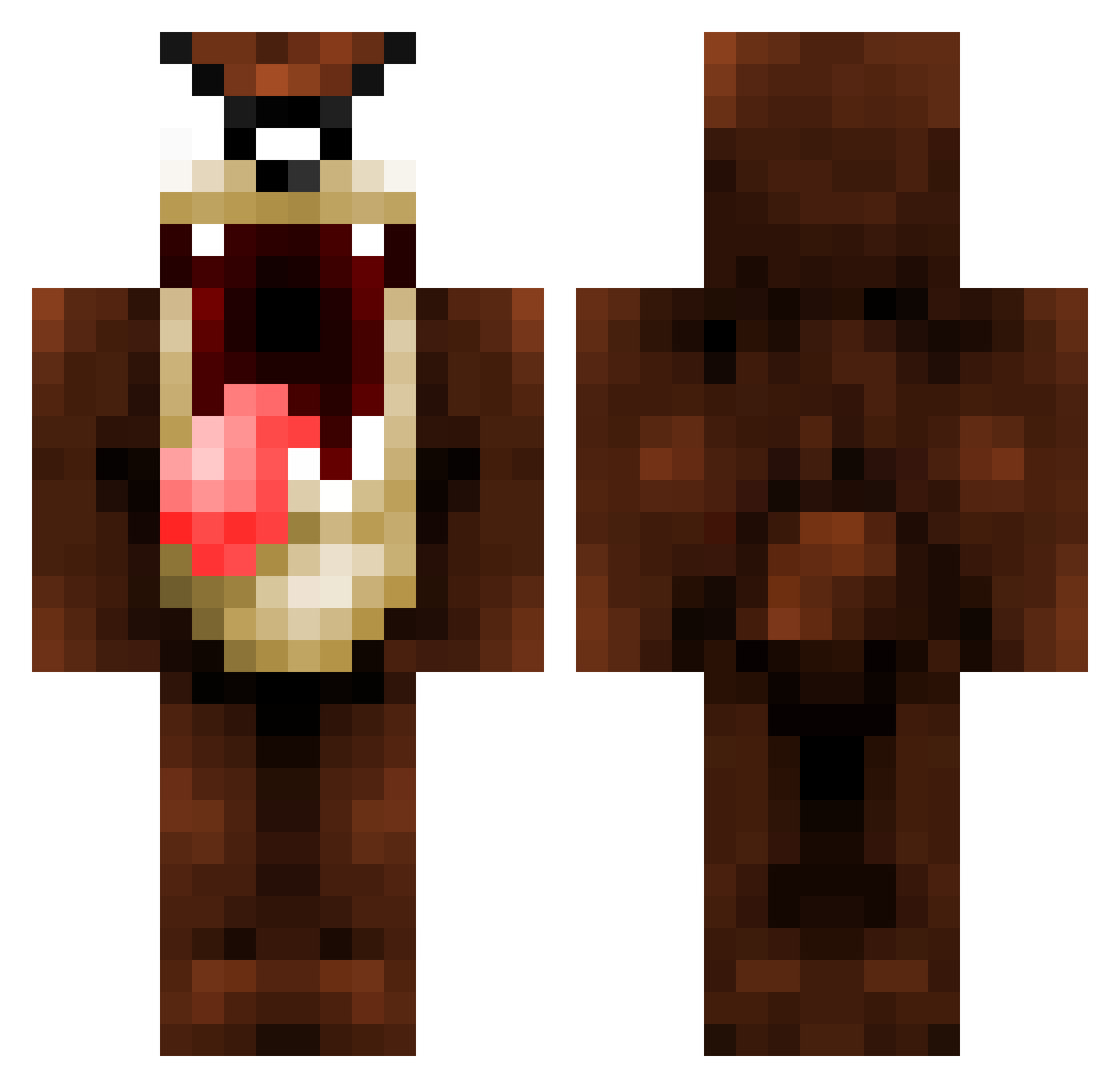
Current Minecraft skin of the player Deathhawk16, loaded from the official Mojang API. Rotate the 3D model with your mouse or finger, then download the skin as a PNG file and use it in Minecraft: Bedrock Edition or Java Edition for free. When Deathhawk16 changes their skin, this page updates automatically and the old skin stays in the history below.
Other players with this skin (155)
Deathhawk16 was the 124th player we have seen with this skin, first spotted on 10.10.2026. The same skin was seen on these players. Open a nickname to see their current skin and skin history.
 tazenna Dylan_2207 marcelinho981 Lmkra EnesCyln shetern21 Multy08 SenpaiP Luis_venchaa zMantiss Bum_Bums SleepyDawg Dummnies ThePFly gneryp vPablox Mamaliga HorACEEEE Elliotcast32 TheDavinschiiii Demonix720 badaboomboom Rodion_777 ahvu firehamm khal1d guga250211 Snugcraft LokoSeba14 s5ef sogumm0617 Wasmasjien88 Nicsaft pzd_ couscous1212 ROMSTERIO Benloub albertito712 memoamens Bufflesote Tonetto84 MarinNain Martix9701 GuisoDL Brambly rddtwo JoelGamerr Honeycha12 Syltho Rxchyyy wa_tory ocenax24 PukyPikenko BananowyKacper HippoSIN Rasekowski LVX_DragiWaves pizza_guy13 Seenji SrSiestas
More Taz Minecraft skins
How to install the Deathhawk16 skin
- Press the Download button above to save the skin as a PNG file.
- Minecraft: Bedrock Edition (PE): open the Dressing Room from the main menu (or tap your character → Edit Character), go to Classic Skins → Owned, press the + (new skin) button, choose the downloaded PNG and pick the Classic (Steve) model. Works on PC and mobile; consoles cannot import custom skins.
- Minecraft: Java Edition: open the Minecraft Launcher, go to the Skins tab, click New Skin, load the PNG, pick the Classic (Steve) model and press Save & Use. You can also upload it at minecraft.net → Profile → Change Skin.
The skin does not show up after import - what should I do?
Restart Minecraft and open the Dressing Room again - imported skins sometimes appear only after a restart. Also make sure you selected the imported skin and picked the Classic (Steve) model.
Which model should I choose, Classic or Slim?
This skin is designed for the Classic (Steve) model. If you pick the wrong model, the arms of the skin will look stretched or squeezed.
Is the skin of Deathhawk16 free to download?
Yes. Press Download, save the PNG file and use it in Minecraft: Bedrock Edition or Java Edition - no payment or registration needed. The skin also works on multiplayer servers and Realms.
More skins
Looking for more? Go back to all Minecraft skins and check the top skins of the week, month and all time, or find any player's skin by nickname.