
DeadlyMartin - Minecraft Skins & Skin History
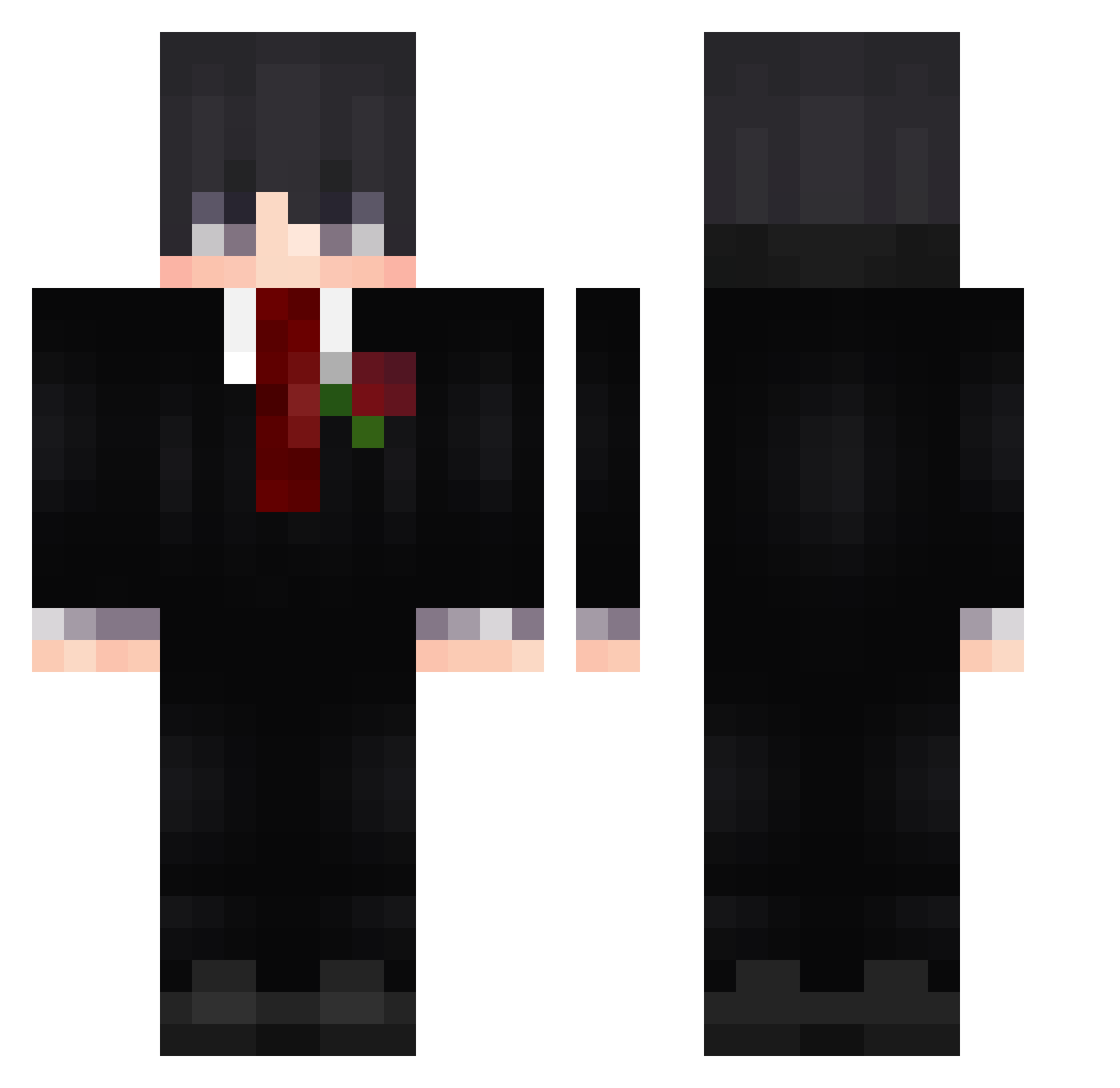
Current Minecraft skin of the player DeadlyMartin, loaded from the official Mojang API. Rotate the 3D model with your mouse or finger, then download the skin as a PNG file and use it in Minecraft: Bedrock Edition or Java Edition for free. When DeadlyMartin changes their skin, this page updates automatically and the old skin stays in the history below.
Other players with this skin (596)
DeadlyMartin was the 260th player we have seen with this skin, first spotted on 10.09.2026. The same skin was seen on these players. Open a nickname to see their current skin and skin history.
 Reviil593 2boBr5 BOYAN4 rickwxs Muhammet55 _vet VinnyWinnyPoo jvgxz miganta dropletzz JackJocker15 patel008 Landergamer12 Jhs829 2hint bartolimollo SamRex_
 im_eroos_x FSWH Tokirimoto ibrhmm27 Lavlax OffxCyclone
 Telly JiggyThaKillah Theamir_22 Steadi_k SunriseOnTop Mainiaak SteelFlare aito650 iBryanMzpx 5heynn Fakhir_ Rickster2709 abdullah90009 SquirrelOmen Polotes zShinx_ YueXM f_x2 Alumruin ItsCyberCat xtwinxnoel Backfisch712 SereinB11507 Glitchhands AbsolutMatrix GamDu KirinMok nikias093 Astronauta0 Dream3012 marekszparek15 Ace001700 KYOSTU1 TheRocAlouxis8 DuraAce666 ZakuraTao qweqwewqeqwe
More Rose Minecraft skins
How to install the DeadlyMartin skin
- Press the Download button above to save the skin as a PNG file.
- Minecraft: Bedrock Edition (PE): open the Dressing Room from the main menu (or tap your character → Edit Character), go to Classic Skins → Owned, press the + (new skin) button, choose the downloaded PNG and pick the Classic (Steve) model. Works on PC and mobile; consoles cannot import custom skins.
- Minecraft: Java Edition: open the Minecraft Launcher, go to the Skins tab, click New Skin, load the PNG, pick the Classic (Steve) model and press Save & Use. You can also upload it at minecraft.net → Profile → Change Skin.
The skin does not show up after import - what should I do?
Restart Minecraft and open the Dressing Room again - imported skins sometimes appear only after a restart. Also make sure you selected the imported skin and picked the Classic (Steve) model.
Which model should I choose, Classic or Slim?
This skin is designed for the Classic (Steve) model. If you pick the wrong model, the arms of the skin will look stretched or squeezed.
Is the skin of DeadlyMartin free to download?
Yes. Press Download, save the PNG file and use it in Minecraft: Bedrock Edition or Java Edition - no payment or registration needed. The skin also works on multiplayer servers and Realms.
More skins
Looking for more? Go back to all Minecraft skins and check the top skins of the week, month and all time, or find any player's skin by nickname.