
DatchyXDD - Minecraft Skins & Skin History
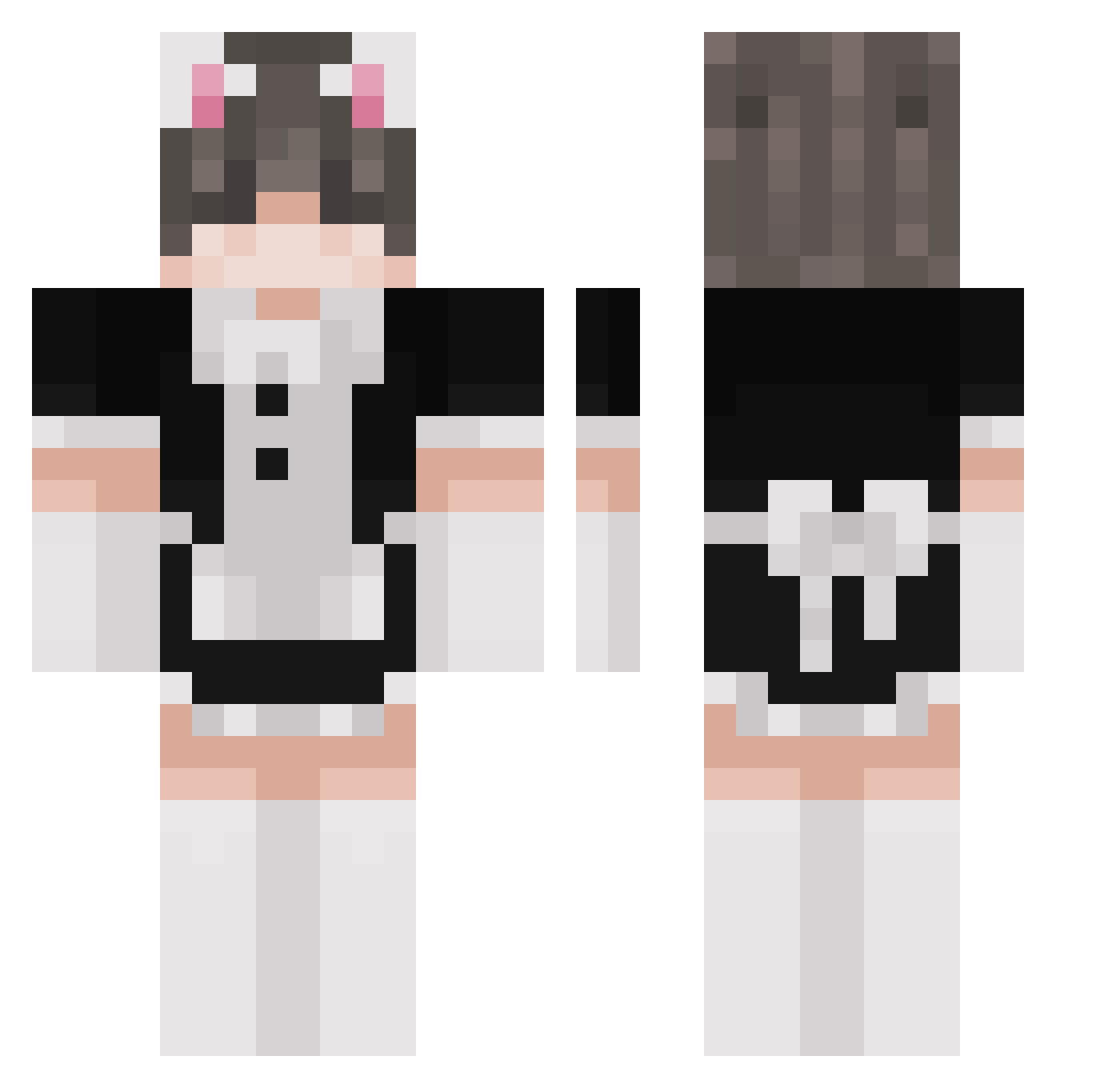
Current Minecraft skin of the player DatchyXDD, loaded from the official Mojang API. Rotate the 3D model with your mouse or finger, then download the skin as a PNG file and use it in Minecraft: Bedrock Edition or Java Edition for free. When DatchyXDD changes their skin, this page updates automatically and the old skin stays in the history below.
Other players with this skin (261)
DatchyXDD was the 123rd player we have seen with this skin, first spotted on 17.09.2026. The same skin was seen on these players. Open a nickname to see their current skin and skin history.
 Juli653 Bonnie_Gameplay SupaMurph Imansito ihyjms Jadexxn BRAN_23 StarfishQueeen Phant0m_Kitty NatsuDaScientist therealoutsider meso69674 PepsiAgent NotJackUwU MassiveTurtle69 Femboyfeethunter good_real_cat468 DonSJ bhadben MAN_0033 eschoriat _KeksimusMaximus Jepp7445 FatNaga ItsMePizz4 HaruKaiju KingCaty aeonggi ReikerRom Quartz_kun xcxds N_nashi elz41 leewan718 BudeReatz
 Frazzle85 LittleFrackinCat Rhenta enoisha Roloburger Rip_Spectre RefusedMax Alu_Senpai EncryptRelic586 RaddestShober ibszm Tofu_0260 DanielBlu Amarowoo Gasparus_ h6neyy T0ASTY11 Kevin_Garcia iTheMuppets juliav25 Yoda_1998 MrBroke Nine_of_Cats Yralyuo koldiss
More Maid Minecraft skins
How to install the DatchyXDD skin
- Press the Download button above to save the skin as a PNG file.
- Minecraft: Bedrock Edition (PE): open the Dressing Room from the main menu (or tap your character → Edit Character), go to Classic Skins → Owned, press the + (new skin) button, choose the downloaded PNG and pick the Classic (Steve) model. Works on PC and mobile; consoles cannot import custom skins.
- Minecraft: Java Edition: open the Minecraft Launcher, go to the Skins tab, click New Skin, load the PNG, pick the Classic (Steve) model and press Save & Use. You can also upload it at minecraft.net → Profile → Change Skin.
The skin does not show up after import - what should I do?
Restart Minecraft and open the Dressing Room again - imported skins sometimes appear only after a restart. Also make sure you selected the imported skin and picked the Classic (Steve) model.
Which model should I choose, Classic or Slim?
This skin is designed for the Classic (Steve) model. If you pick the wrong model, the arms of the skin will look stretched or squeezed.
Is the skin of DatchyXDD free to download?
Yes. Press Download, save the PNG file and use it in Minecraft: Bedrock Edition or Java Edition - no payment or registration needed. The skin also works on multiplayer servers and Realms.
More skins
Looking for more? Go back to all Minecraft skins and check the top skins of the week, month and all time, or find any player's skin by nickname.