
CraftZolika - Minecraft Skins & Skin History
Current Minecraft skin of the player CraftZolika, loaded from the official Mojang API. Rotate the 3D model with your mouse or finger, then download the skin as a PNG file and use it in Minecraft: Bedrock Edition or Java Edition for free. When CraftZolika changes their skin, this page updates automatically and the old skin stays in the history below.
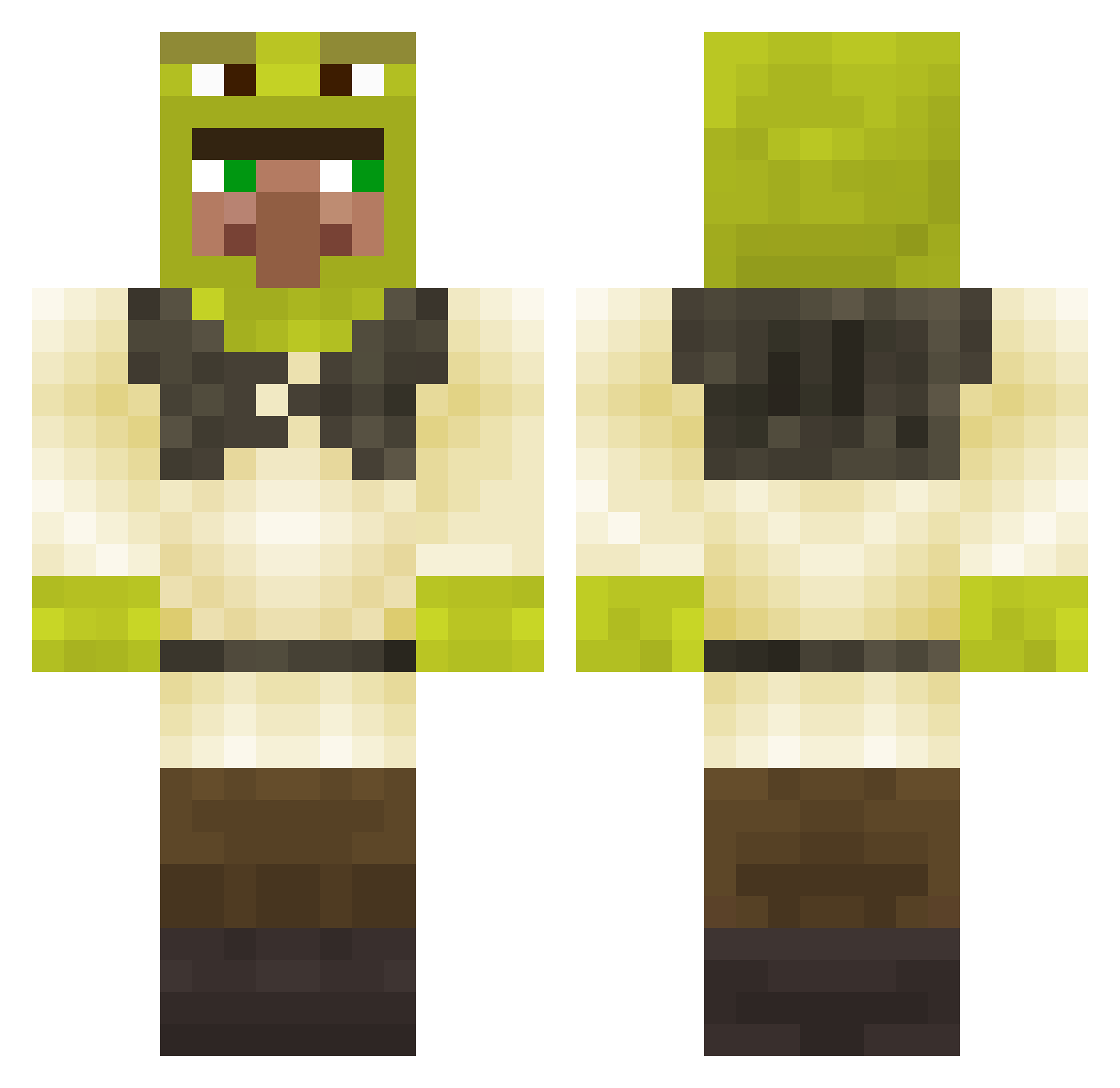
Other players with this skin (280)
CraftZolika was the 24th player we have seen with this skin, first spotted on 02.08.2026. The same skin was seen on these players. Open a nickname to see their current skin and skin history.
 MilkyBoye TheKingzSeb Theprophet182 1RoachHamood1 Charlie_Beee Nonomat Moyashiro__ MaceDynasty _NEYZ_001 Sam360Spider JeffreyEggert Eetu42 WujasWupas FrredyCZ TayTayTen Ohuddy Bazookajoe0 Chickenstick187 alterApfelAlex SoSiBiBu Niutlegg Joord1h Domoohh Crun_ LeffeSchleffe MagicMan71 ZeroAdrian100 mrdisguisedman JJbinks5 DruivenSuiker_ IWantSexWithLoli Nattmonster LoeweWueste2 17Trio abirrell77 MiaT212 BosGoku selinaegeli OmNom04 captnSchmaler DeineMuddaXD
 Jhn14 karto_fanPMA fweak Gasolinegarry gomigomichan krutaya_pipiska _Noaru_ JackyCola20 Navdude TomeWu Riverbuilder
 DubstepCookie_ JackDaRippa7 JorJu69 MrShreko piletonikolai choygn12 Paulll Astro___
More Shrek Minecraft skins
How to install the CraftZolika skin
- Press the Download button above to save the skin as a PNG file.
- Minecraft: Bedrock Edition (PE): open the Dressing Room from the main menu (or tap your character → Edit Character), go to Classic Skins → Owned, press the + (new skin) button, choose the downloaded PNG and pick the Classic (Steve) model. Works on PC and mobile; consoles cannot import custom skins.
- Minecraft: Java Edition: open the Minecraft Launcher, go to the Skins tab, click New Skin, load the PNG, pick the Classic (Steve) model and press Save & Use. You can also upload it at minecraft.net → Profile → Change Skin.
The skin does not show up after import - what should I do?
Restart Minecraft and open the Dressing Room again - imported skins sometimes appear only after a restart. Also make sure you selected the imported skin and picked the Classic (Steve) model.
Which model should I choose, Classic or Slim?
This skin is designed for the Classic (Steve) model. If you pick the wrong model, the arms of the skin will look stretched or squeezed.
Is the skin of CraftZolika free to download?
Yes. Press Download, save the PNG file and use it in Minecraft: Bedrock Edition or Java Edition - no payment or registration needed. The skin also works on multiplayer servers and Realms.
More skins
Looking for more? Go back to all Minecraft skins and check the top skins of the week, month and all time, or find any player's skin by nickname.