
Chuglife466 - Minecraft Skins & Skin History
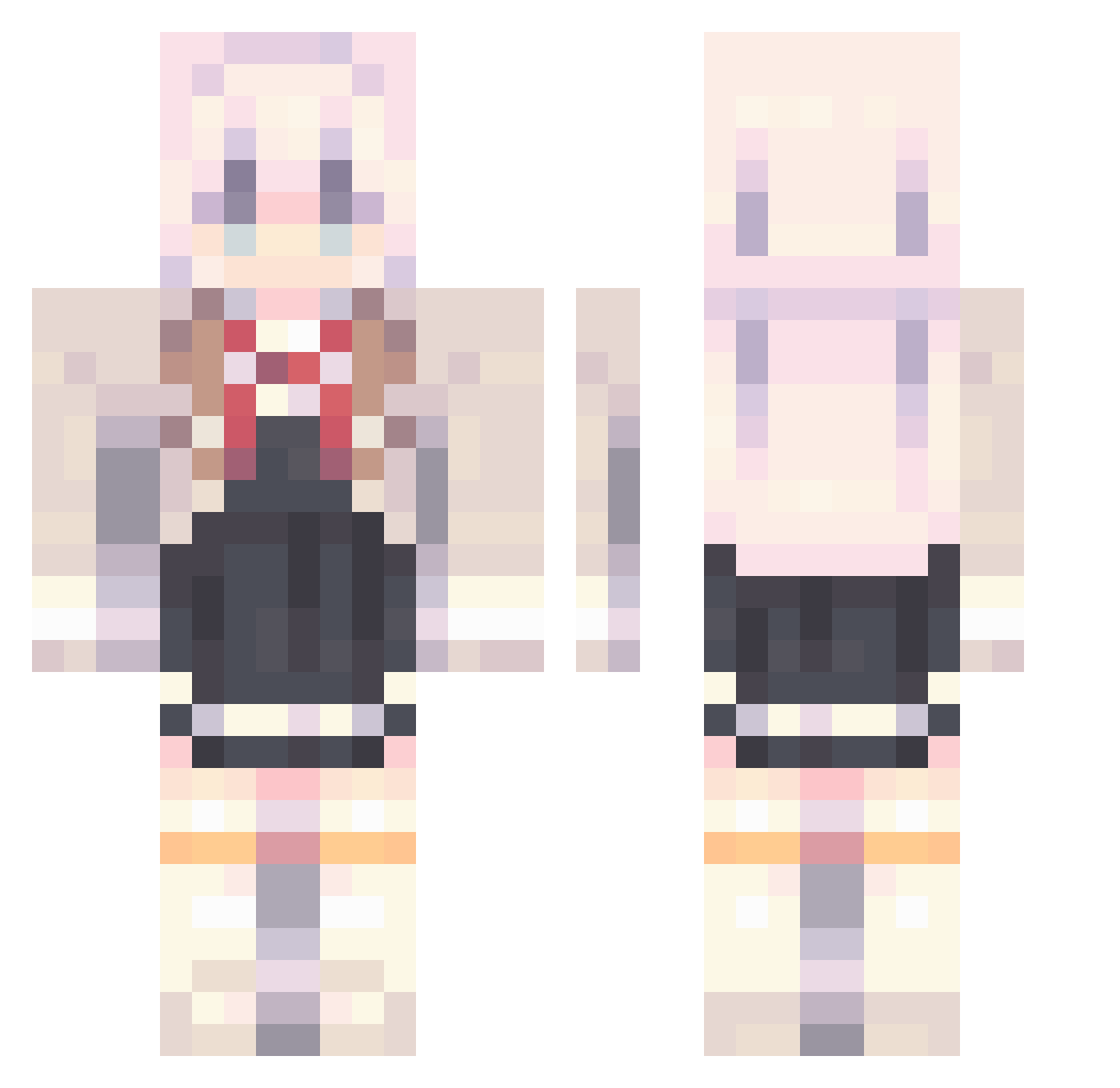
Current Minecraft skin of the player Chuglife466, loaded from the official Mojang API. Rotate the 3D model with your mouse or finger, then download the skin as a PNG file and use it in Minecraft: Bedrock Edition or Java Edition for free. When Chuglife466 changes their skin, this page updates automatically and the old skin stays in the history below.
Other players with this skin (815)
Chuglife466 was the 180th player we have seen with this skin, first spotted on 15.08.2026. The same skin was seen on these players. Open a nickname to see their current skin and skin history.
 Elainabroom KiyoshiKaga _Desuwa_ FBICheese MarkLin__ EdyStar MeeNaMaySa
 HxyPluto Peachanan Mintneko5170 Shushi0826 MEOWNOTDOG Snickers_Was_Tkn Traskowk Lotus_koi Skyeepic G3081 Markoronie GBLVS Waruisuraimu04 Scryers ___meian___ tfyp yumeA1 OAO12345 CashMoney727 NazunaOuO Aazurraa LarppyInit Twrxri_z asdfghjkl0008 Dida77 WRQThehigh walkemdownjavari rinEZ046 Jona162588 bright23 beeny2987
 IlEmrys
 Banana0011 SpectralSorcerer Alya24 MonkeyDBruh RickyRui16 Teheperolin QCPZ Eloise_o Taiddy dirrty_101 jun_jun5671 Lexorvk richbell101 _190 Sung_wooooook HG_3539 R1noXx_ yin_331 __AKaNe__ desirableacid UU_H
More School Uniform Minecraft skins
See all 6071 School Uniform skins
How to install the Chuglife466 skin
- Press the Download button above to save the skin as a PNG file.
- Minecraft: Bedrock Edition (PE): open the Dressing Room from the main menu (or tap your character → Edit Character), go to Classic Skins → Owned, press the + (new skin) button, choose the downloaded PNG and pick the Classic (Steve) model. Works on PC and mobile; consoles cannot import custom skins.
- Minecraft: Java Edition: open the Minecraft Launcher, go to the Skins tab, click New Skin, load the PNG, pick the Classic (Steve) model and press Save & Use. You can also upload it at minecraft.net → Profile → Change Skin.
The skin does not show up after import - what should I do?
Restart Minecraft and open the Dressing Room again - imported skins sometimes appear only after a restart. Also make sure you selected the imported skin and picked the Classic (Steve) model.
Which model should I choose, Classic or Slim?
This skin is designed for the Classic (Steve) model. If you pick the wrong model, the arms of the skin will look stretched or squeezed.
Is the skin of Chuglife466 free to download?
Yes. Press Download, save the PNG file and use it in Minecraft: Bedrock Edition or Java Edition - no payment or registration needed. The skin also works on multiplayer servers and Realms.
More skins
Looking for more? Go back to all Minecraft skins and check the top skins of the week, month and all time, or find any player's skin by nickname.