
Chloe0705 - Minecraft Skins & Skin History
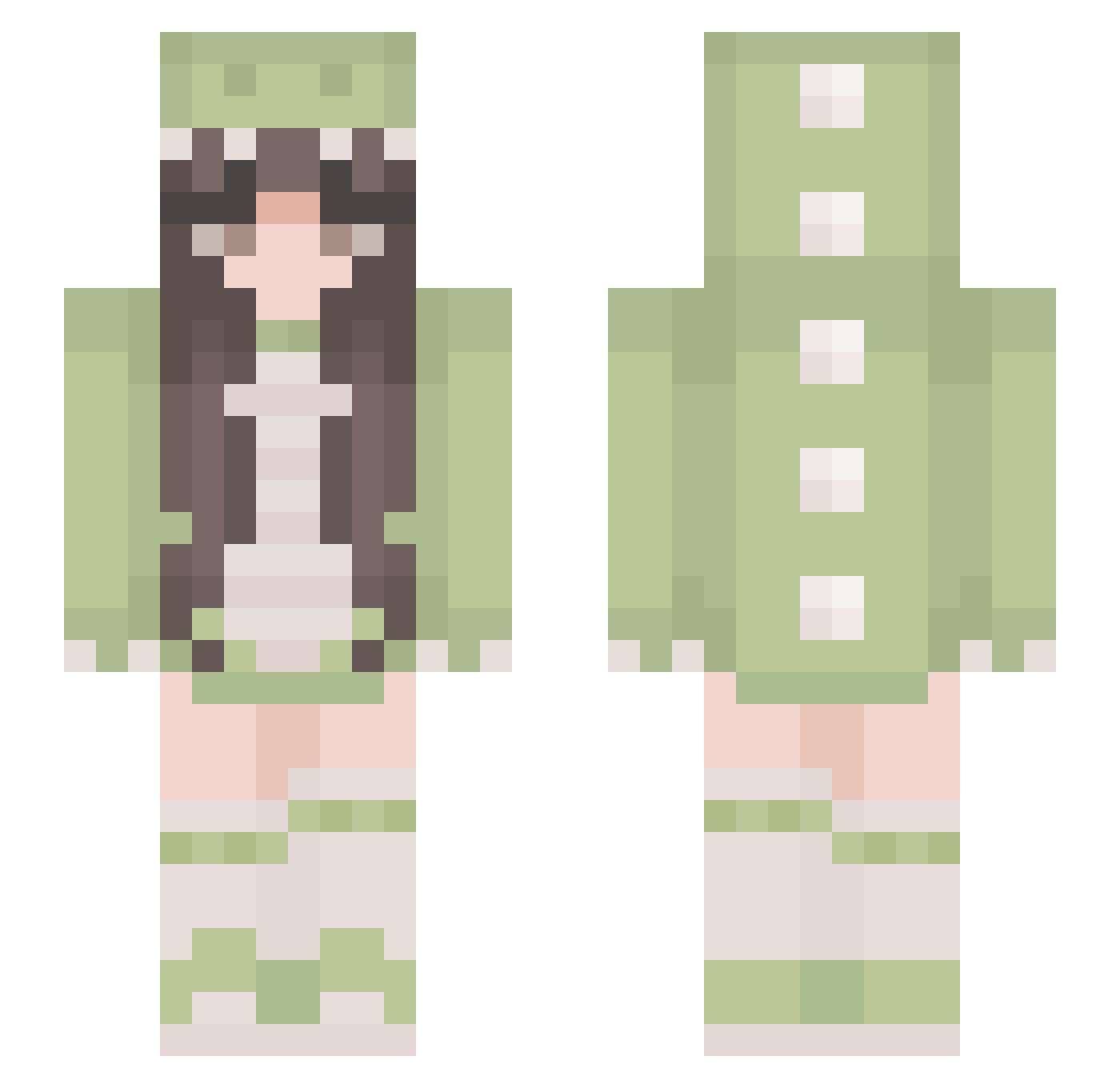
Current Minecraft skin of the player Chloe0705, loaded from the official Mojang API. Rotate the 3D model with your mouse or finger, then download the skin as a PNG file and use it in Minecraft: Bedrock Edition or Java Edition for free. When Chloe0705 changes their skin, this page updates automatically and the old skin stays in the history below.
Other players with this skin (384)
Chloe0705 was the 252nd player we have seen with this skin, first spotted on 03.10.2026. The same skin was seen on these players. Open a nickname to see their current skin and skin history.
 RosieToes8 Juvkz Giuly1014 theavocado13 bob09876 hoshi1007 maddyo_ itzJeniy BallerinaJanina more07 luciacc1 BarryDaBee DracarysDragon suji6772 mikusab Stereomade Karaboo16 kimoura99 memelord6600 InvinDevin fede5498 setonoyuraku BabyVampire1025 feer_05 mxxnlvr Nin1ve SnowWyBall biu_P Aly92417 fisch4321 __Giovanna Dazuzy17 crybxbycali __CRYSTAL__ AnnieTheDinosaur SalmaPrincess Laczek_Finna Eve0104 Smul4n Namiirang Lyssaa5 Herr_DerDinge Radkes1974 Maxiainen hunibunie popartyaner moodang007 heyitslexy K3SIXXX NancyVlt ncu87 poohcat DubouuSunflowRe Collectedfall aTalkingTree serappp Sophizinhaa bigmonke888 Bakugou444 Linnpus
More Pastel Minecraft skins
How to install the Chloe0705 skin
- Press the Download button above to save the skin as a PNG file.
- Minecraft: Bedrock Edition (PE): open the Dressing Room from the main menu (or tap your character → Edit Character), go to Classic Skins → Owned, press the + (new skin) button, choose the downloaded PNG and pick the Slim (Alex) model. Works on PC and mobile; consoles cannot import custom skins.
- Minecraft: Java Edition: open the Minecraft Launcher, go to the Skins tab, click New Skin, load the PNG, pick the Slim (Alex) model and press Save & Use. You can also upload it at minecraft.net → Profile → Change Skin.
The skin does not show up after import - what should I do?
Restart Minecraft and open the Dressing Room again - imported skins sometimes appear only after a restart. Also make sure you selected the imported skin and picked the Slim (Alex) model.
Which model should I choose, Classic or Slim?
This skin is designed for the Slim (Alex) model. If you pick the wrong model, the arms of the skin will look stretched or squeezed.
Is the skin of Chloe0705 free to download?
Yes. Press Download, save the PNG file and use it in Minecraft: Bedrock Edition or Java Edition - no payment or registration needed. The skin also works on multiplayer servers and Realms.
More skins
Looking for more? Go back to all Minecraft skins and check the top skins of the week, month and all time, or find any player's skin by nickname.