
ChiviMC - Minecraft Skins & Skin History
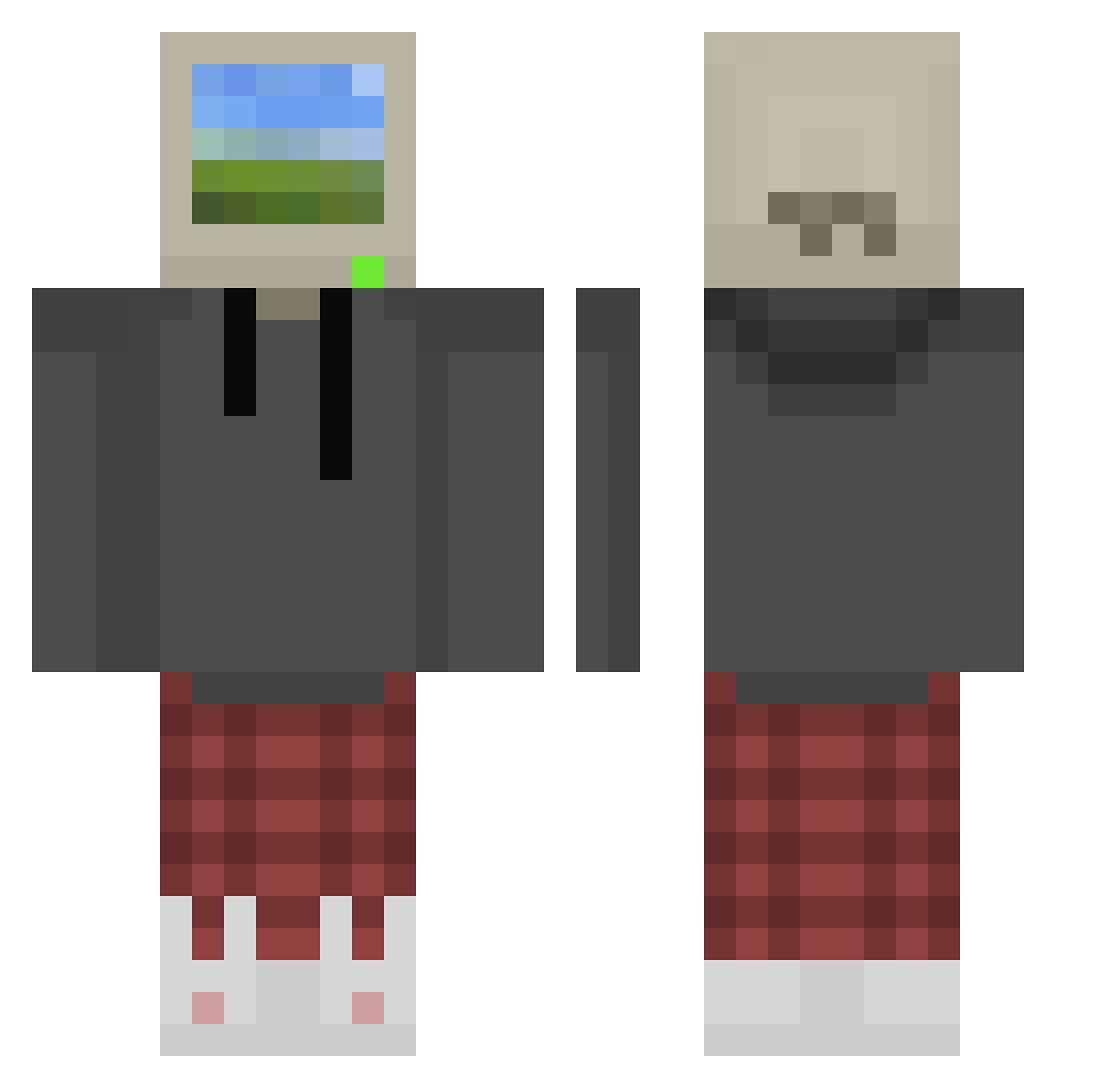
Current Minecraft skin of the player ChiviMC, loaded from the official Mojang API. Rotate the 3D model with your mouse or finger, then download the skin as a PNG file and use it in Minecraft: Bedrock Edition or Java Edition for free. When ChiviMC changes their skin, this page updates automatically and the old skin stays in the history below.
Other players with this skin (1072)
ChiviMC was the 957th player we have seen with this skin, first spotted on 09.11.2026. The same skin was seen on these players. Open a nickname to see their current skin and skin history.
 magsamostb kuresoy notAsvana Checkmate361 lwoa bxon24 ShayDroo plutooo710 kndlq boredrb DRIFT00 KangiiSama Csyon2008 maxIand jangsudol pacqui11 Shvecrt Senalolz lorrh4n rutgaaar DBOOM697 DeckerMp islandjarfr Tritriiii FuwaShiki INolvX VarsSiel Drumachine Bnoches Niko_777 KingSxar kaktusguyy TDrizzyy44 roger8569 Carbon_Cookie jikle Vox_FGC CoIlpa ThatsBrutal Codraisc Unitpod Zedictater ReceivedOral x_MAVS_x Chris4424 axe_j Poleniak xDrIsKinIT28 Taac26 R0tt3nN3wr0 Jcraft09 ReignHound TBroey LoftWing Hypersplice SkyBragasLimpias mononona unlockedsoap239 mikeericee2 Prophet077
More Windows XP Minecraft skins
How to install the ChiviMC skin
- Press the Download button above to save the skin as a PNG file.
- Minecraft: Bedrock Edition (PE): open the Dressing Room from the main menu (or tap your character → Edit Character), go to Classic Skins → Owned, press the + (new skin) button, choose the downloaded PNG and pick the Classic (Steve) model. Works on PC and mobile; consoles cannot import custom skins.
- Minecraft: Java Edition: open the Minecraft Launcher, go to the Skins tab, click New Skin, load the PNG, pick the Classic (Steve) model and press Save & Use. You can also upload it at minecraft.net → Profile → Change Skin.
The skin does not show up after import - what should I do?
Restart Minecraft and open the Dressing Room again - imported skins sometimes appear only after a restart. Also make sure you selected the imported skin and picked the Classic (Steve) model.
Which model should I choose, Classic or Slim?
This skin is designed for the Classic (Steve) model. If you pick the wrong model, the arms of the skin will look stretched or squeezed.
Is the skin of ChiviMC free to download?
Yes. Press Download, save the PNG file and use it in Minecraft: Bedrock Edition or Java Edition - no payment or registration needed. The skin also works on multiplayer servers and Realms.
More skins
Looking for more? Go back to all Minecraft skins and check the top skins of the week, month and all time, or find any player's skin by nickname.