
ChinnyVinny - Minecraft Skins & Skin History
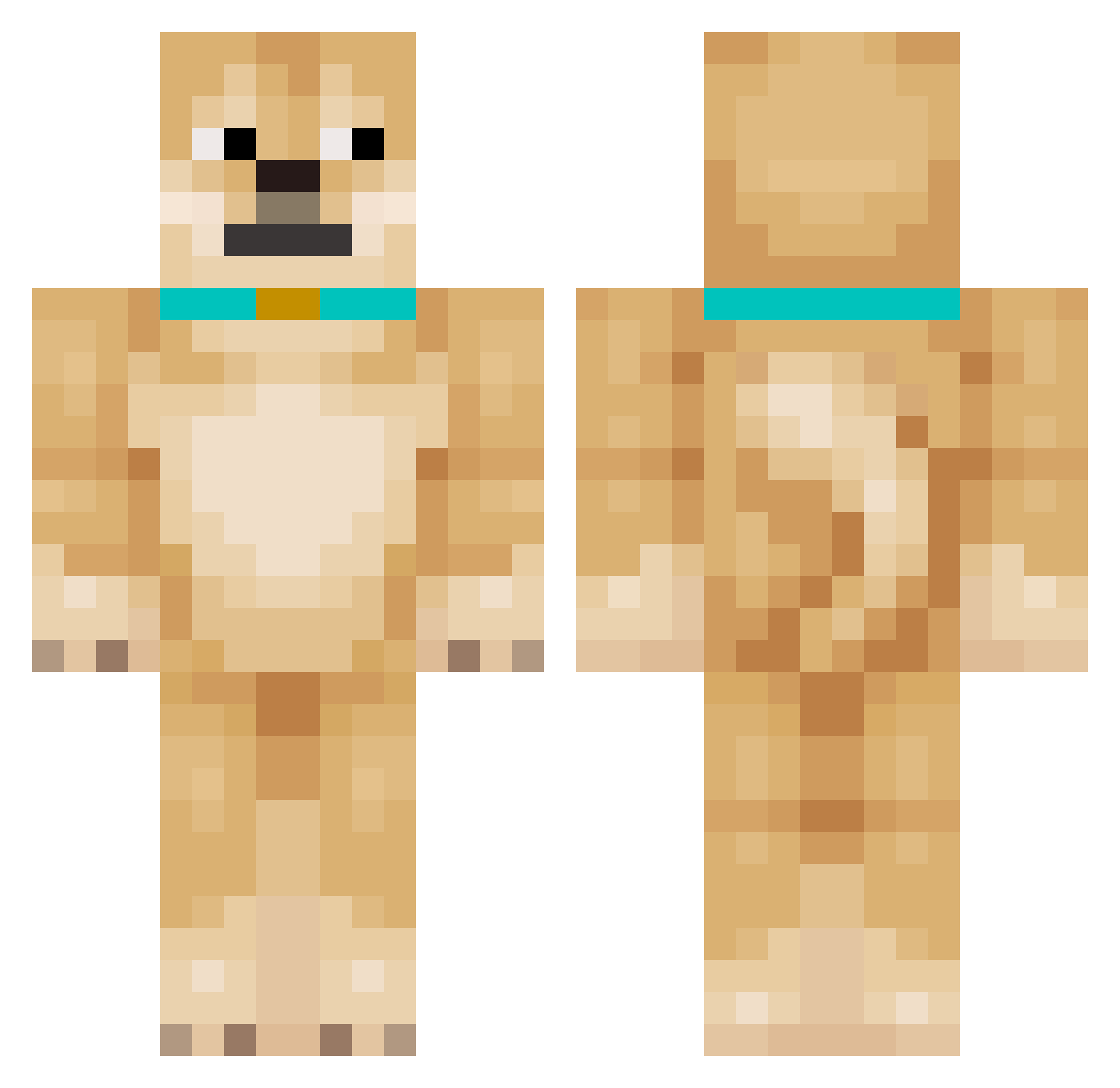
Current Minecraft skin of the player ChinnyVinny, loaded from the official Mojang API. Rotate the 3D model with your mouse or finger, then download the skin as a PNG file and use it in Minecraft: Bedrock Edition or Java Edition for free. When ChinnyVinny changes their skin, this page updates automatically and the old skin stays in the history below.
Other players with this skin (171)
ChinnyVinny was the 17th player we have seen with this skin, first spotted on 08.08.2026. The same skin was seen on these players. Open a nickname to see their current skin and skin history.
 MythicalTask iCasualPvP suiiiiiiiii_ TheGamerDosha Dawidpilka69 DoraTheDog Jayjay123423 Dog AlfieMather TheGamingDogYT Jyc2726 VojtaHK Josepha_Chenille taro1nu Alpqca DreamyPhoenix82 dovabasha20 PilarDwarf41327 thedaog
 Lecimyx1 Bxllcoolxd Honzizz zizegou HalseyBro Redfor maths_999 BetinhoDaSaude Da7JuanGuy1
 Hypersuperduber Ian006 Felipechiari Kamil122417 Miloispro Issy71 darkeyedjunco12 ItzReallyNotHack 920s Trippy1082 A_Wild_Tree SEHGaming xdsnipess SigmaKurt marcatlover50351 FluxFlame Cowdog __sWeRvY__ TheZeido OlliBolli57 thedoggg barrynaga Pauleckis BPGamer ORCA1203 Nemiyzz Joyboy_fkyouup minggggg2 3mkAlt6 R1csus KrastyArthur PvPzoom1234
More Shiba Inu Minecraft skins
How to install the ChinnyVinny skin
- Press the Download button above to save the skin as a PNG file.
- Minecraft: Bedrock Edition (PE): open the Dressing Room from the main menu (or tap your character → Edit Character), go to Classic Skins → Owned, press the + (new skin) button, choose the downloaded PNG and pick the Classic (Steve) model. Works on PC and mobile; consoles cannot import custom skins.
- Minecraft: Java Edition: open the Minecraft Launcher, go to the Skins tab, click New Skin, load the PNG, pick the Classic (Steve) model and press Save & Use. You can also upload it at minecraft.net → Profile → Change Skin.
The skin does not show up after import - what should I do?
Restart Minecraft and open the Dressing Room again - imported skins sometimes appear only after a restart. Also make sure you selected the imported skin and picked the Classic (Steve) model.
Which model should I choose, Classic or Slim?
This skin is designed for the Classic (Steve) model. If you pick the wrong model, the arms of the skin will look stretched or squeezed.
Is the skin of ChinnyVinny free to download?
Yes. Press Download, save the PNG file and use it in Minecraft: Bedrock Edition or Java Edition - no payment or registration needed. The skin also works on multiplayer servers and Realms.
More skins
Looking for more? Go back to all Minecraft skins and check the top skins of the week, month and all time, or find any player's skin by nickname.