
Centaureaaa - Minecraft Skins & Skin History
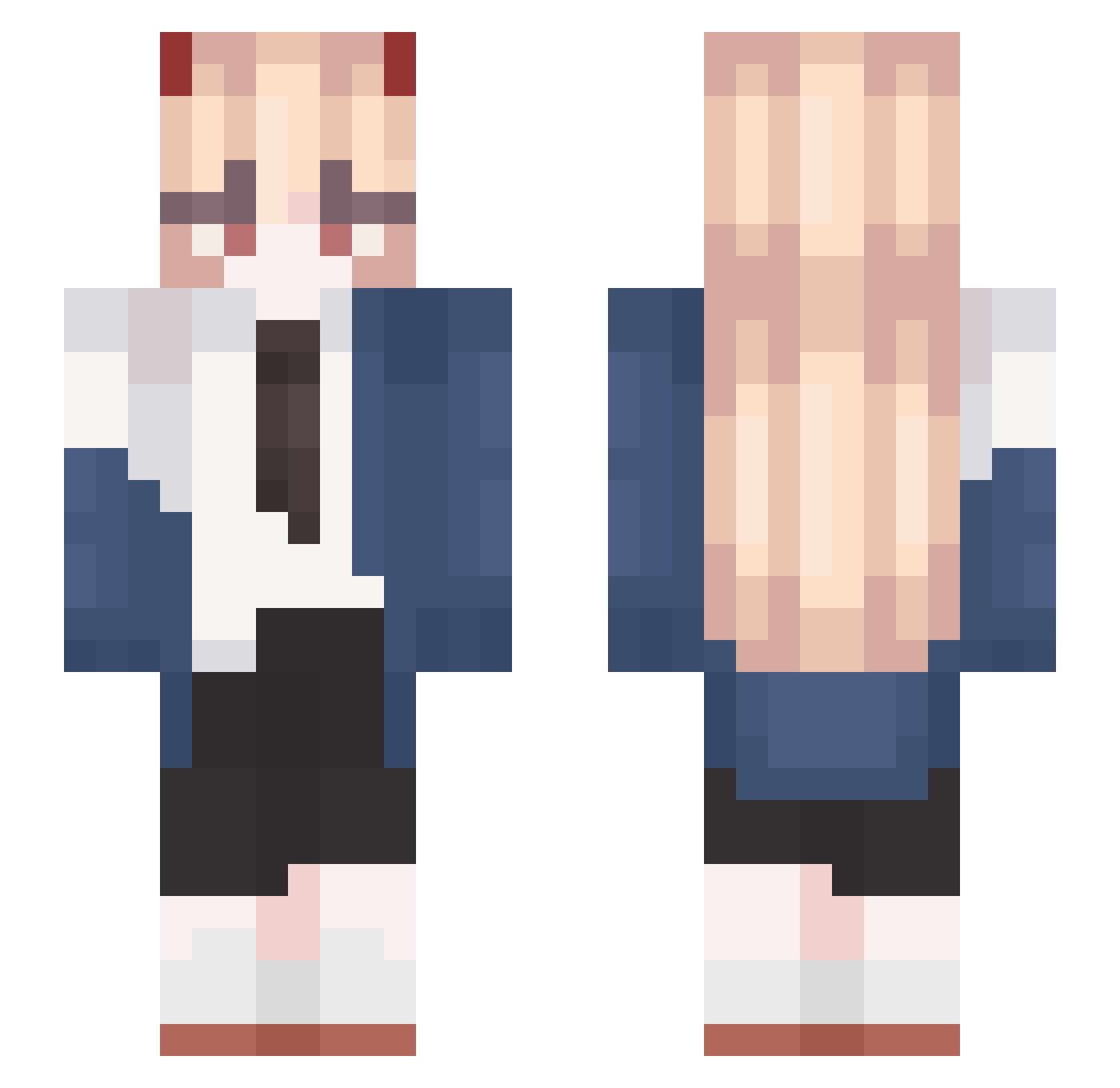
Current Minecraft skin of the player Centaureaaa, loaded from the official Mojang API. Rotate the 3D model with your mouse or finger, then download the skin as a PNG file and use it in Minecraft: Bedrock Edition or Java Edition for free. When Centaureaaa changes their skin, this page updates automatically and the old skin stays in the history below.
Other players with this skin (567)
Centaureaaa was the 399th player we have seen with this skin, first spotted on 04.10.2026. The same skin was seen on these players. Open a nickname to see their current skin and skin history.
 Little_LiLi HolyApollo02 xF5YM9yira93BmRp UonXanax psychostage NatikV bodu sunseo_ Wen_Jianglin BSBKOJI pyke2778 SillyDyl _Basematter_ 3ink HotaruDreamz BruceJ28 kejunz Skyrbnm Zappoh BlondeBimbo99 ImJigglypuffRun doyeon04 especifica Gabrizinha zzzzl_z Cremetals McRae159 Taaykoi Bujidiu Ember144 notcasp3r DodamPrime gomilkog daily_leon Palmkub Rofiner Yugmura Yotsuba_2469 AshYuriko Sn_HuoXing Skyrng yukimurq juckbutt _vido__ ChochaPelua kaczor_yt Tabors shiguanga OCHACAH PeachyIchi Sarah2408 Nokolikoko _citizen Echex22 Shirooya GGallyang Zzzz1219 papargo Cord27 Gugalibi
More Power Minecraft skins
How to install the Centaureaaa skin
- Press the Download button above to save the skin as a PNG file.
- Minecraft: Bedrock Edition (PE): open the Dressing Room from the main menu (or tap your character → Edit Character), go to Classic Skins → Owned, press the + (new skin) button, choose the downloaded PNG and pick the Slim (Alex) model. Works on PC and mobile; consoles cannot import custom skins.
- Minecraft: Java Edition: open the Minecraft Launcher, go to the Skins tab, click New Skin, load the PNG, pick the Slim (Alex) model and press Save & Use. You can also upload it at minecraft.net → Profile → Change Skin.
The skin does not show up after import - what should I do?
Restart Minecraft and open the Dressing Room again - imported skins sometimes appear only after a restart. Also make sure you selected the imported skin and picked the Slim (Alex) model.
Which model should I choose, Classic or Slim?
This skin is designed for the Slim (Alex) model. If you pick the wrong model, the arms of the skin will look stretched or squeezed.
Is the skin of Centaureaaa free to download?
Yes. Press Download, save the PNG file and use it in Minecraft: Bedrock Edition or Java Edition - no payment or registration needed. The skin also works on multiplayer servers and Realms.
More skins
Looking for more? Go back to all Minecraft skins and check the top skins of the week, month and all time, or find any player's skin by nickname.