
CaptainFlint8 - Minecraft Skins & Skin History
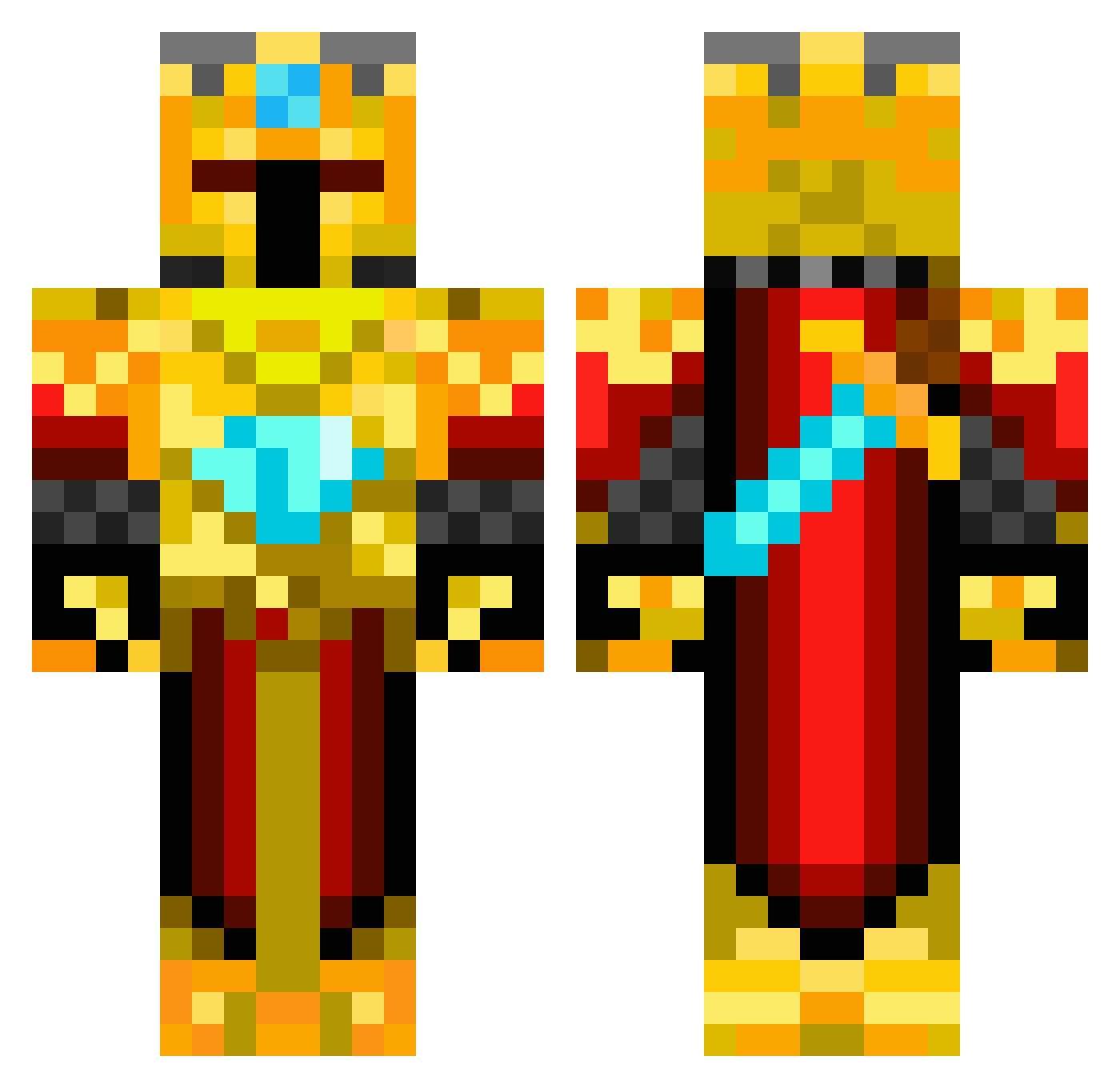
Current Minecraft skin of the player CaptainFlint8, loaded from the official Mojang API. Rotate the 3D model with your mouse or finger, then download the skin as a PNG file and use it in Minecraft: Bedrock Edition or Java Edition for free. When CaptainFlint8 changes their skin, this page updates automatically and the old skin stays in the history below.
Other players with this skin (217)
CaptainFlint8 was the 67th player we have seen with this skin, first spotted on 25.08.2026. The same skin was seen on these players. Open a nickname to see their current skin and skin history.
 IwannhsMetaxas Baptiste0027 OmEgA1355 SpeltokigaCalle Sir_Arnon BerniSwl Fill_drip SemperPie85 LiamTKD _AdamMan_ Oxion__ SuperZizer Biksut synxb ninjaick3332 CVVPHILL Rochambeaut ZenX666 SoloStalker69 herotown Dragonkillers KingPurpleMan MuteBurrito9215 G0dFatherDiIta LordPetik Xtrojuicyj Theropods TNTHD01 rubinnmincraft96 HavocMcStabby J_Hendy CbxInFinity ICantReadHelp Zentramenago perinha14 DiltronGamer06 GoldKarat ZShuri Infinity_Fightz Boeemed huihanblack GoldenBoy217 McSquizor26 tondatankista _T_E_U_N_020_ DarkKnight317 Pinkios CounterClock92 Dark_Knight_527 KEELASS Darkness977 JapaKora Semperfive864 Lunala_Prime SwaterPsplash XxMatroflexX Luismi2112 UnrealKerill
 LiArLe Wolfie_2k8
More Golden Armor Minecraft skins
See all 170 Golden Armor skins
How to install the CaptainFlint8 skin
- Press the Download button above to save the skin as a PNG file.
- Minecraft: Bedrock Edition (PE): open the Dressing Room from the main menu (or tap your character → Edit Character), go to Classic Skins → Owned, press the + (new skin) button, choose the downloaded PNG and pick the Classic (Steve) model. Works on PC and mobile; consoles cannot import custom skins.
- Minecraft: Java Edition: open the Minecraft Launcher, go to the Skins tab, click New Skin, load the PNG, pick the Classic (Steve) model and press Save & Use. You can also upload it at minecraft.net → Profile → Change Skin.
The skin does not show up after import - what should I do?
Restart Minecraft and open the Dressing Room again - imported skins sometimes appear only after a restart. Also make sure you selected the imported skin and picked the Classic (Steve) model.
Which model should I choose, Classic or Slim?
This skin is designed for the Classic (Steve) model. If you pick the wrong model, the arms of the skin will look stretched or squeezed.
Is the skin of CaptainFlint8 free to download?
Yes. Press Download, save the PNG file and use it in Minecraft: Bedrock Edition or Java Edition - no payment or registration needed. The skin also works on multiplayer servers and Realms.
More skins
Looking for more? Go back to all Minecraft skins and check the top skins of the week, month and all time, or find any player's skin by nickname.