
Bryszard2137pL - Minecraft Skins & Skin History
Current Minecraft skin of the player Bryszard2137pL, loaded from the official Mojang API. Rotate the 3D model with your mouse or finger, then download the skin as a PNG file and use it in Minecraft: Bedrock Edition or Java Edition for free. When Bryszard2137pL changes their skin, this page updates automatically and the old skin stays in the history below.
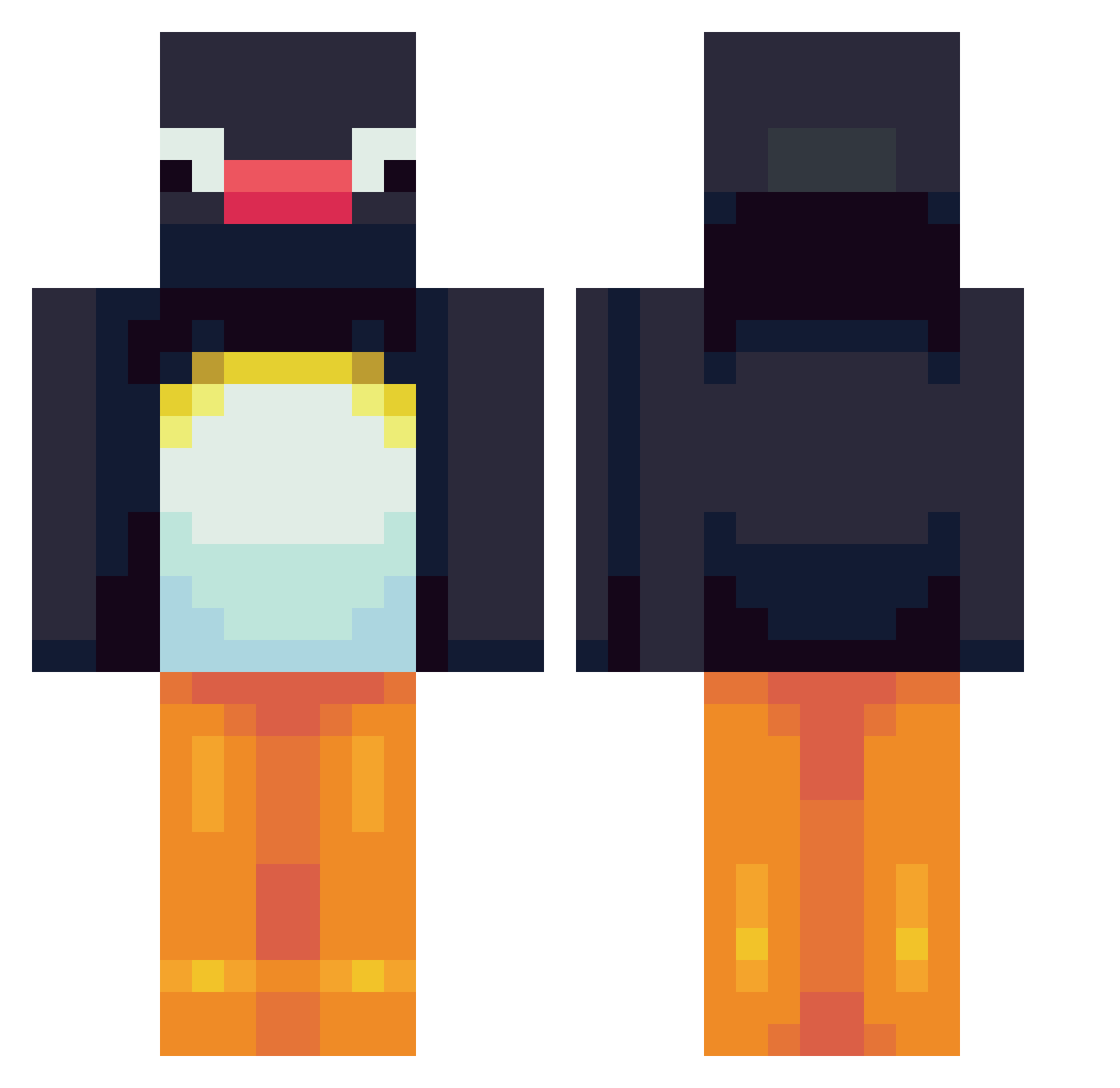
Other players with this skin (564)
Bryszard2137pL was the 147th player we have seen with this skin, first spotted on 19.08.2026. The same skin was seen on these players. Open a nickname to see their current skin and skin history.
 mm364653 x3458
 Jxng_E NonRacialPanda sdax Pelichar OGwera kgdf ACOCA AziaisDead zwickl DontBlameMeQQ Baracadi ForgotMyRice GuestNumber1 PabloThePenguino nimogen1 jazzspurson Gilbe104 ahyun_o_o stodyy_ Parag456 katiee28 LucasVsLife Hmodcha Ecclesiasticus blazed_sun Igor157 Bunzan jonpartokaja Juanster_ Jephriii tohmahz kieboetskie vallar01 chipmunkboy drecdrec gavinus_magnus PineBanana VasyThePenguin Dakmoking sarahMB1604 cornlicker SkinnerIndy kwiikwii railash ms_213 tomato4759 CrazyTacoboi Trnrmagne Franchiskito Julio30_ Spl0gee XPogCatX dipmaster557 DaBasement LeFunSponge yungbubbles Livie123 Wrexil
More Pingu Minecraft skins
How to install the Bryszard2137pL skin
- Press the Download button above to save the skin as a PNG file.
- Minecraft: Bedrock Edition (PE): open the Dressing Room from the main menu (or tap your character → Edit Character), go to Classic Skins → Owned, press the + (new skin) button, choose the downloaded PNG and pick the Classic (Steve) model. Works on PC and mobile; consoles cannot import custom skins.
- Minecraft: Java Edition: open the Minecraft Launcher, go to the Skins tab, click New Skin, load the PNG, pick the Classic (Steve) model and press Save & Use. You can also upload it at minecraft.net → Profile → Change Skin.
The skin does not show up after import - what should I do?
Restart Minecraft and open the Dressing Room again - imported skins sometimes appear only after a restart. Also make sure you selected the imported skin and picked the Classic (Steve) model.
Which model should I choose, Classic or Slim?
This skin is designed for the Classic (Steve) model. If you pick the wrong model, the arms of the skin will look stretched or squeezed.
Is the skin of Bryszard2137pL free to download?
Yes. Press Download, save the PNG file and use it in Minecraft: Bedrock Edition or Java Edition - no payment or registration needed. The skin also works on multiplayer servers and Realms.
More skins
Looking for more? Go back to all Minecraft skins and check the top skins of the week, month and all time, or find any player's skin by nickname.