
BradleyEvans50 - Minecraft Skins & Skin History
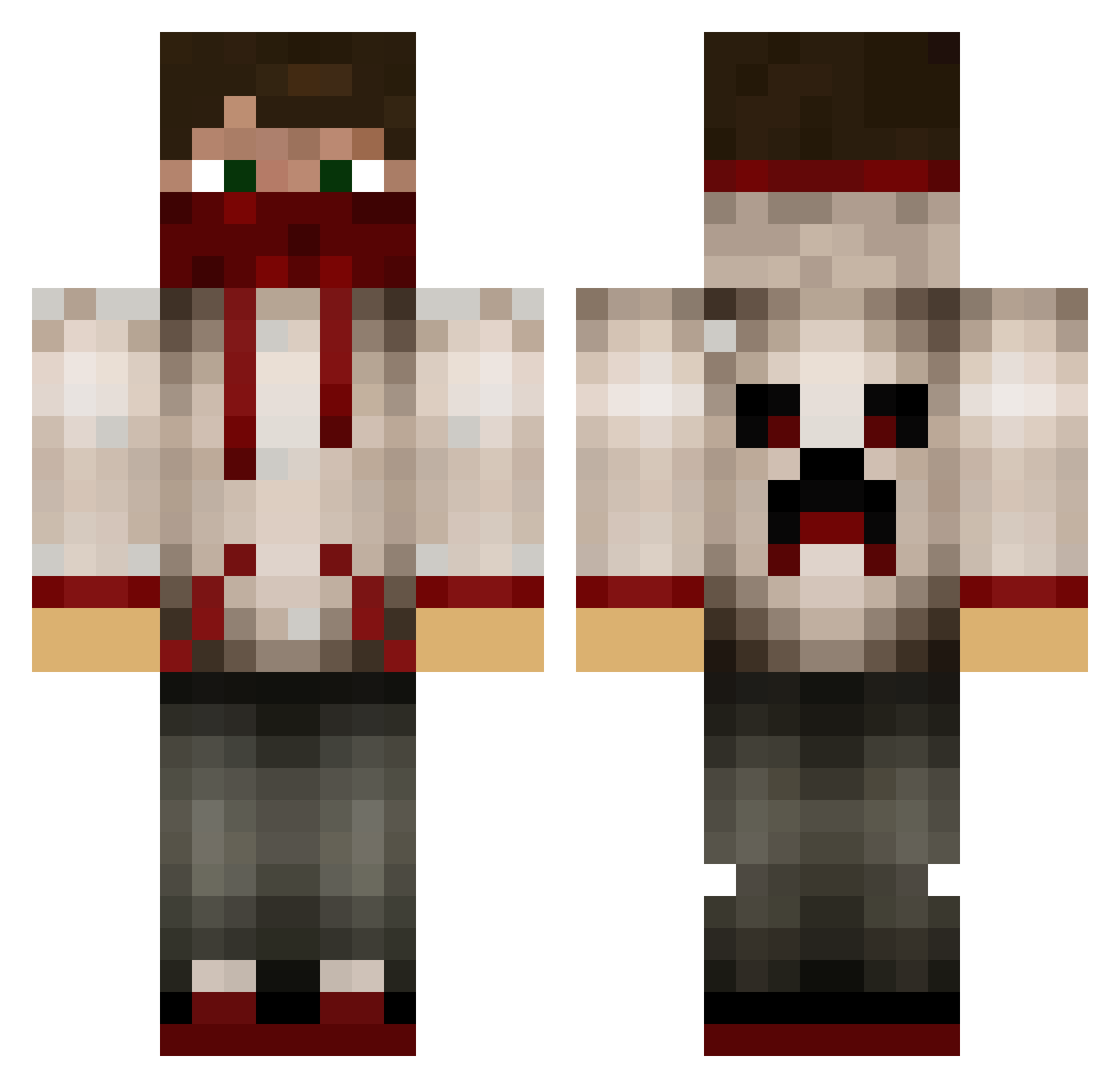
Current Minecraft skin of the player BradleyEvans50, loaded from the official Mojang API. Rotate the 3D model with your mouse or finger, then download the skin as a PNG file and use it in Minecraft: Bedrock Edition or Java Edition for free. When BradleyEvans50 changes their skin, this page updates automatically and the old skin stays in the history below.
Other players with this skin (629)
BradleyEvans50 was the 417th player we have seen with this skin, first spotted on 02.10.2026. The same skin was seen on these players. Open a nickname to see their current skin and skin history.
 Candymore1 Diamondgamingme TheDistracted NgocCr7 MiKBandit DunkelLP WhiteLucy UnseenBandaid warmachine2016 weirdnoris lIlGrey SykeUK Poppyt662 Banditev18 dasher418 xX_RAYAN_XxX gallactic2003 Srfenisrey Waffle4ever42 Juizzio buccat Cole_Garland warlyninga1 e5calate LeSilax motsm1 simpa12 DiamondAugust randompotato88 littleredbullet FLUFFY_ROFL fille0077 davide02 KevinT007 LongShot037 xXCrazyMarsXx magiickoalaa Swarm416 Jonas121997 Ainstempesto Greysen005 Wodanius adamd03 Mindbender2001 anthas1996 Ninjablock101 AnmDude101 GhossRider JonJS_Bach DarkWolf674 thijskra Dreygur george1902 payton210160 Banderas04 Crabdaddy_ tomnir007 Andre_G96 ChR0nicGaM1nGHD kortegaard
More Bandana Minecraft skins
How to install the BradleyEvans50 skin
- Press the Download button above to save the skin as a PNG file.
- Minecraft: Bedrock Edition (PE): open the Dressing Room from the main menu (or tap your character → Edit Character), go to Classic Skins → Owned, press the + (new skin) button, choose the downloaded PNG and pick the Classic (Steve) model. Works on PC and mobile; consoles cannot import custom skins.
- Minecraft: Java Edition: open the Minecraft Launcher, go to the Skins tab, click New Skin, load the PNG, pick the Classic (Steve) model and press Save & Use. You can also upload it at minecraft.net → Profile → Change Skin.
The skin does not show up after import - what should I do?
Restart Minecraft and open the Dressing Room again - imported skins sometimes appear only after a restart. Also make sure you selected the imported skin and picked the Classic (Steve) model.
Which model should I choose, Classic or Slim?
This skin is designed for the Classic (Steve) model. If you pick the wrong model, the arms of the skin will look stretched or squeezed.
Is the skin of BradleyEvans50 free to download?
Yes. Press Download, save the PNG file and use it in Minecraft: Bedrock Edition or Java Edition - no payment or registration needed. The skin also works on multiplayer servers and Realms.
More skins
Looking for more? Go back to all Minecraft skins and check the top skins of the week, month and all time, or find any player's skin by nickname.