
Boogieman0829 - Minecraft Skins & Skin History
Current Minecraft skin of the player Boogieman0829, loaded from the official Mojang API. Rotate the 3D model with your mouse or finger, then download the skin as a PNG file and use it in Minecraft: Bedrock Edition or Java Edition for free. When Boogieman0829 changes their skin, this page updates automatically and the old skin stays in the history below.
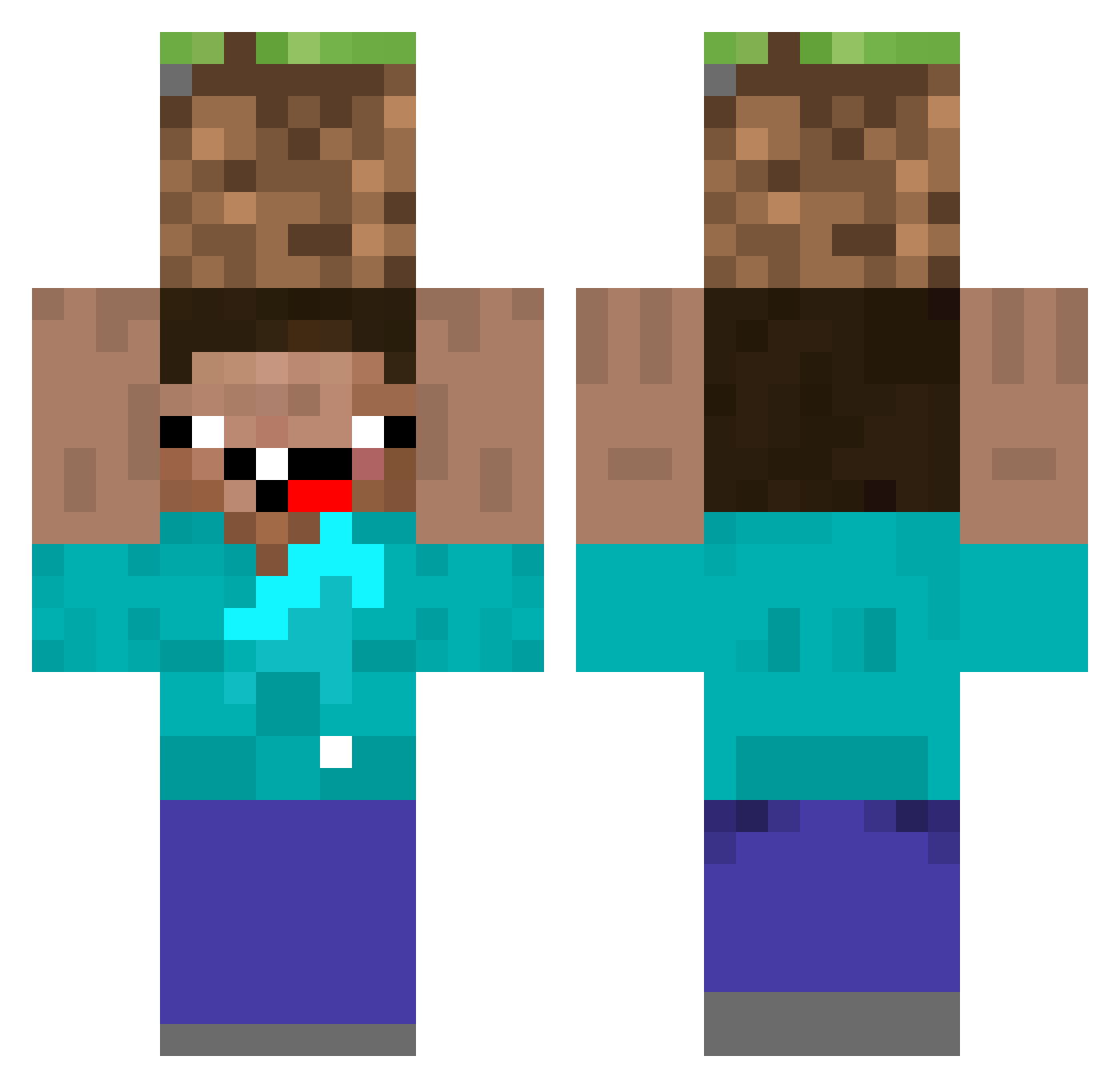
Other players with this skin (92)
Boogieman0829 was the 64th player we have seen with this skin, first spotted on 11.10.2026. The same skin was seen on these players. Open a nickname to see their current skin and skin history.
 FlameSyndicate LanzaOD Szzycun MrsBoB Noyo773 SimonGGs goober83 lethaL76 michalkofanYT ghonim19 SkarpaA votthu SUCCESSFULLIFE 9Crisps _yqu Yes_Man_129 mw_0630 Woxik1 aaaaaaaaa1212121 im__orenge Mor9k Mopocryph4 wennwennwenn _Oika ErezKalPop Marton_2000 HIPEX_1 LilNacho19 Struggl1ng ItsKMX NAVIinferno JOJOLECRIME beehivemihai XiaoHei_TP Chibrasse BBOO1543 _xiao_0219 Tuhooja21 FlareCdxJKeN8Sv2 tutui09 MrLuxi BozydarHeniu67 lingchenx j1n54 Turbiner pol1775 tulio5459 marLagoriLLa LouisCu Tititaco ibox7z Gongox AbrahamZ10 Teddddy520 Mori_Maks SFRANXX donijoa JongE0000 caweeeee terradaktul
More Dirt Block Minecraft skins
How to install the Boogieman0829 skin
- Press the Download button above to save the skin as a PNG file.
- Minecraft: Bedrock Edition (PE): open the Dressing Room from the main menu (or tap your character → Edit Character), go to Classic Skins → Owned, press the + (new skin) button, choose the downloaded PNG and pick the Classic (Steve) model. Works on PC and mobile; consoles cannot import custom skins.
- Minecraft: Java Edition: open the Minecraft Launcher, go to the Skins tab, click New Skin, load the PNG, pick the Classic (Steve) model and press Save & Use. You can also upload it at minecraft.net → Profile → Change Skin.
The skin does not show up after import - what should I do?
Restart Minecraft and open the Dressing Room again - imported skins sometimes appear only after a restart. Also make sure you selected the imported skin and picked the Classic (Steve) model.
Which model should I choose, Classic or Slim?
This skin is designed for the Classic (Steve) model. If you pick the wrong model, the arms of the skin will look stretched or squeezed.
Is the skin of Boogieman0829 free to download?
Yes. Press Download, save the PNG file and use it in Minecraft: Bedrock Edition or Java Edition - no payment or registration needed. The skin also works on multiplayer servers and Realms.
More skins
Looking for more? Go back to all Minecraft skins and check the top skins of the week, month and all time, or find any player's skin by nickname.