
BereuGatinha - Minecraft Skins & Skin History
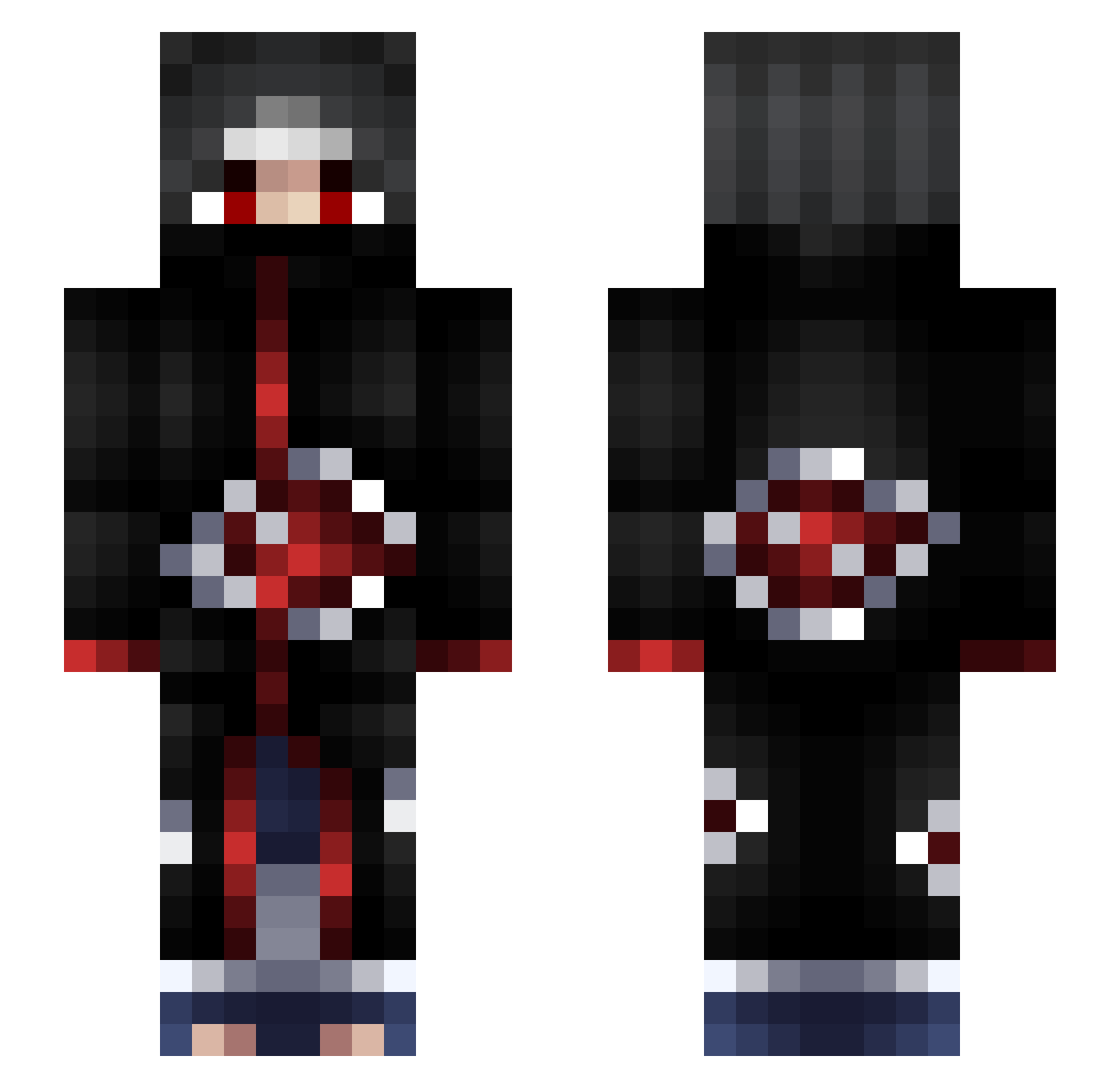
Current Minecraft skin of the player BereuGatinha, loaded from the official Mojang API. Rotate the 3D model with your mouse or finger, then download the skin as a PNG file and use it in Minecraft: Bedrock Edition or Java Edition for free. When BereuGatinha changes their skin, this page updates automatically and the old skin stays in the history below.
Other players with this skin (90)
BereuGatinha was the 28th player we have seen with this skin, first spotted on 18.08.2026. The same skin was seen on these players. Open a nickname to see their current skin and skin history.
 Sleepliss _xSkittles Koko_74 szrt DamianNooob CaptainM7mD yg372
 miguelmilk3 ch4m4n Vezyuol Link_013 SETISMA VERSACHEEBOII gaara1601 MazoBeats
 Hirasen2000 bitomb TheDarkFlare Corgester wwxshm ubbubb CAN_SEL
 qrxnico Jason120661 JayHawkJRHYT AimFiix_ nnnil x_kewin_x xen77 JcBShinobi ETF_Watermelon Ferrax_10 Patar22 _AnTo_RuBe_ tutur72 Freveo ProphetOfSorrow GrrrrH
 NoaMalka DerCooleGossen ItsCasualBob PolarYoshi kiricouille_ ImCona25 EluneBloodcaller doflamingow1337 AbdurRimmi hot_abdullah XK72Master OmenBlaze lene_skt Trinowo babyvain PhuongDang1210VN OneRyZeIssUp Pouchy Josh_ooh_argh Inkohh CasparDZ2014 Barab_
More Itachi Uchiha Minecraft skins
See all 318 Itachi Uchiha skins
How to install the BereuGatinha skin
- Press the Download button above to save the skin as a PNG file.
- Minecraft: Bedrock Edition (PE): open the Dressing Room from the main menu (or tap your character → Edit Character), go to Classic Skins → Owned, press the + (new skin) button, choose the downloaded PNG and pick the Slim (Alex) model. Works on PC and mobile; consoles cannot import custom skins.
- Minecraft: Java Edition: open the Minecraft Launcher, go to the Skins tab, click New Skin, load the PNG, pick the Slim (Alex) model and press Save & Use. You can also upload it at minecraft.net → Profile → Change Skin.
The skin does not show up after import - what should I do?
Restart Minecraft and open the Dressing Room again - imported skins sometimes appear only after a restart. Also make sure you selected the imported skin and picked the Slim (Alex) model.
Which model should I choose, Classic or Slim?
This skin is designed for the Slim (Alex) model. If you pick the wrong model, the arms of the skin will look stretched or squeezed.
Is the skin of BereuGatinha free to download?
Yes. Press Download, save the PNG file and use it in Minecraft: Bedrock Edition or Java Edition - no payment or registration needed. The skin also works on multiplayer servers and Realms.
More skins
Looking for more? Go back to all Minecraft skins and check the top skins of the week, month and all time, or find any player's skin by nickname.