
Becky0880 - Minecraft Skins & Skin History
Current Minecraft skin of the player Becky0880, loaded from the official Mojang API. Rotate the 3D model with your mouse or finger, then download the skin as a PNG file and use it in Minecraft: Bedrock Edition or Java Edition for free. When Becky0880 changes their skin, this page updates automatically and the old skin stays in the history below.
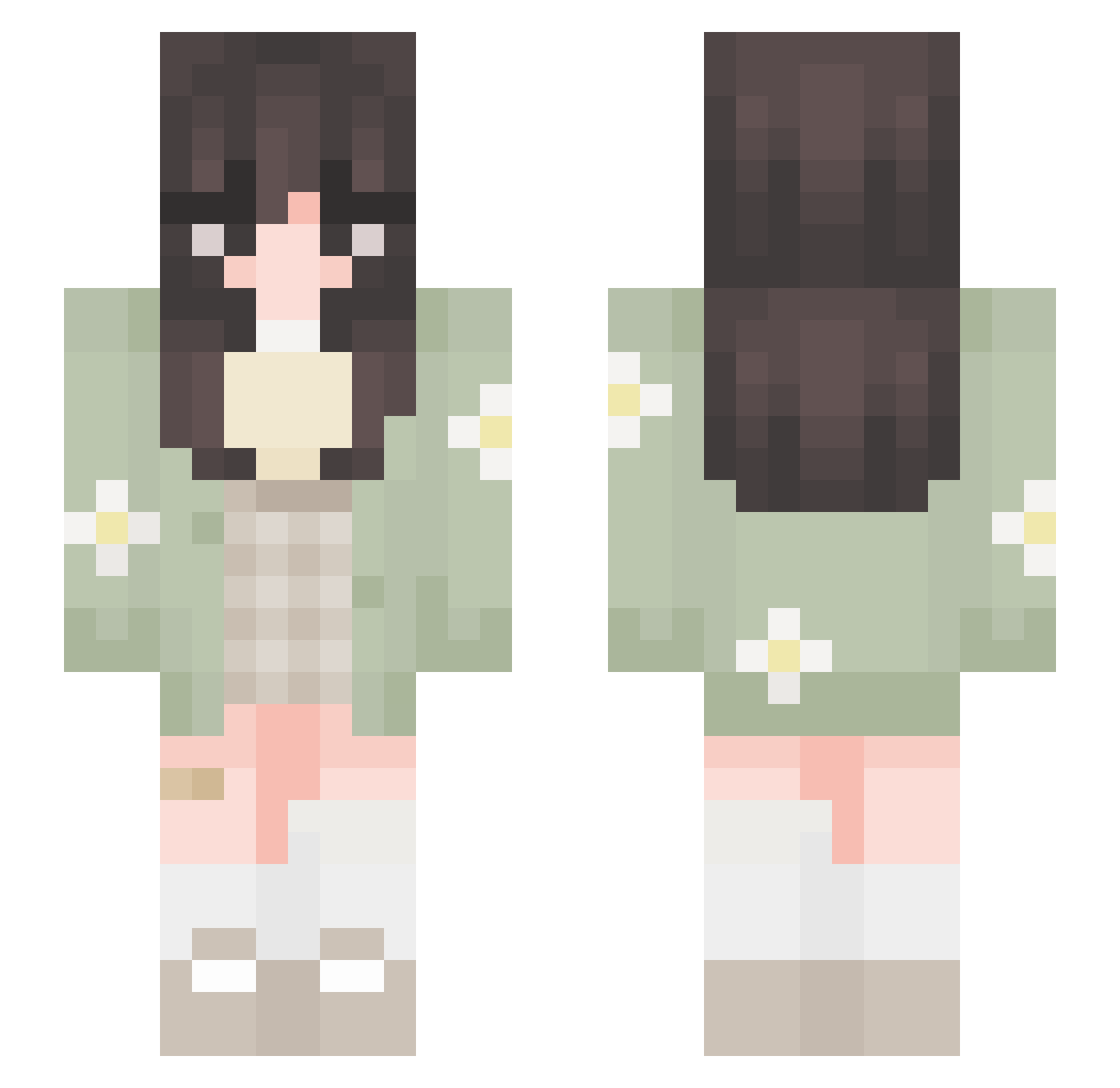
Other players with this skin (651)
Becky0880 was the 271st player we have seen with this skin, first spotted on 08.09.2026. The same skin was seen on these players. Open a nickname to see their current skin and skin history.
 mooniemooncake whosvic SavageFin Shiro572 Sumshine22 youbetchabri technotessa bubblepoppengi YouForgotTheKey kneewin yewon522 Macheinha Rikka9045 m1n1k4 forest__fox justvibinhere KotaBoda nerowor UltimateKYL Vannesse Enderika7 esh9l claire4727 SalmonRhodes Princess_Yaoyao Yume_Hime alyssa2214 WastedVersace anzumajo Misoobun sammyann Syd07 Tamagko HONEY_COW_ mimifromvenus Gekijou CultOfTheLamb PicTtie suzume1272 SuppyJenna tofuchaaan lcvelymoon elsalou ann9147 Pol94ok Cam_mushu Xiiovixa Paripep january0_0 Y3llowCase Alice___27 armutt_ YOyYO3D Crazycruickshank tukemono_3 Maddycereal
 _simplynoodles medusuv DuckyLove49 LubiCubie
More Daisy Minecraft skins
How to install the Becky0880 skin
- Press the Download button above to save the skin as a PNG file.
- Minecraft: Bedrock Edition (PE): open the Dressing Room from the main menu (or tap your character → Edit Character), go to Classic Skins → Owned, press the + (new skin) button, choose the downloaded PNG and pick the Slim (Alex) model. Works on PC and mobile; consoles cannot import custom skins.
- Minecraft: Java Edition: open the Minecraft Launcher, go to the Skins tab, click New Skin, load the PNG, pick the Slim (Alex) model and press Save & Use. You can also upload it at minecraft.net → Profile → Change Skin.
The skin does not show up after import - what should I do?
Restart Minecraft and open the Dressing Room again - imported skins sometimes appear only after a restart. Also make sure you selected the imported skin and picked the Slim (Alex) model.
Which model should I choose, Classic or Slim?
This skin is designed for the Slim (Alex) model. If you pick the wrong model, the arms of the skin will look stretched or squeezed.
Is the skin of Becky0880 free to download?
Yes. Press Download, save the PNG file and use it in Minecraft: Bedrock Edition or Java Edition - no payment or registration needed. The skin also works on multiplayer servers and Realms.
More skins
Looking for more? Go back to all Minecraft skins and check the top skins of the week, month and all time, or find any player's skin by nickname.