
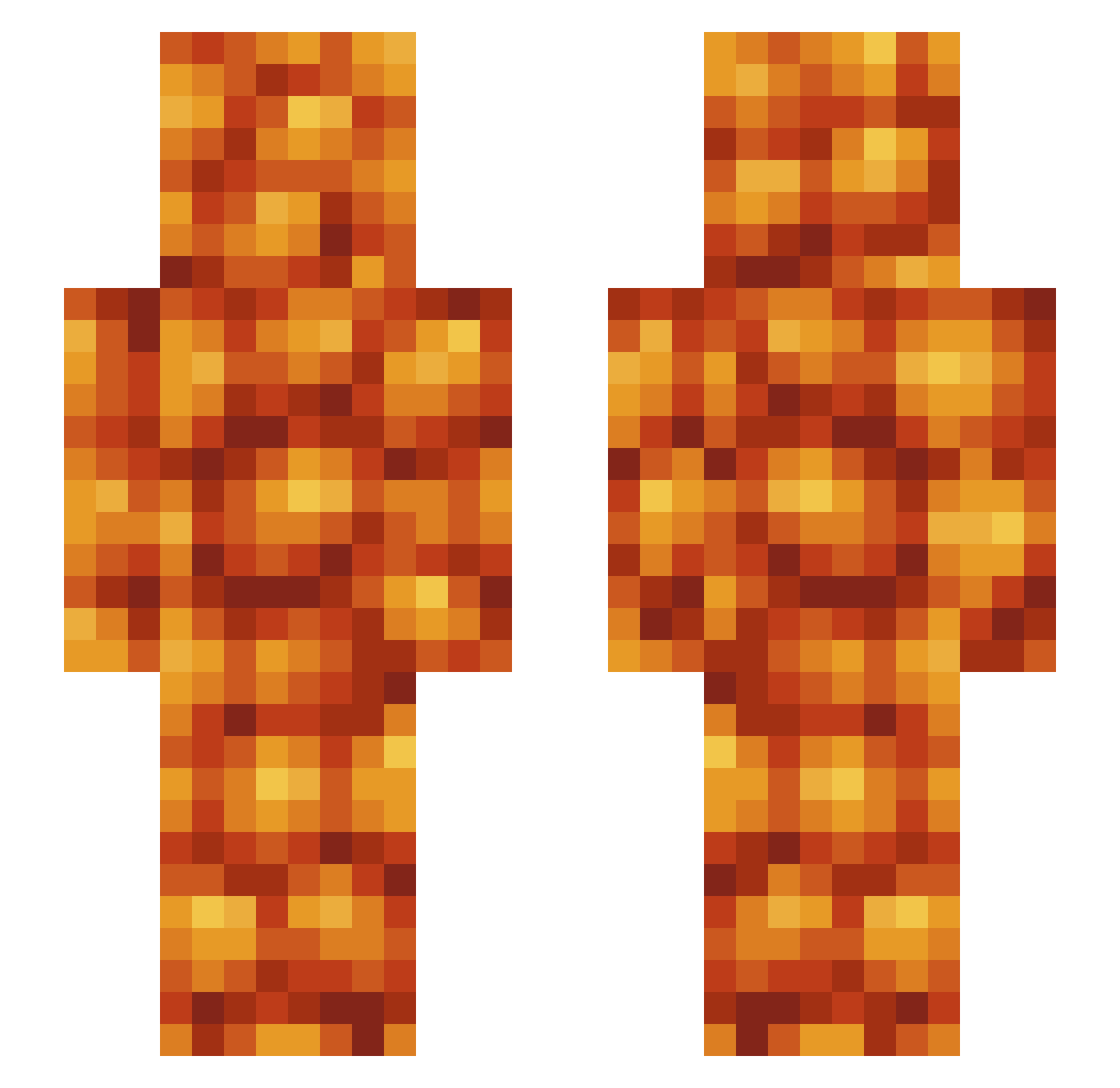
Current Minecraft skin of the player BeanMaster09, loaded from the official Mojang API. Rotate the 3D model with your mouse or finger, then download the skin as a PNG file and use it in Minecraft: Bedrock Edition or Java Edition for free. When BeanMaster09 changes their skin, this page updates automatically and the old skin stays in the history below.
Other players with this skin (427)
BeanMaster09 was the 356th player we have seen with this skin, first spotted on 04.10.2026. The same skin was seen on these players. Open a nickname to see their current skin and skin history.
 BeanMan_69 JitteryJared onskari mintywhale SterlingBullet finn90946 HenryJ111 notfatphobic El_macintosh nico2905 Meatymister RagTheRed user_277353 LittlePickleBoy HeinzBakedBeanzz lawlessek_25 Pep3Man Mk__IV Gremerd Jazgarz Deku_Dane Nipseh RaidExcalibur ZDoubleZ SMP3 BrosephBroski YouGetSomeFire awesomermatt0412 Broodle64 Dinamite_Maluco Buddy1320 Rachibly levi1x hysterie_ TheSoupSpoon XTowerofHeavenX BeanMachine1771 confricker reserx1 VomPineapple2 GamerGriII crewtahn Leeham1874 roryward99 d_Mayonnaise notFangBlade hellochloe Meinanutshell PotatoPerson24 stale_soup Jtorttu YoshiMlemDotWav PRvex8 RFails WeeBeano YeMothor2457 Kingstefan228 CptSlander olivia12rose ForeverInfernal
More Baked Beans Minecraft skins
How to install the BeanMaster09 skin
- Press the Download button above to save the skin as a PNG file.
- Minecraft: Bedrock Edition (PE): open the Dressing Room from the main menu (or tap your character → Edit Character), go to Classic Skins → Owned, press the + (new skin) button, choose the downloaded PNG and pick the Slim (Alex) model. Works on PC and mobile; consoles cannot import custom skins.
- Minecraft: Java Edition: open the Minecraft Launcher, go to the Skins tab, click New Skin, load the PNG, pick the Slim (Alex) model and press Save & Use. You can also upload it at minecraft.net → Profile → Change Skin.
The skin does not show up after import - what should I do?
Restart Minecraft and open the Dressing Room again - imported skins sometimes appear only after a restart. Also make sure you selected the imported skin and picked the Slim (Alex) model.
Which model should I choose, Classic or Slim?
This skin is designed for the Slim (Alex) model. If you pick the wrong model, the arms of the skin will look stretched or squeezed.
Is the skin of BeanMaster09 free to download?
Yes. Press Download, save the PNG file and use it in Minecraft: Bedrock Edition or Java Edition - no payment or registration needed. The skin also works on multiplayer servers and Realms.
More skins
Looking for more? Go back to all Minecraft skins and check the top skins of the week, month and all time, or find any player's skin by nickname.