
Bawls - Minecraft Skins & Skin History
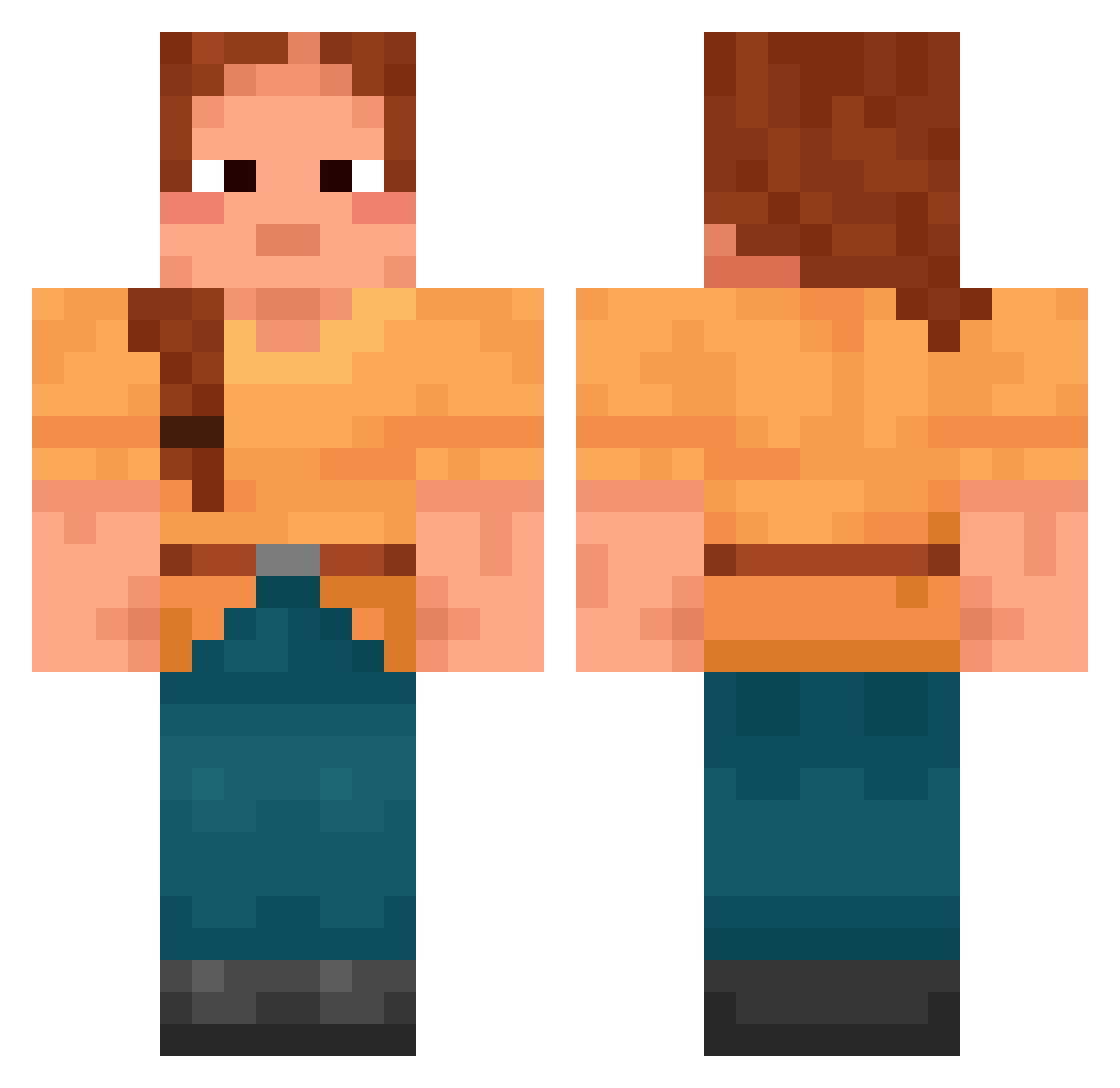
Current Minecraft skin of the player Bawls, loaded from the official Mojang API. Rotate the 3D model with your mouse or finger, then download the skin as a PNG file and use it in Minecraft: Bedrock Edition or Java Edition for free. When Bawls changes their skin, this page updates automatically and the old skin stays in the history below.
Other players with this skin (1420)
Bawls was the 247th player we have seen with this skin, first spotted on 09.08.2026. The same skin was seen on these players. Open a nickname to see their current skin and skin history.
 NotNineNight crotching Geneticists Archangelica mooching flyingcritter Illusiveness GradenAL lauritswinther syen1 colonelpune Mortifia Udomniki18472
 Ezgi__ Syncnn Nihadijohn Avokadotoast Bart4564
 joaacooo JesperPRO1 Sunflower65003 _swz_ potdolls Gnar_Zhou RazvanG Locum dawoodalsaed Captivator Linie_ SirRory sericks HudieGuy ElnoXMC DorukUR FR3DH unstained Quicky02 kkiruk matrica11 pteryla Alexis232
 Paducas Nebuchadnezzar Fogbow Ethyls Autrucheuh
 souroque El_gatomaspro LadySnow airmailed Needly Bourdon DeFogger Plantagenet xWhusy new_thitroll Highseidich1bin KlefaNieKlepie Aventure Mentrixxoss
More Cottagecore Minecraft skins
See all 5597 Cottagecore skins
How to install the Bawls skin
- Press the Download button above to save the skin as a PNG file.
- Minecraft: Bedrock Edition (PE): open the Dressing Room from the main menu (or tap your character → Edit Character), go to Classic Skins → Owned, press the + (new skin) button, choose the downloaded PNG and pick the Classic (Steve) model. Works on PC and mobile; consoles cannot import custom skins.
- Minecraft: Java Edition: open the Minecraft Launcher, go to the Skins tab, click New Skin, load the PNG, pick the Classic (Steve) model and press Save & Use. You can also upload it at minecraft.net → Profile → Change Skin.
The skin does not show up after import - what should I do?
Restart Minecraft and open the Dressing Room again - imported skins sometimes appear only after a restart. Also make sure you selected the imported skin and picked the Classic (Steve) model.
Which model should I choose, Classic or Slim?
This skin is designed for the Classic (Steve) model. If you pick the wrong model, the arms of the skin will look stretched or squeezed.
Is the skin of Bawls free to download?
Yes. Press Download, save the PNG file and use it in Minecraft: Bedrock Edition or Java Edition - no payment or registration needed. The skin also works on multiplayer servers and Realms.
More skins
Looking for more? Go back to all Minecraft skins and check the top skins of the week, month and all time, or find any player's skin by nickname.