
Basar1000 - Minecraft Skins & Skin History
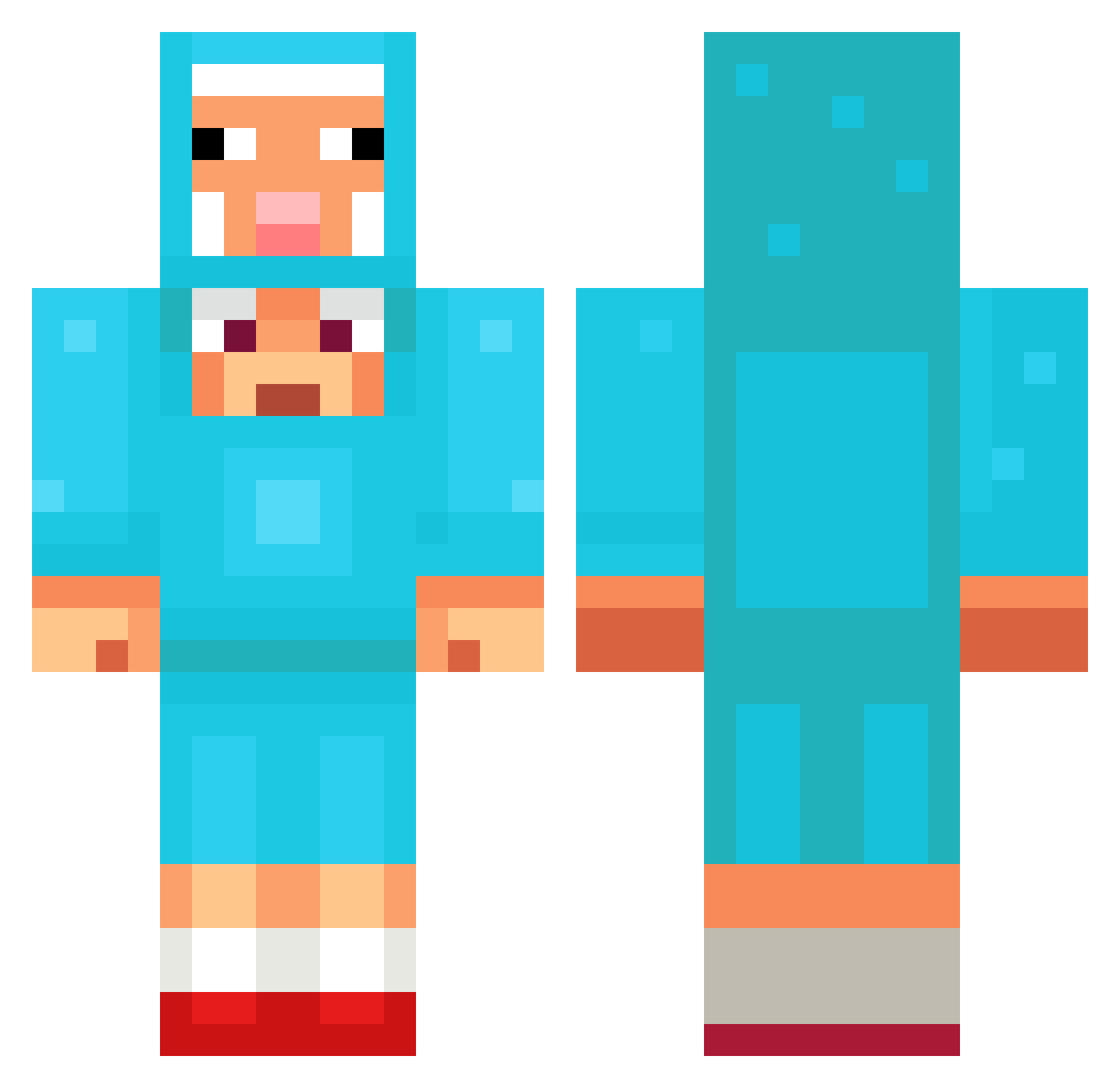
Current Minecraft skin of the player Basar1000, loaded from the official Mojang API. Rotate the 3D model with your mouse or finger, then download the skin as a PNG file and use it in Minecraft: Bedrock Edition or Java Edition for free. When Basar1000 changes their skin, this page updates automatically and the old skin stays in the history below.
Other players with this skin (1097)
Basar1000 was the 350th player we have seen with this skin, first spotted on 22.08.2026. The same skin was seen on these players. Open a nickname to see their current skin and skin history.
 TheDermot PeanutOfDoom1 KerosiiniKone ronnings1 modlover5
 AzraBuilds its_a_witch Utkaz July1scold
 rlawldb141 Drakeohhhh SxFSax Daaniela Kingkillian24 Rufus360 itsmikaa
 Moccio12Ofcl RxbWhite angerf idkbro512 MarsJCR sl_fedx Vintage_Panda Henuj WurzigeKartoffel Noodle_sponge teagannjj Isotammm RUDE_H2 jumongi HeroKai666 haciek3 iziwin123 Seung_Min_01 UnbeatenMoss687 Frontier_Zero Maco251 thuwanon Drachenlort123 Dijoo35 Choco_Olitje Aztroxyz LeonardoOoooop Mosaik47 Zhiizy BingBong60 mirooweel metcx Yujio_ Rewer95 YoussefPikachu Mucaltinu IamBooked aliozturk28 CarlOctavius shut542 193bbbbbbbbb NotCoreKimba HowdyPartna Cravinhos_
More Sheep Minecraft skins
How to install the Basar1000 skin
- Press the Download button above to save the skin as a PNG file.
- Minecraft: Bedrock Edition (PE): open the Dressing Room from the main menu (or tap your character → Edit Character), go to Classic Skins → Owned, press the + (new skin) button, choose the downloaded PNG and pick the Classic (Steve) model. Works on PC and mobile; consoles cannot import custom skins.
- Minecraft: Java Edition: open the Minecraft Launcher, go to the Skins tab, click New Skin, load the PNG, pick the Classic (Steve) model and press Save & Use. You can also upload it at minecraft.net → Profile → Change Skin.
The skin does not show up after import - what should I do?
Restart Minecraft and open the Dressing Room again - imported skins sometimes appear only after a restart. Also make sure you selected the imported skin and picked the Classic (Steve) model.
Which model should I choose, Classic or Slim?
This skin is designed for the Classic (Steve) model. If you pick the wrong model, the arms of the skin will look stretched or squeezed.
Is the skin of Basar1000 free to download?
Yes. Press Download, save the PNG file and use it in Minecraft: Bedrock Edition or Java Edition - no payment or registration needed. The skin also works on multiplayer servers and Realms.
More skins
Looking for more? Go back to all Minecraft skins and check the top skins of the week, month and all time, or find any player's skin by nickname.