
BOSCOCOSTCO69 - Minecraft Skins & Skin History
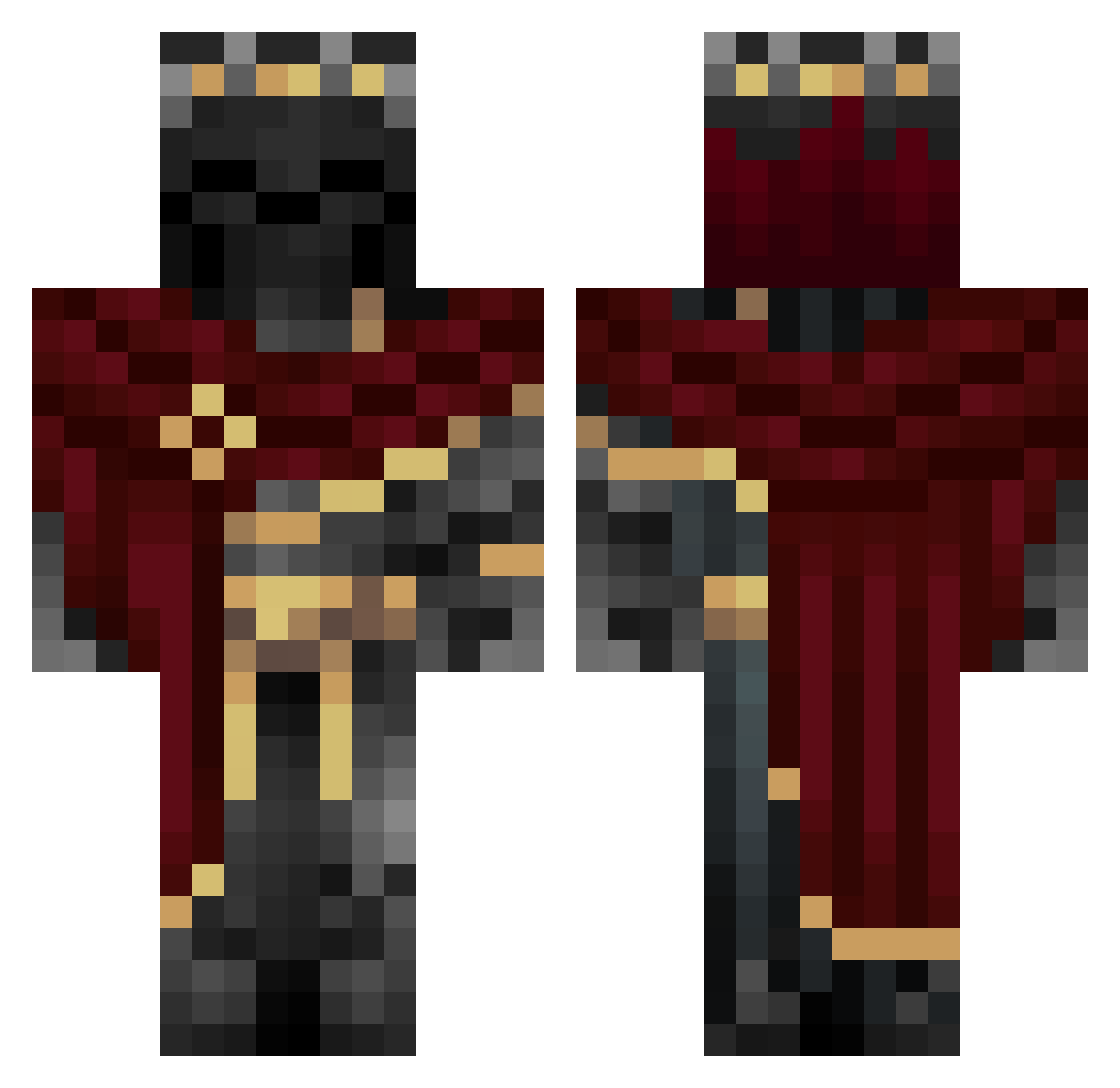
Current Minecraft skin of the player BOSCOCOSTCO69, loaded from the official Mojang API. Rotate the 3D model with your mouse or finger, then download the skin as a PNG file and use it in Minecraft: Bedrock Edition or Java Edition for free. When BOSCOCOSTCO69 changes their skin, this page updates automatically and the old skin stays in the history below.
Other players with this skin (983)
BOSCOCOSTCO69 was the 821st player we have seen with this skin, first spotted on 18.10.2026. The same skin was seen on these players. Open a nickname to see their current skin and skin history.
 XeracXies sehyeon0105 OroYCarbon1891 madmaxsonx Azqe_ BadLag xswordx23 gprimo16 XPlusGG NuncaNemVi06 Shad0w__Knight_ Karamel7148 LamaPower12_ Sasori13 lucifer19944991 ANTOVITZ siberia1314 Pendrup Galdur001 xdewzx 4P3Godz SoupDeity tricipite MikeyBoss1 SB1A voxerismeWxlf bueno2784 k_leday41 TrueGod221 DrUnbekannt98 XxSGAxX1234 MaidenlessGuy69 MickeyBooo Januxx7 enayz Aaron585 Timothy1267 helldog111 ShadowFight_ DarknessRainbow ShavedPierog este__nel Smilly32 Kapiszonski _Tunnis_ Josez442 OllieMartinez Ada3990 BlackWarden47 seb_west KingSeven777 CHAIPER YIPPE1234_5 Sanz01 Munifu KuraBlack VAMP1RISMM gabe_059 Retributioner ThrotTheUclean
More King Minecraft skins
How to install the BOSCOCOSTCO69 skin
- Press the Download button above to save the skin as a PNG file.
- Minecraft: Bedrock Edition (PE): open the Dressing Room from the main menu (or tap your character → Edit Character), go to Classic Skins → Owned, press the + (new skin) button, choose the downloaded PNG and pick the Classic (Steve) model. Works on PC and mobile; consoles cannot import custom skins.
- Minecraft: Java Edition: open the Minecraft Launcher, go to the Skins tab, click New Skin, load the PNG, pick the Classic (Steve) model and press Save & Use. You can also upload it at minecraft.net → Profile → Change Skin.
The skin does not show up after import - what should I do?
Restart Minecraft and open the Dressing Room again - imported skins sometimes appear only after a restart. Also make sure you selected the imported skin and picked the Classic (Steve) model.
Which model should I choose, Classic or Slim?
This skin is designed for the Classic (Steve) model. If you pick the wrong model, the arms of the skin will look stretched or squeezed.
Is the skin of BOSCOCOSTCO69 free to download?
Yes. Press Download, save the PNG file and use it in Minecraft: Bedrock Edition or Java Edition - no payment or registration needed. The skin also works on multiplayer servers and Realms.
More skins
Looking for more? Go back to all Minecraft skins and check the top skins of the week, month and all time, or find any player's skin by nickname.