
Astromonkey0 - Minecraft Skins & Skin History
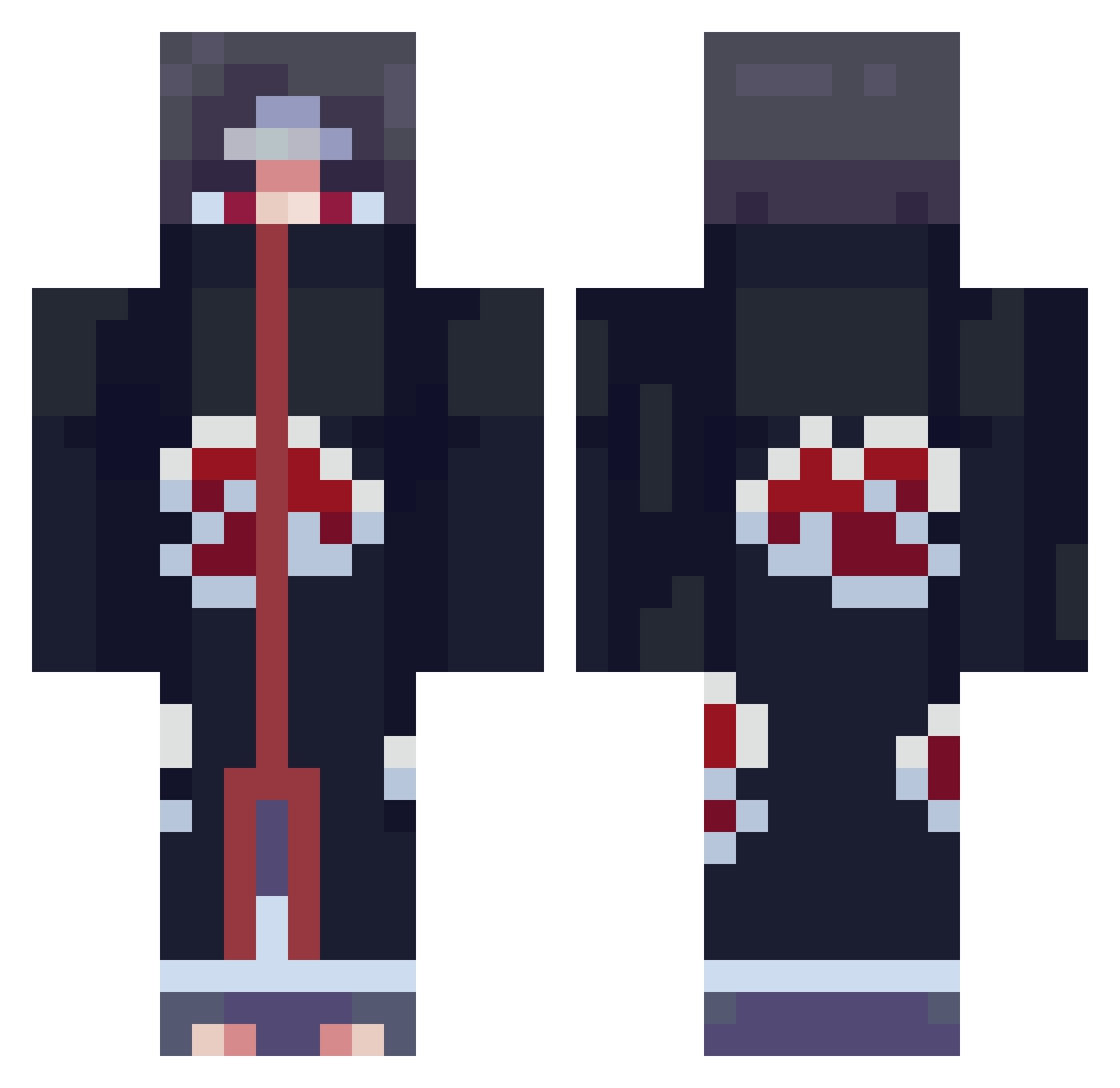
Current Minecraft skin of the player Astromonkey0, loaded from the official Mojang API. Rotate the 3D model with your mouse or finger, then download the skin as a PNG file and use it in Minecraft: Bedrock Edition or Java Edition for free. When Astromonkey0 changes their skin, this page updates automatically and the old skin stays in the history below.
Other players with this skin (663)
Astromonkey0 was the 381st player we have seen with this skin, first spotted on 17.09.2026. The same skin was seen on these players. Open a nickname to see their current skin and skin history.
 VoltageTS JokingsX ltzse AntiVaxDad_ Voidking_TW CrackedCal Tobi15100 Gallegoflow bachaun I_AM_CANTALOPE Ignis09 Grrea salchipapa90 tiandaorock Zeneristic Epic_OtiZ CancMaster OrchidMale gabu01 lack575 ropeycarrot zigure JJDa1456 its_M99 Flobro2612 angelo_senpai Askinor kfushida RICHYMON7 Digssa Anoniko YosoyPerez unpurist Yoshua_Sunrise_J M4xitr0n LAMBDAkuush bXenon _Shalopay_ I77jz BAR_ZARK sean76 AnotherOneGodlye Keksbrecher8 Chocomilk11 GeasonB HuaRUS xxxcl _ShowFlake waterofbong adog266 marasans moresbaka T00BadSoSad ELPaco20 SoulRaverDE Hurikan_mdx karto23 leshayka KolaniTortelloni NicoMan777
More Itachi Uchiha Minecraft skins
See all 307 Itachi Uchiha skins
How to install the Astromonkey0 skin
- Press the Download button above to save the skin as a PNG file.
- Minecraft: Bedrock Edition (PE): open the Dressing Room from the main menu (or tap your character → Edit Character), go to Classic Skins → Owned, press the + (new skin) button, choose the downloaded PNG and pick the Classic (Steve) model. Works on PC and mobile; consoles cannot import custom skins.
- Minecraft: Java Edition: open the Minecraft Launcher, go to the Skins tab, click New Skin, load the PNG, pick the Classic (Steve) model and press Save & Use. You can also upload it at minecraft.net → Profile → Change Skin.
The skin does not show up after import - what should I do?
Restart Minecraft and open the Dressing Room again - imported skins sometimes appear only after a restart. Also make sure you selected the imported skin and picked the Classic (Steve) model.
Which model should I choose, Classic or Slim?
This skin is designed for the Classic (Steve) model. If you pick the wrong model, the arms of the skin will look stretched or squeezed.
Is the skin of Astromonkey0 free to download?
Yes. Press Download, save the PNG file and use it in Minecraft: Bedrock Edition or Java Edition - no payment or registration needed. The skin also works on multiplayer servers and Realms.
More skins
Looking for more? Go back to all Minecraft skins and check the top skins of the week, month and all time, or find any player's skin by nickname.