
AlexJones45623 - Minecraft Skins & Skin History
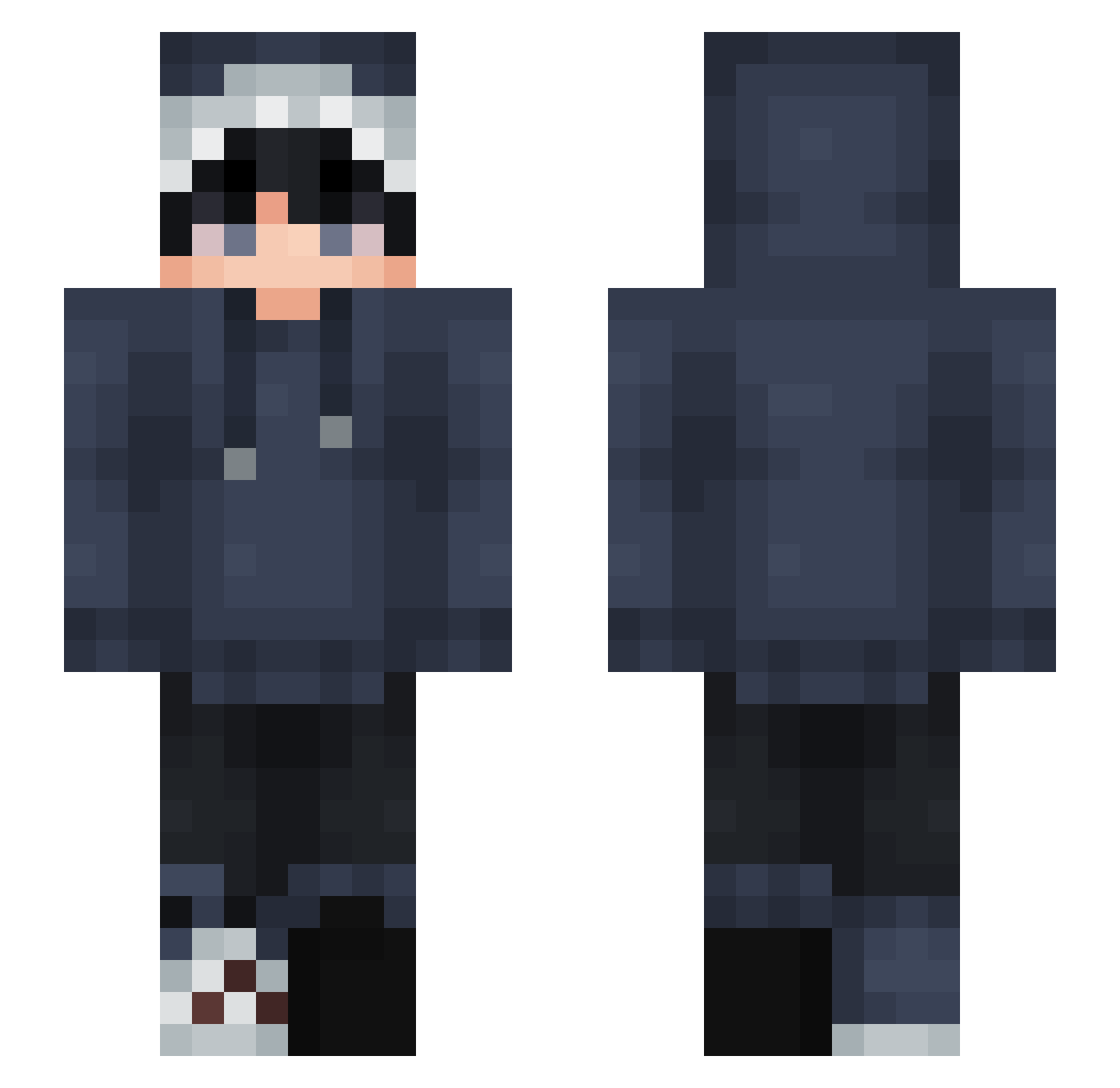
Current Minecraft skin of the player AlexJones45623, loaded from the official Mojang API. Rotate the 3D model with your mouse or finger, then download the skin as a PNG file and use it in Minecraft: Bedrock Edition or Java Edition for free. When AlexJones45623 changes their skin, this page updates automatically and the old skin stays in the history below.
Other players with this skin (827)
AlexJones45623 was the 267th player we have seen with this skin, first spotted on 28.08.2026. The same skin was seen on these players. Open a nickname to see their current skin and skin history.
 5EXI ImPotato69 finboii nnr73208 TeeV33x huanghailu
 squashn00dles BestestShark flaviospazi2009 _sort xKrydake engsuper hungoem Mhmtx4 Gotsukii Salty5310 NoIc_E Thomboy16 taehyun0745 soggywaffles666 zatu273 ShuterMage Mr_Watermalone GalaxyNote10Plus 6fey weilun__00213 Dr3yba3 Vinlawz Pzew Mistermox01 MaksW0
 vvsoulz kubaPL1233 LizerdWizerd eligamez brs2137 Peas_Mushroom wolffiy bananamilk07
 phadora professor1122 Adri3nZ angryemo69 dgdmj123 DIOTNE123 lim733 NECROMANTE BadIlMario deannaclark_ Bl1NCK5 DKO2 _SoulsEater_ MuMyeol SpeediestGuy kusoim520 Alfstin mtf001
 ener1108 DecQmenT MadsMagi
How to install the AlexJones45623 skin
- Press the Download button above to save the skin as a PNG file.
- Minecraft: Bedrock Edition (PE): open the Dressing Room from the main menu (or tap your character → Edit Character), go to Classic Skins → Owned, press the + (new skin) button, choose the downloaded PNG and pick the Slim (Alex) model. Works on PC and mobile; consoles cannot import custom skins.
- Minecraft: Java Edition: open the Minecraft Launcher, go to the Skins tab, click New Skin, load the PNG, pick the Slim (Alex) model and press Save & Use. You can also upload it at minecraft.net → Profile → Change Skin.
The skin does not show up after import - what should I do?
Restart Minecraft and open the Dressing Room again - imported skins sometimes appear only after a restart. Also make sure you selected the imported skin and picked the Slim (Alex) model.
Which model should I choose, Classic or Slim?
This skin is designed for the Slim (Alex) model. If you pick the wrong model, the arms of the skin will look stretched or squeezed.
Is the skin of AlexJones45623 free to download?
Yes. Press Download, save the PNG file and use it in Minecraft: Bedrock Edition or Java Edition - no payment or registration needed. The skin also works on multiplayer servers and Realms.
More skins
Looking for more? Go back to all Minecraft skins and check the top skins of the week, month and all time, or find any player's skin by nickname.