
Aegibab - Minecraft Skins & Skin History
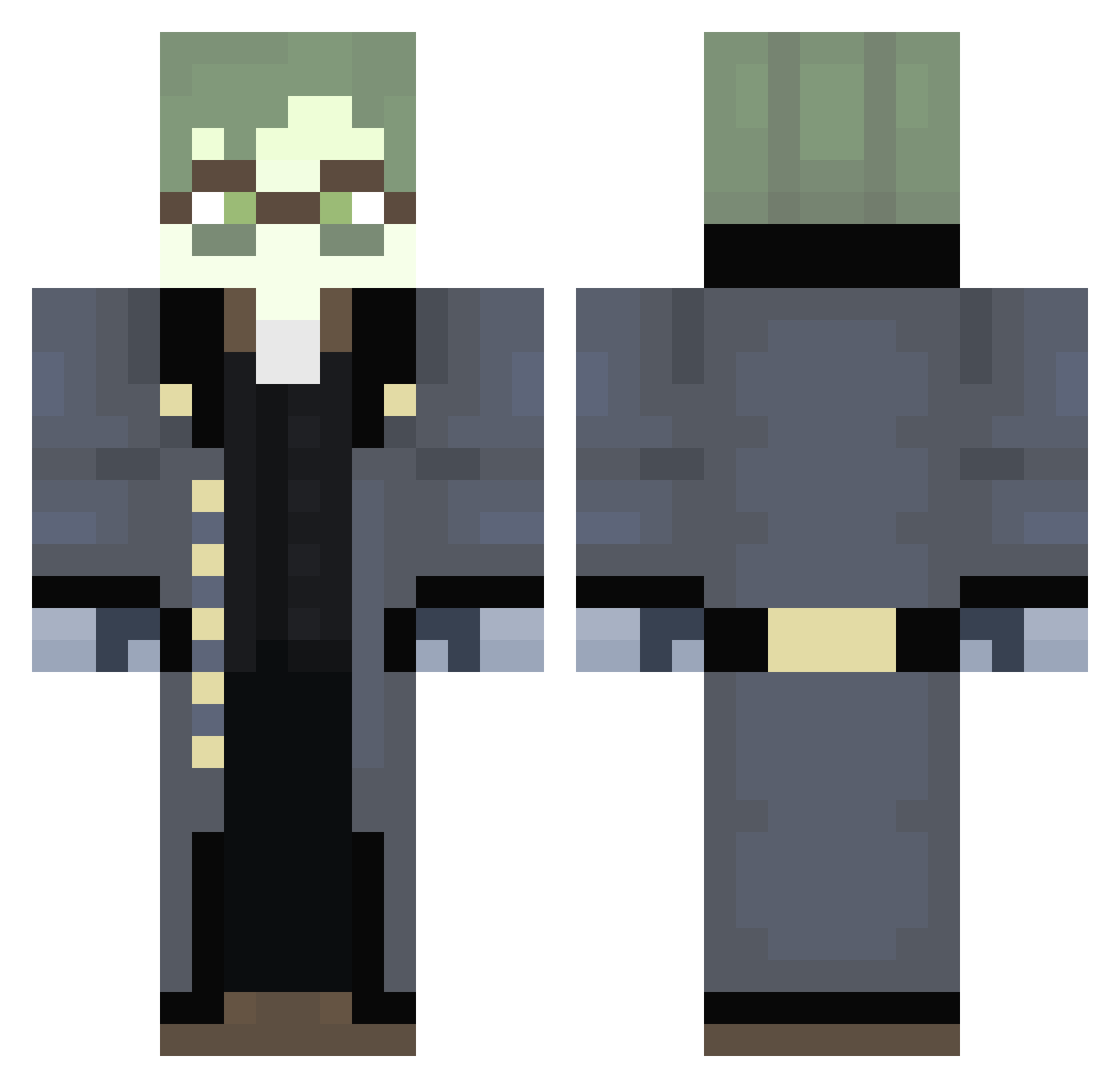
Current Minecraft skin of the player Aegibab, loaded from the official Mojang API. Rotate the 3D model with your mouse or finger, then download the skin as a PNG file and use it in Minecraft: Bedrock Edition or Java Edition for free. When Aegibab changes their skin, this page updates automatically and the old skin stays in the history below.
Other players with this skin (293)
Aegibab was the 228th player we have seen with this skin, first spotted on 17.10.2026. The same skin was seen on these players. Open a nickname to see their current skin and skin history.
 OPJohn626 DanVan_ DUKE_ERISIAAA AYO_what1203 Azure1983 EltheoGuy CheechMaster C0RZZ Adrian932 ghemoc OmgBadBoy DifferentNames 1simmon vicentecrank Unresae Toaster52 onedrawingguy Herpas5551 HyperL1me Erisia_mayor PolarisThe2nd R4ZExvz Matiskii SleepyBenKenobi RealVentus aksenia338 AtomicReborn69 Joselhas MadeInAlt KeanuWanu DogUber TheDeepCalled Danilozk LocalKerbonaut Philosphe ssorataa LimberSquire449 StarGuy8000 EnvyHira Aziagod Sparky7777 69DPS fayth3036 TxxTaro DaBunn Crypt_Vondren Sovnloshed Daywalker1236 GrimmGarden Skours Kuke2007 KeiKingY xabl4auzin moongls TheHighwaySon MauroXZK chuubozz Okimok69 Protoeshroom FreakyChungle
More Detective Minecraft skins
How to install the Aegibab skin
- Press the Download button above to save the skin as a PNG file.
- Minecraft: Bedrock Edition (PE): open the Dressing Room from the main menu (or tap your character → Edit Character), go to Classic Skins → Owned, press the + (new skin) button, choose the downloaded PNG and pick the Classic (Steve) model. Works on PC and mobile; consoles cannot import custom skins.
- Minecraft: Java Edition: open the Minecraft Launcher, go to the Skins tab, click New Skin, load the PNG, pick the Classic (Steve) model and press Save & Use. You can also upload it at minecraft.net → Profile → Change Skin.
The skin does not show up after import - what should I do?
Restart Minecraft and open the Dressing Room again - imported skins sometimes appear only after a restart. Also make sure you selected the imported skin and picked the Classic (Steve) model.
Which model should I choose, Classic or Slim?
This skin is designed for the Classic (Steve) model. If you pick the wrong model, the arms of the skin will look stretched or squeezed.
Is the skin of Aegibab free to download?
Yes. Press Download, save the PNG file and use it in Minecraft: Bedrock Edition or Java Edition - no payment or registration needed. The skin also works on multiplayer servers and Realms.
More skins
Looking for more? Go back to all Minecraft skins and check the top skins of the week, month and all time, or find any player's skin by nickname.