
AGOdesu - Minecraft Skins & Skin History
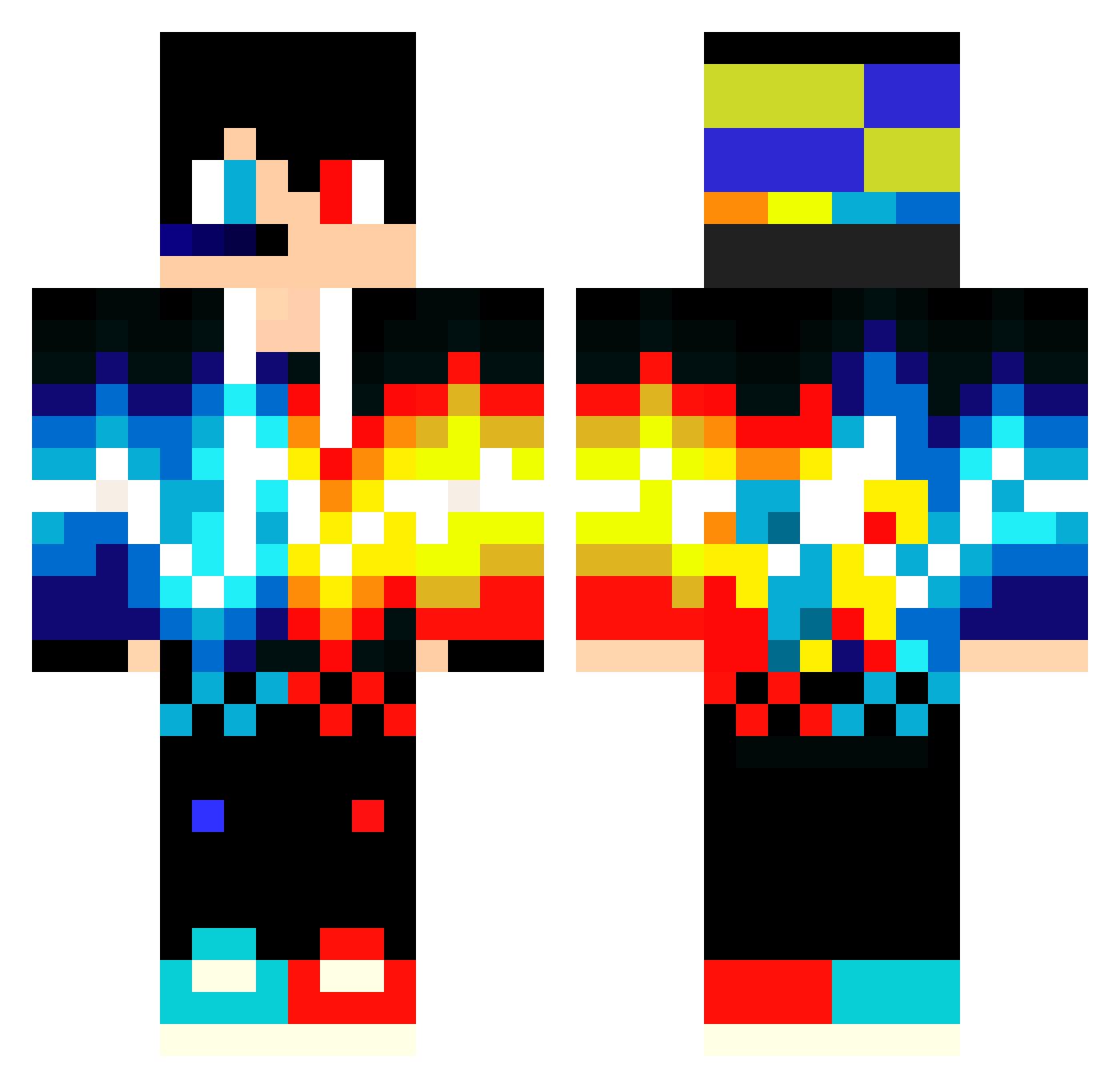
Current Minecraft skin of the player AGOdesu, loaded from the official Mojang API. Rotate the 3D model with your mouse or finger, then download the skin as a PNG file and use it in Minecraft: Bedrock Edition or Java Edition for free. When AGOdesu changes their skin, this page updates automatically and the old skin stays in the history below.
Other players with this skin (549)
AGOdesu was the 48th player we have seen with this skin, first spotted on 03.08.2026. The same skin was seen on these players. Open a nickname to see their current skin and skin history.
 caleb_ninja Sickbully minerluke2000 MingingBlah physicsdolphin Flussell gseemz miss1016 n1deo silverbullettxm Dolina512 STUXKY simcamo ProGamer1502 _RayeNN KapitanKacpi manogomes Andrew95it nirenire55 A_A_A_A_A_A_A AnuMayo JaarneGamer2007 yunmuxi EpicGamerWolf Daddy_of_Dokyle SkyLinePro HOLOLOLOLO_98 Slasher_28 happe1010 ParkereK Sadessm Uniformseven78 Imposter_Hal FireGameKinG TAND0R_01 morgion12 xxPhillosxx SatellaZ2 Gabriel101111 marot0021 _DG_1 PanThere43 Spritzin U2Hazard YBmonster Skip23 Dead_Inside04 ProRevolutionZ realandrew Killerstorm358 WearyPup ArifBey242 meliodas12142424 RayoM24 Leandro_reis MrWrecker Sks_Kss ienesss varesbam Spideymusic
More Fire And Ice Minecraft skins
See all 695 Fire And Ice skins
How to install the AGOdesu skin
- Press the Download button above to save the skin as a PNG file.
- Minecraft: Bedrock Edition (PE): open the Dressing Room from the main menu (or tap your character → Edit Character), go to Classic Skins → Owned, press the + (new skin) button, choose the downloaded PNG and pick the Classic (Steve) model. Works on PC and mobile; consoles cannot import custom skins.
- Minecraft: Java Edition: open the Minecraft Launcher, go to the Skins tab, click New Skin, load the PNG, pick the Classic (Steve) model and press Save & Use. You can also upload it at minecraft.net → Profile → Change Skin.
The skin does not show up after import - what should I do?
Restart Minecraft and open the Dressing Room again - imported skins sometimes appear only after a restart. Also make sure you selected the imported skin and picked the Classic (Steve) model.
Which model should I choose, Classic or Slim?
This skin is designed for the Classic (Steve) model. If you pick the wrong model, the arms of the skin will look stretched or squeezed.
Is the skin of AGOdesu free to download?
Yes. Press Download, save the PNG file and use it in Minecraft: Bedrock Edition or Java Edition - no payment or registration needed. The skin also works on multiplayer servers and Realms.
More skins
Looking for more? Go back to all Minecraft skins and check the top skins of the week, month and all time, or find any player's skin by nickname.